The world of generative AI is moving at a breakneck pace, and nowhere is the hype more intense than in video. We’ve all seen the mind-bending clips and futuristic demos. At the center of this storm is Sora, the text-to-video model and app from OpenAI. The demos are impressive, showcasing a level of realism and narrative understanding that feels like a quantum leap forward.
But for a working creative professional, hype doesn’t pay the bills. The real questions are practical. Can this tool actually be used in a professional pipeline? Does it save time and create value, or is it just a high-tech toy? Most importantly, can you use it for client work without getting yourself or your agency sued?
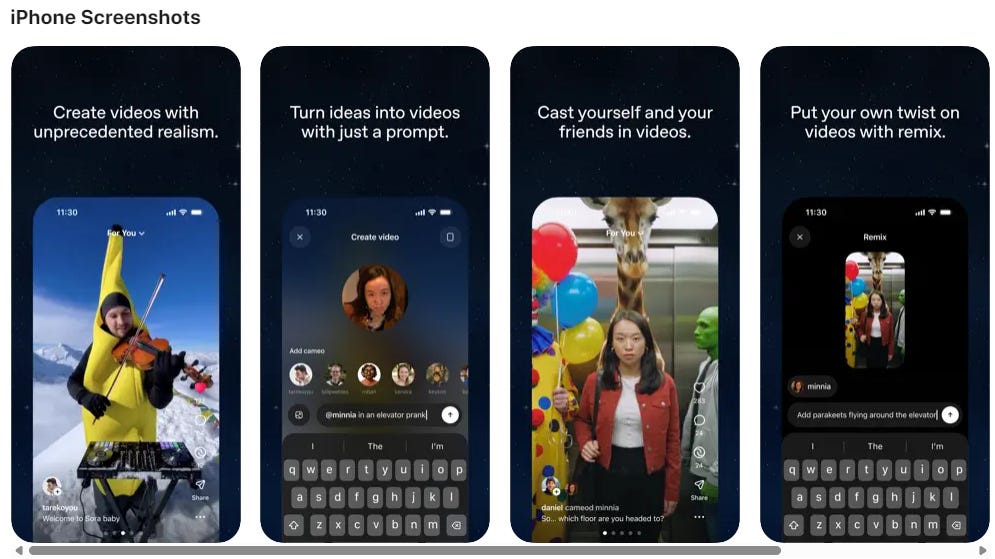
Image credit: Why Try AI
What Exactly is Sora?
Sora is a generative artificial intelligence model developed by OpenAI, the same company behind ChatGPT and DALL-E 3. Its sole function is to create video clips from text-based prompts. Unlike earlier text-to-video tools that produced short, often glitchy or abstract clips, Sora can generate high-fidelity, coherent video scenes up to one minute in length.
What makes Sora a significant step forward is its apparent understanding of the physical world. The model demonstrates a surprisingly sophisticated grasp of physics, motion, and cause-and-effect within a scene. Objects and characters interact in believable ways, casting accurate shadows and maintaining a consistent presence. This allows it to create not just moving images, but scenes that feel grounded in a cohesive reality, making it a powerful engine for visual storytelling.
And now, it’s available to everyone (no more beta invite codes needed). So if you’ve been wanting to give it a shot, now’s the time.
How Can Creative Professionals Use It?
Despite the limited access, Sora’s capabilities point toward several powerful applications for professionals. But using it effectively requires understanding its strengths and, more importantly, its significant limitations.
Next-Level Pre-Visualization and Concepting
This is Sora’s most immediate and powerful use case. Every creative director, filmmaker, and agency creative knows the challenge of translating a written script or a creative concept into a visual that a client can understand and approve. Sora is arguably the most powerful pre-visualization tool ever created.
Instead of spending days or weeks creating storyboards, sourcing stock footage for a mood reel, or building 3D animatics, you can now generate a high-fidelity moving image that captures the exact tone, style, and action of a scene.
- For Filmmakers and Directors: Use it to storyboard complex sequences. A prompt like, “cinematic shot of a lone astronaut walking across a dusty red planet, sun setting on the horizon, lens flare,” can provide a tangible visual reference for your Director of Photography and VFX team, establishing the look and feel long before production begins.
- For Advertising Agencies: Accelerate the pitch process. Take a key scene from a commercial script and generate a 15-second clip. This moves the client conversation from imagining what the spot could look like to reacting to a concrete visual, enabling faster feedback and more confident greenlights.
- For Game Designers: Visualize in-game cinematics or environmental moods. Generate fly-throughs of fantastical landscapes or key character animations to set the art direction for the entire production team.
The Potential For Production Assets
The quality of Sora’s output is high enough to raise the question of using it for final production assets. For certain applications, this is a real possibility. The clips can be used as unique B-roll, abstract backgrounds for motion graphics, or VFX plates that would be too expensive or time-consuming to shoot practically.
However, the one-minute time limit is a hard ceiling. You aren’t creating a long-form narrative with Sora alone. Furthermore, the model’s consistency, while impressive within a single clip, is not guaranteed across multiple generations. Generating the same character in the exact same outfit and environment across ten different shots is still an enormous challenge, making it unreliable for building sequential scenes. For now, think of each generation as a single, powerful, but isolated shot.
The Critical Issue: Commercial Use and Legal Risk
This is the conversation that matters most for any working professional. A tool’s creative power is irrelevant if it exposes you and your clients to legal jeopardy. And right now, Sora exists in a state of profound legal ambiguity.
The core of the issue is the data used to train the model. OpenAI has not been fully transparent about the sources, but the capabilities strongly suggest it was trained on a massive corpus of publicly available and copyrighted video. Initially, the company launched with an “opt-out” policy, placing the burden on rights holders to ask for their content to be removed after the fact.
This is a red flag for commercial work. Using an asset generated from a model trained on potentially unlicensed data means you cannot guarantee to your client that the work is free of copyright infringement. The risk of a lawsuit, while perhaps remote, is not zero. For any project with a major brand, that level of uncertainty is unacceptable.
This stands in stark contrast to a platform like Adobe Firefly, which was designed from the ground up to be “commercially safe.” Adobe trained its model on its own licensed Adobe Stock library and public domain content. This allows them to offer enterprise customers IP indemnification—a legal guarantee that they will assume responsibility for any copyright claims against work created with Firefly.
Until OpenAI can offer a similar level of legal clarity and protection, Sora remains a high-risk proposition for commercial projects. The future promise of an “opt-in” training model and revenue sharing is just that—a promise. Professionals need guarantees, not verbal assurances.
Is Sora Right For You?
Let’s cut to the chase. Sora is a phenomenal piece of technology, but its place in a professional toolkit must be defined with sharp clarity.
Who it’s for right now:
- Creative Directors, Art Directors, and Concept Artists: As a tool for internal ideation, mood boarding, and high-fidelity pre-visualization, Sora is unmatched. It can accelerate creative development and help sell ideas with astonishing clarity.
- Solo Creators and R&D Teams: For personal projects, artistic experimentation, and exploring the future of a new medium, Sora is an essential tool. It’s a glimpse into what’s next, and getting hands-on experience is a strategic advantage.
Who it’s NOT for right now:
- Agencies, Studios, and Freelancers Delivering Final Client Work: The legal and commercial risk is simply too high and undefined. You cannot confidently deliver Sora-generated assets to a client and assure them they are free and clear of potential copyright claims.
- Anyone Needing Multi-Shot Narrative Consistency: If your project requires a character or environment to appear consistently across different scenes, Sora is not the right tool. It excels at contained shots, not sequential storytelling.
The Bottom Line
Sora is a stunning preview of the future of video creation. Its ability to generate imaginative and physically coherent scenes from text is a game-changer for the ideation phase of any creative project. It is, without a doubt, a tool that every creative professional should be watching closely.
However, as a professional tool for delivering commercial work, there are question marks. The unresolved legal status of its training data makes it too risky for client projects. For now, treat Sora as the most powerful creative research and development tool you’ve ever seen. Use it to push your own creativity, to visualize concepts in ways that were previously impossible, and to prepare for the day when the legal frameworks finally catch up to the technology. But when it comes to final, billable client work, stick to tools with a clear commercial license, which may involve exploring free Midjourney alternatives until the legal dust settles.