


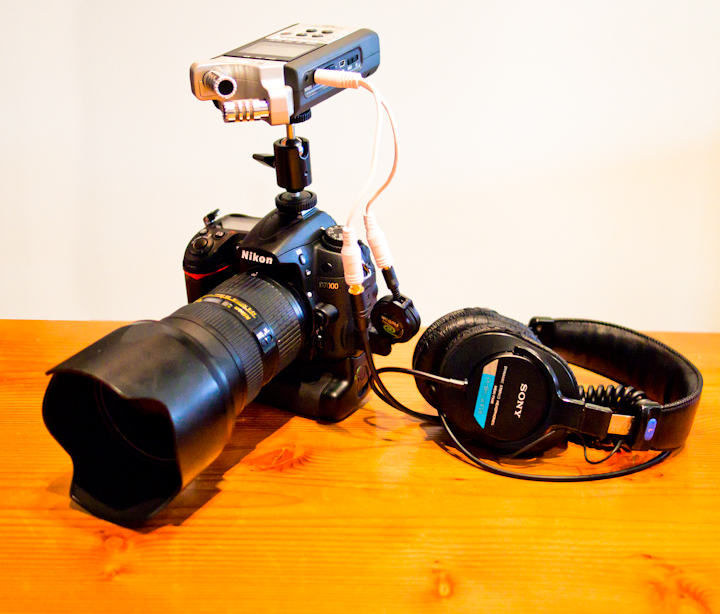
 HDSLR video is a great way to get high quality footage on a micro budget; and a great way to keep that budget micro is to be picky about what accessories are right for your setup. I recently received an email question focused on this and–in particular–if I had to choose between the Rode Stereo Videomic or the Zoom H4n, which would I use? So here’s a little background on my thinking…
1. Cost. They cost roughly the same amount, and I use both on a regular basis, so the question is a tough one.
2. The Rode. I recently did a blog post about the Rode Mic a few months ago. You should read it, but to summarize; I love the thing for its straight forward simplicity. It allows me to just shoot and not worry about sound, but…
3. The Zoom. …When I DO need to worry about the sound (such as an interview or a scene in a narrative film) I bust out the Zoom H4n. It captures better files that the straight camera – remember it’s sole function is audio.
So, while my preference is to have both, if forced to chose one, I would buy the H4n. Here’s why: with a little hack, spending a little more cash and buying one extra cable plus a hot shoe adapter you can turn the Zoom H4n into a badass on-camera mic. Here’s how:
First, get a hot shoe adapter like this one and mount your H4n on top of your camera.
Second, plug this line-out splitter into the headphone jack of the H4n and plug the male end of it into the mic input on your camera. Now your camera will record what the H4n’s microphones are picking up and your H4n will record a high quality, AGC (automatic gain control) free backup file.
Third, you can even monitor what the H4n is recording with 1/8” headphone jack on the fancy new cable you bought.
Lastly, an important tip. Make sure the H4n is recording! It’s easy to forget to start your audio recorder when the director just yells “Roll camera!”.
This is a little more of piecemeal one-man-band kinda setup than using just a microphone like the Rode, so make sure you’re familiar enough with your equipment to make it work properly without slowing down the production while you make adjustments. You’ll probably be in the role of be being audio guy and camera guy, so make sure to practice to get good at both.
Here’s an enlarged image of the thumbnail above, highlighting the cabling. Keep in mind that these cables were purchased at RadioShack a while back just to test out my original hack job/experiment. If you buy the cables I linked to above from B&H, your setup will look much slicker than this first attempt pictured here.
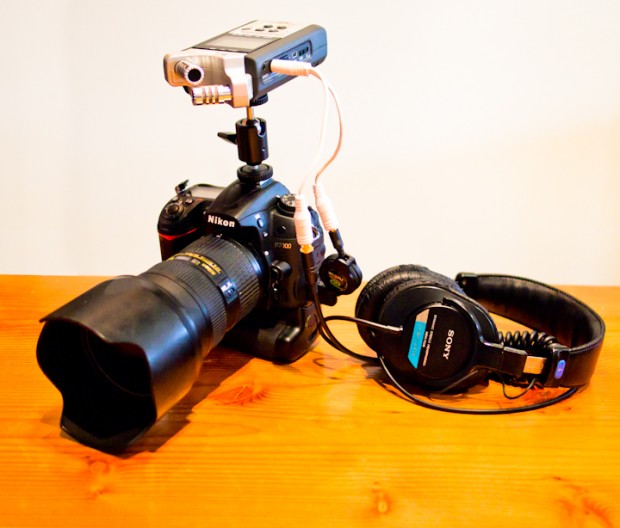
Here’s a picture of my setup with cables purchased at RadioShack. If you buy the cables I linked to above, your setup will look much slicker than mine.












From above: “Lastly, an important tip. Make sure the H4n is recording! It’s easy to forget to start your audio recorder when the director just yells ‘Roll camera!’.”
Even better, try to make sure that the director calls “Roll sound” before he/she calls “Roll camera,” if you have that level of communication with the director, which I hope you do. Much better for everyone to have that consistent cue.
You can ignore the first two words of my previous post (“From above:”). Not sure why I left them in there. I’m referencing something in the article, not the comments.
What do you do about wind noise with the H4n?
yeah, i’m also quite curious. i’m gonna guess it’s mainly for indoor interview stuff, but maybe not.
I use a redheadwindscreens.com It doesn’t ‘eliminate wind noise’ but it is pretty good.
Redhead windscreens work great: http://www.redheadwindscreens.com
I’m using the H4n noise cap + a “dead cat” from thewindcutter.com , works nice.
This is why I’m pretty excited about the new Rode Video Mic with built in recorder.
http://www.rodemic.com/news/announcing-the-videomic-hd-the-worlds-first-digital-recorder-video-microphone
It’s the video mic, with MicroSD for recording full audio and headphone output. MMMM! I want!
Chase, you should call them and have them send you one. Then you can tell us about it and whether it is truly as wonderful as it seems.
Very slick! While it’s based on the VideoMic concept it looks like the internals are actually the NTG3 + a recorder so it’ll probably be $$$.
So are you saying your H4n audio is running into the camera (being recorded on the MOV file) while the audio from the camera is also being recording onto the H4n? I was a bit confused. I have a Zoom H4n, but currently record the audio separately and sync in post. Can you clarify for simpleton like myself?
No, I have the H4n recording, and I have a line going from the headphone out to the D7000’s audio in. But for some reason the D7000 still uses it’s own audio when I open the MOV fil, not the H4n’s line feed.
I can sync in post but I’m about to work on a big project that would make my life a lot easier if the D7000 just took the H4n’s feed like it’s supposed to once you plug in a cable.
If you press record on the h4n, yes it does record one audio file on the h4n while sending the h4n output signal to the dslr audio input. Useful if you want to sync in post as the audio recorded with the h4n matches the one in your video file (although the h4n has better audio quality)
My question: The h4n can record stereo. with the splitter do you still send stereo in both ends or is it splitting the right and left? Also I read somewhere that plugging the headphones output to a microphone input is not good? Something about amplified sound..?
It should just split the stereo signal into two stereo outputs (I think), and yes you should not plug headphone output directly into a microphone input without a ‘pad’ or ‘attenuator’. I posed a reply on that above but the splitter in the B&H link has it built in.
I picked up the H4n recently and did a test video on my 5 month old son. I ran a line out from the headphone jack into my D7000 and for some reason I couldn’t get it to take the audio from the H4n. But when I compared the audio between the two, it was a large gap in quality. The H4n is nice, just need to figure out what is going on.
If you were doing street interviews, using this as one-man-band kind of deal, do you think it would pick up too much camera noise being mounted on camera if you were having to recompose a little during live shooting?
You need to make sure you have the -25dB of attenuation on that line because the zoom outputs an ‘headphone/line’ level signal and the camera is looking for ‘microphone’ level signal. There as some tutorials around on how to make these (just a few resistors I think) or you can buy them ready made like in the link.
As I understand ‘microphone level’ is the lowest and requires a pre-amp to bring it up to ‘line level’ which is quieter again than headphone level (which obviously needs to be varied depending the the headphones impedance and ability to block noise as well as the track volume).
There is also a difference between unbalanced connection like these and balanced xlr type connections, definitely a separate topic but it may be worth knowing they are a little different.