

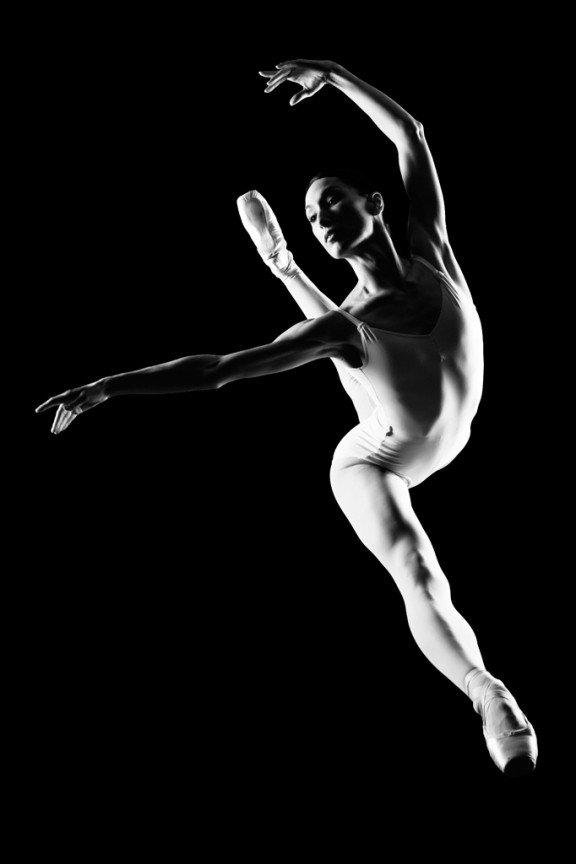
I learned to light after years of deconstructing the work of other photographers. And I know from your previous feedback that you guys are fond of these posts, so let’s dig into another one.
How did I make this picture?
Is it a lucky snapshot?
Is it lit?
If so, how?
The camera Settings?
The direction?
Post production?
Whatever details you think are needed to make this image.
Looking forward to you trying to pick this apart… I’ll reveal everything in a followup post. The person who gets the closest gets… …a chest bump and a pizza, or signed book or something. Don’t be shy. Let er rip.












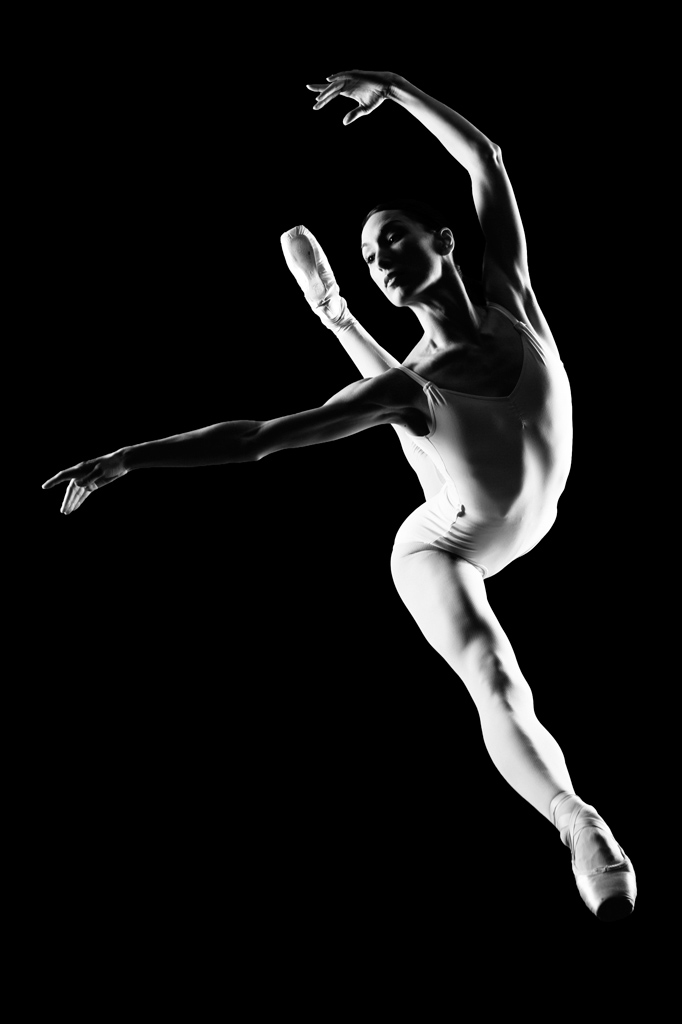
She’s posing on a black seamless and you’re above at an angle. The settings are probably around f-11 @ 160 since she’s sharp throughout. I would have used gridded strip banks or gridded medium box. You then turned her b & w, cranked the contrast and enhanced the catch lights in her eyes to give them depth.
You’re welcome.
Sorry that’s f11 not f1 obviously!
This is a fantastic photo!!! I’m just going to type what I am thinking.
Judging from the linear shadow on the right leg, this photo has to have been lit from both sides. The background remains an inky black, so that would mean that the bare strobes were positioned in front of some gobo’s to prevent light spill and no reflectors. This is strictly a two light setup. This photo being an action shot of the ballerina jumping towards the camera had to have been rehearsed/shot numerous times to get the timing right. As for the camera settings, I’m going to go with an F8.0 to F11 at 250th. Post production, if it were me I like things simple, just desaturate the photo and work with the contrast/tones/curves to keep the skin tones.
My thoughts are considering there are shadows directly in the center of her body, there are 2 light sources. There is a light source at the bottom right anticipating her jump (maybe a speedlight or a large soft box) and a speed light high above her to the left for fill (maybe with a diffuser)
With her jumping and being in focus, you’re going to need a fast shutter speed and a relatively small aperture.The first and obvious reason is that fast sync helps stop motion. You need to shoot at 1/500 or faster to stop action. I agree with Erik, F8-F13 maybe!
Then use of PP to convert to black and white! I can’t wait to see the answer!
Looks like 2 lights (one left and one right). The one on the right looks lower back a little and slightly tilted up. The one on the left is tougher to tell….either higher, and more forward than the one on the right and is perhaps even high enough to need to be tilted down a bit. Or it might be lower pointed up (based on the shadows in her outfit by her waist).
Relatively fast shutter to help black out background, aperture/flash combo set to properly expose the subject. Depending on how close the background is to the subject might even have used a flag/grid or something to make sure light from the strobes didn’t light the background?
In post I’d say the contrast and/or black levels were bumped up.
I dig it. 🙂