


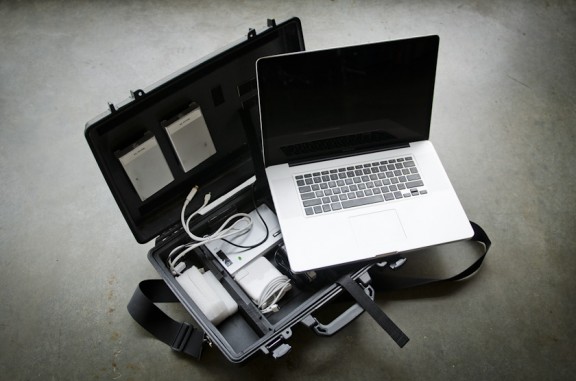
Howdy Y’all, Dartanyon again responding to an important gear question we get asked all the time. We spend a great deal of time out on location, and as Chase’s last series of blog posts clearly shows that it’s not all hotel rooms and poolside locations. Sometimes we’re at 12,000 feet above sea level snowshoeing to location, and carrying “extra” stuff is not practical. Over the last 4 years I have refined my traveling gear considerably, and it is not very often that I find myself wishing I had something I didn’t bring, or carrying stuff I didn’t use [or have a very good reason for carrying]. I’m going to take you through my traveling kit of DAM (Digital Asset Management) goodies and explain why I do certain things, but as I have said before this is MY way and certainly not the only or best way.
COMPUTER_ I bring a 17″ Mac Book Pro to almost all location shoots, it’s sole purpose is digital asset management, it doesn’t get used by a producer or intern back at the studio, it just sits and patiently waits to be needed in the gear closet. It’s loaded up with…… all the software I could need [discussed more in detail here]. It’s rocking the 7200RPM hard drive [not the biggest capacity drive available from Apple, but the fastest], maxed out with RAM, and as close to as a Mac Pro as you can get at a 1/10th the weight.
STORAGE_ A careful consideration must always be made to ensure that you will have enough storage space for a given job. With experience I can make a pretty good guess on a given shoot, with a given number of days and shots, just how many Gigabytes we’ll fill up. So I make my calculations, and then automatically add 50%, because you just never know for sure. I take two identical hard drives, let’s say 2 500GB bus powered drives. Then I also take a drive to back up the work each night back at the hotel. The “basecamp” drive as it’s called, is a G-Safe it’s a hardware RAID 1 drive enclosure that makes simultaneous copies to 2 different drives. We take special care to keep each drive unit from the basecamp drive in different hotel rooms each day, and during the night the primary and secondary location drives are kept in different rooms too.
CARD READERS_ I make sure I have at least 3 card readers with me. It always seems like if something is going to break it’s going to be the $30 bit or bobble. We’ve gone through the full myriad of card readers and my current favorite is the SanDisk Multi reader. For what ever reason, however unscientific it is, I feel like it’s a faster reader than the FW800 version.
TRAVEL DRIVE_ The essentials for a worst case scenario. Read all about it here.
PERIPHERALS_ The standard fare. We will occasionally bring a monitor with us, for our basecamp setup, either the 27″ LED, or maybe a 30″ Cinema. Mouse; Apple Magic mouse [it lives with the computer] . We bring a wired keyboard with us [instead of the smaller wireless], since with the 10 key you have a few more options on what keys to click for rating images. Cables, lots. A couple of each, even if you don’t need them, it goes back to the idea of the cheap things being the ones that break. [FW800-FW800, USB-Mini, FW800-400, eSATA]. We also always have an external battery pack with us, a HyperMac 222.
PACKAGE IT ALL UP_ If you have been following us for a while you’ve certainly seen the Laptop Case Vid, if not go watch and come back, I’ll wait … It’s a Pelican 1490, all carved up so that it fits everything we need in the smallest [well protected] space that we can. Everything goes in here with the exception of the basecamp drive, my travel drive, and an assortment of cables, which simply don’t fit, and stay at our basecamp anyway.
Further questions about workflow? Make sure to check out our now-infamous workflow video on how we move data through this–or a similar–set of gear.
Hope this is helpful. Let me know what your travel kit looks like in the comments, I’d love to know what y’all are carrying with you.













Dartanyon,
Great job making a complex description seem simple. Have you tried converting your MBP to run off an internal SSD instead of (or in addition to) the stock 7200PRM drive? Thoughts?
If I had a spare one around I’d do it without hesitation.
Cheers Dartanyon, fantastic post, i too wondered about the daisy chain, glad that’s explained now 🙂
DAM good post. I see you bring an external battery. How long does that typically last? Taking a notebook out in the field is always a pain for me because the batteries can never keep up.
That 220w battery will keep the MacBookPro cranking files for about 7 hours.
Well I only have 13,3 HP 4310S with built in card reader and WD 320GB externam hard drive, so there´s not much to carry;) and I don´t really need more to my Nikon D60 and two lenses;)
Really appreciate all the info you always share with us.
Does the 17″ MacBook Pro fit in the 1490?
Since your laptop location case has evolved over the years (the photo above looks very different from the original configuration), maybe it’s time to make an updated laptop case video? Would really like to see the above configuration in more detail.
If you guys are too busy to do one, next time you do a shoot here in Maui drop me a line – I’ll shoot it for you. 🙂
Yes it fits. Not inside the given dimensions of the “laptop tray” so you have to be willing to take a knife to that, but it fits after that.