

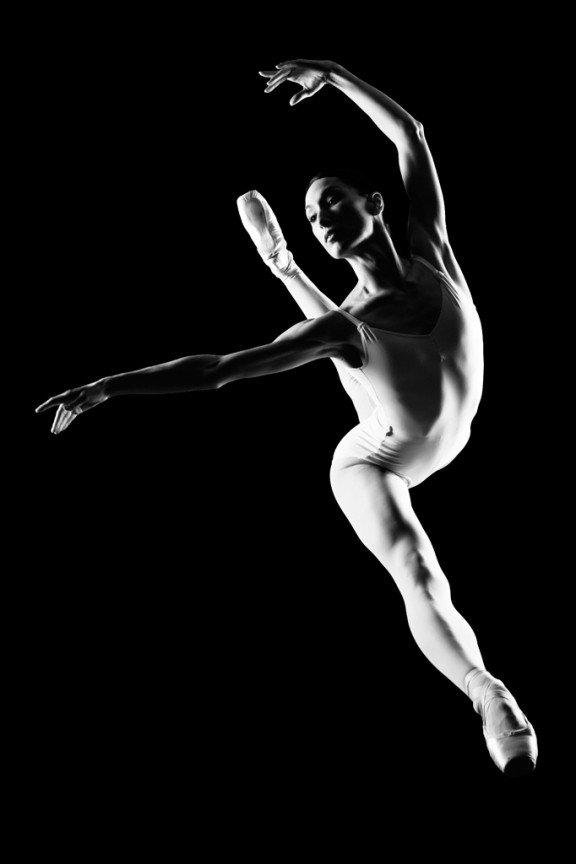
I learned to light after years of deconstructing the work of other photographers. And I know from your previous feedback that you guys are fond of these posts, so let’s dig into another one.
How did I make this picture?
Is it a lucky snapshot?
Is it lit?
If so, how?
The camera Settings?
The direction?
Post production?
Whatever details you think are needed to make this image.
Looking forward to you trying to pick this apart… I’ll reveal everything in a followup post. The person who gets the closest gets… …a chest bump and a pizza, or signed book or something. Don’t be shy. Let er rip.











You made this picture in a studio, or any other place that have little ambient light.
this is no lucky shoot, you planned it.
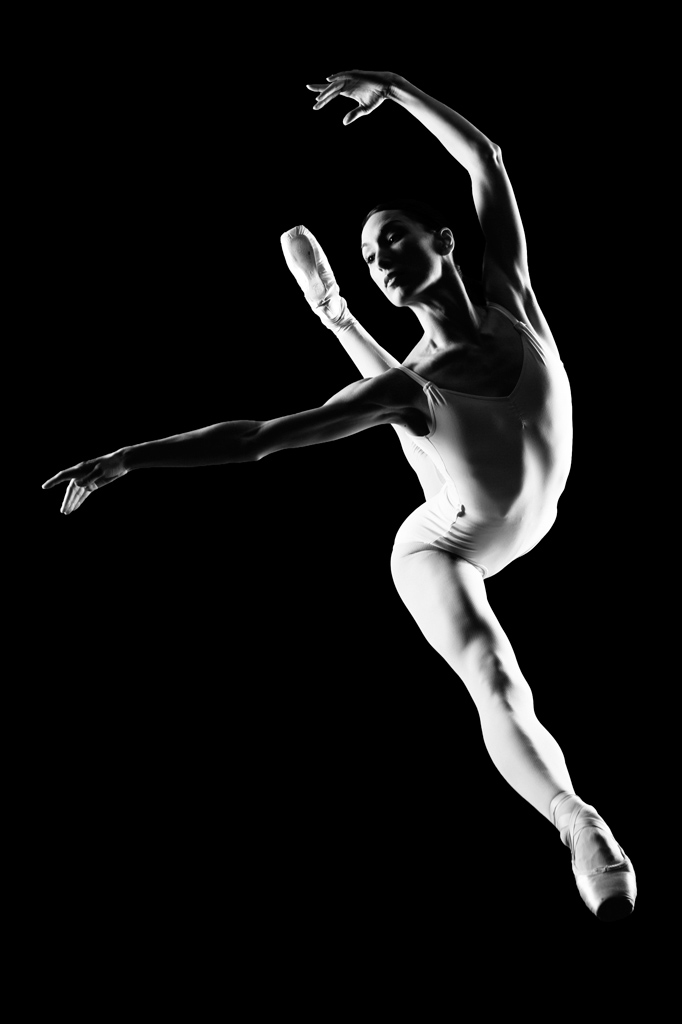
you lit the subject with Two powerfull 90cm Softboxes, place slightly behind her, like the rear L+R surround speaker position diagram to get the soft kicker light shaping. with a black background or black background.
whoah the camera setting is the hard one, I don’t know what equipment you use, but it should be ASA 200 (might be lower), max sync speed (1/200th or 1/250th). f/16.
You shoot this on a tele lens 70mm – 200mm at a little lower left from the subject.
There should not be alot of post production, since you shoot this in a controlled enviroment. you just convert your raw file to BW in lightroom (maybe) and set some level or curve, add some black, contrast, clarity.
i don’t know you are a photoshopper geeks or not, you might fill the background to total darkness.
that’s how I gonna make a picture above, btw why reversing others ppl works? why not make it your own way. as long you got the picture in your head you develop in the process.
Two SB900 or SB800 speedlights (maybe used diffused umbrellas), Power range at 1/4 to 1/8 (On Manual). Camera Nikon D7000 AFS, WB Shade, Spot Metering, Center Focusing Point, ISO 100-200, Shutterspeed 1/200, Manual setting, Image Quality Fine+Large+Raw, In-Camera B&W (Tweaked, maybe added red filter) 50mm f8 (not 1.8 as before), Black muslin backdrop, Small Stepladder may have been used…. + the dancer
Direction: Speedlights sandwiched between dancer. Dancer Jumps, Shutter Snaps…. CAKE!
Post Processing: Crop, Sharpen, Burn.
Wallah!
2 lights, both with modifiers. Back light is a stop stronger than the key light or half the distance closer (inverse square law). Both lights are to the side, causing the shadow in the middle of her, Shot at 1/250s at f/10 maybe.
Post production, softened and boosted the contrast, and converted to black and white.
Stage lighting, spot lights on the left and right angled, little bit of luck on how the light fell on her body. No post production… that’s my guess and I am stinking to it…haha. If only it could be that easy.
One light camera left with modifier and one light camera right bare bulb. There is enough sharpness in the subject so I might say f16 or f11 (powerful lights by the way) which helps to darken the background as well. I will say 250th shutter speed if not higher. Camera is positioned below pointing up to give the perception of a high jump. If there was any processing then it was more of an “S” shaped curve to get a bit more contrast.