

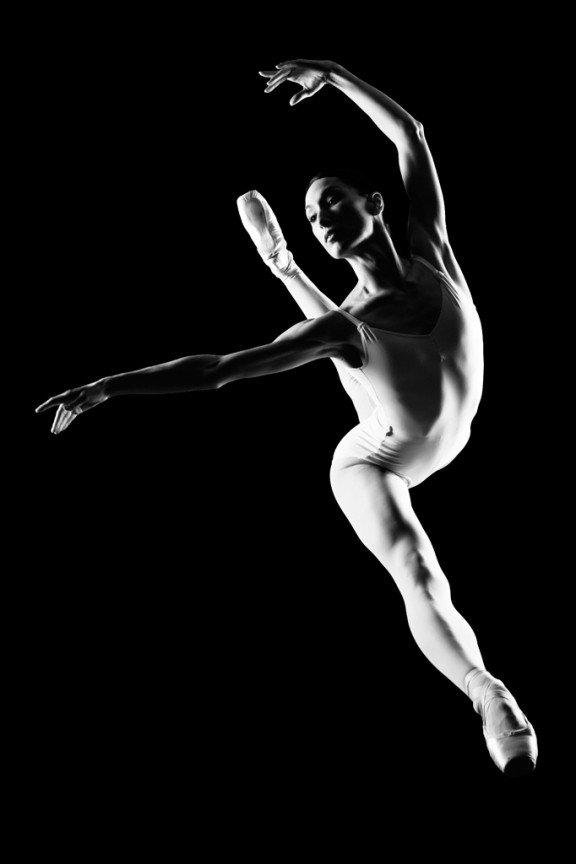
I learned to light after years of deconstructing the work of other photographers. And I know from your previous feedback that you guys are fond of these posts, so let’s dig into another one.
How did I make this picture?
Is it a lucky snapshot?
Is it lit?
If so, how?
The camera Settings?
The direction?
Post production?
Whatever details you think are needed to make this image.
Looking forward to you trying to pick this apart… I’ll reveal everything in a followup post. The person who gets the closest gets… …a chest bump and a pizza, or signed book or something. Don’t be shy. Let er rip.












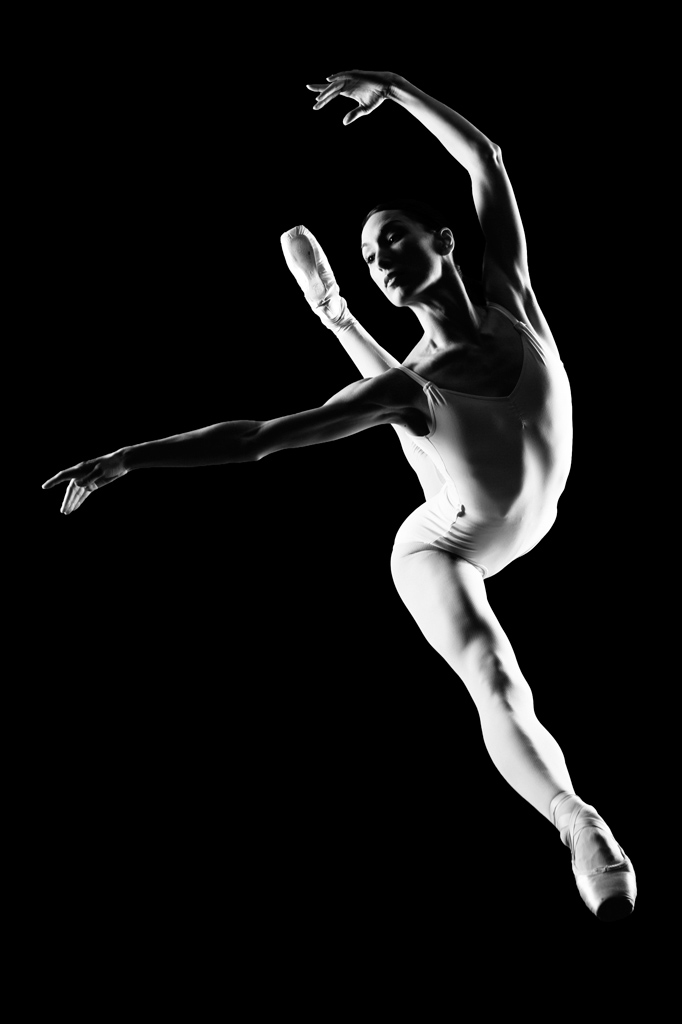
I would guess 2 strobes, one left of modell 45 degress from behind, and one right of modell 45 degress from behind,. Shot from under a plexiglass rig,.
low ambient light, 2 sf on each side of the subject, and post production
I love these!!
2 light sources, the first I would say is a fairly big source that’s some distance away, left of frame, high above her pointing down towards the dancer, the second is a smaller light source or perhaps a bit closer, right of frame at the same hight as she is.
I would think you’re using a fairly fast shutter speed to freeze motion, which also helps to drop the background to black, guessing 300/s at f/8, and the shutter was deliberately, and carefully timed to get this snapshot
As for post production, I’ll go with less is more this time, and just do an adjustment layer for brightness and contrast.
Why not? Seems like rim light setup with the left light being softer… I would say a small softbox or other diffusser.. Right light I think is just a reflector… Um… i guess a little post to ensure the background is black, fill the shadows of the dancer in lightroom?
camera settings I think iso 400 1/160 f11? shooting at 85mm?
Maybe i’m wrong
Not a lucky snap shot… instudio or on location.
At least 4 lights,
light 1 – high (1 foot above subject @ peak lift) camera left.
Light 2 – Camera left a foot back from light 1, lower in height aimed up at where the dancer is going to be at the peak of her échappé sauté(?).
Light 3 – Camera right, about 6 inches back from light 2 and just a little above dancers peak hieght 3-6 inches) and aimed down slightly to feather.
Light 4 would be at the dancers back slightly back from position of light 1 and aimed up, slightly (1/2 foot) lower than peak jump height.
Lights on the right are at a stronger setting than ones on the left, maybe 1 stop or 1/2 a stop.
Camera settings, since the body, hands feet and face are in focus I would say the apeture would have to be closed down around F8.0 or F11, Shutter speed would have to be around 1/200 – 1/250 ish? maybe higher flash syncing camera so up to 1/500? – Also this would render the background black (as she is away from the background). A slight camera tilt to the left.
Direction – Have the dancer do her jump a few times to see where she ends up height wise as well as position. Once figuring out there she should start the jump to be in the proper position the ground is marked and she follows the same path to jump on the retries. Normally these jump peak with both hands in the air, so …maybe she was directed to try different arm postions to add to the composition and negative space on the camera left side.
Post production –
converted to black and while and ise a little bit of tone to the image , I see a slight hint of purple…but I am at work so that could just be the crappy monitor. 🙂 solidified the blacks by adding contrast.
Great practice, I cannot wait to see what the actual setup looked like.