

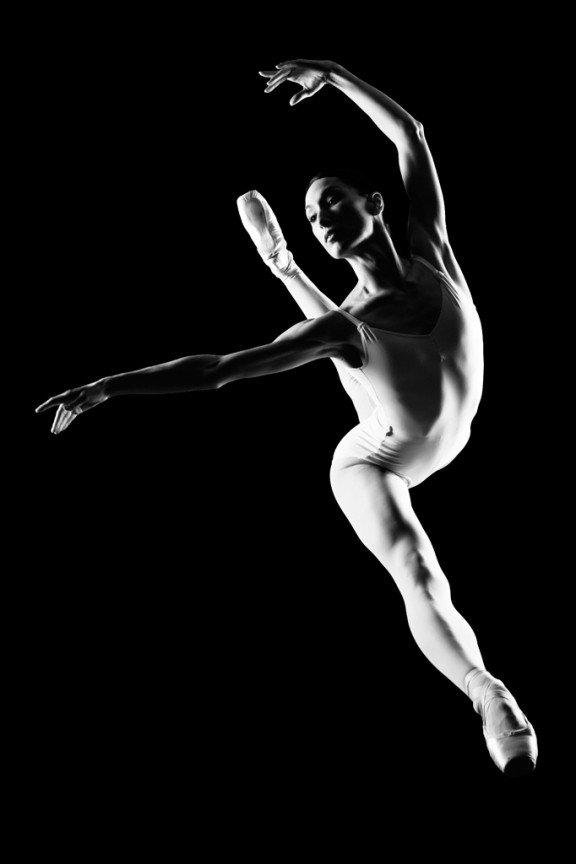
I learned to light after years of deconstructing the work of other photographers. And I know from your previous feedback that you guys are fond of these posts, so let’s dig into another one.
How did I make this picture?
Is it a lucky snapshot?
Is it lit?
If so, how?
The camera Settings?
The direction?
Post production?
Whatever details you think are needed to make this image.
Looking forward to you trying to pick this apart… I’ll reveal everything in a followup post. The person who gets the closest gets… …a chest bump and a pizza, or signed book or something. Don’t be shy. Let er rip.











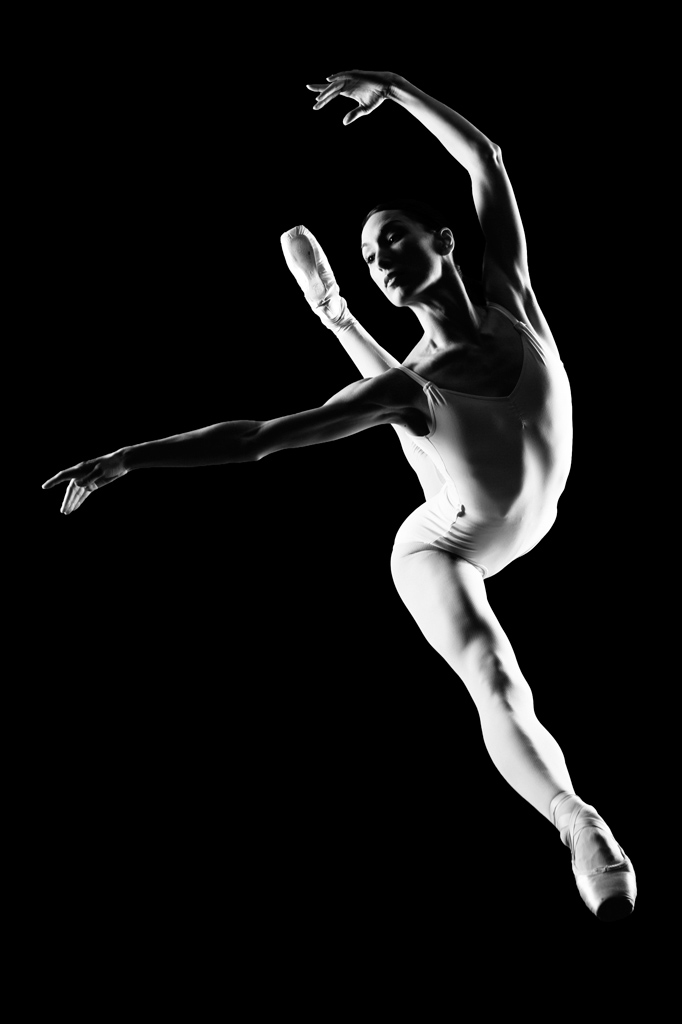
2 light sources, what I don’t know. Where: both behind the subject, left side of the picture, from above, right side from below.
Still a noob at camera settings, but camera settings:
high aperture
I want to say it was shot straight on, but physically, her jump wouldn’t look like that, so I feel like it was shot from a higher angle.
Post work: desaturate? blacks made darker?
I would say that you had your subject lit from both left and right with soft lighting and you had your camera in a monochrome setting with high speed continuos shooting. Thus you chose a still from all those shots
I see 2 light sources. Both seem to be soft light sources so I would guess a large octa or softbox. I am going with the sandwich method of both lights being on 180 degree axis line with subject. Both lights slightly above subject and angled down just a touch. As far as camera settings, I would guess this was shot at your highest sync speed around 1/200s (although it would not matter if all of your ambient was killed with your aperture because the strobe at that point is stopping the action) and I am going to go with f/8.0 for aperture. I want to say you are low and she is leaping so you are looking up. This is a controlled environment so I would say this was shot on black or she is far enough away from whatever background that no light hit it. As far as post, minimal, just B&W treatment with some curves adjustments for contrast.
Lights definitely look like they’re lower camera right + left, and a little bit of overhead light on camera left. These could be strobes or something else.
It’s also possible that this is a posed shot, and you shot it overhead (the subject was doing a split, and you shot her against a black background, to make it seem like she was in the air. I doubt this was the case, though.
Looks like, from the subject’s right leg, there was a bit of post sharpening?
Also guessing this was shot at a small aperture (f/8 or f/16 most likely) and possibly shot on a hasselblad or d3/x/s?
essentially its cross lighting. You may have used strip lights! Shutter speed must be high to reduce all ambient light as the blacks seem really black.