

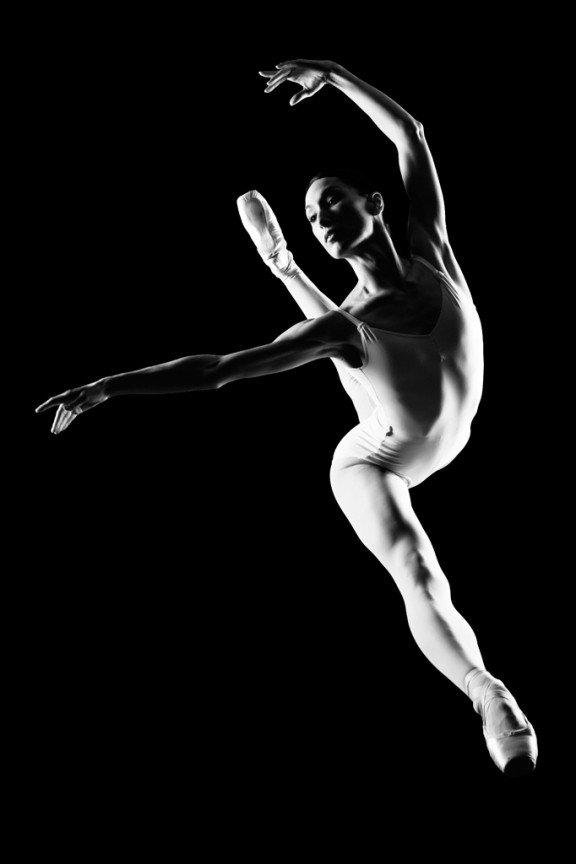
I learned to light after years of deconstructing the work of other photographers. And I know from your previous feedback that you guys are fond of these posts, so let’s dig into another one.
How did I make this picture?
Is it a lucky snapshot?
Is it lit?
If so, how?
The camera Settings?
The direction?
Post production?
Whatever details you think are needed to make this image.
Looking forward to you trying to pick this apart… I’ll reveal everything in a followup post. The person who gets the closest gets… …a chest bump and a pizza, or signed book or something. Don’t be shy. Let er rip.











Nah,,. I don’t think so. Two large soft-boxes on either side, quite a distance apart. But then, that would leave no space for the dancer, would it? Knowing Chris’ photos, he would have surely taken this in burst. Post-produced to turn in B&W and increasing the black levels. A bit of cropping. Considering the DoF, it might be f/4 or more. I don’t think there are more than 2 lights here. No hair light is seen. Yep, that’s about it. Scott might have worked more in post than I think, however.
It could be live, as it looks like she’s being lit from all angles (both sides and a separation light, which would be consistent with stage lighting). And she’s definitely mid air.
Telephoto, stopped down a bit (also consistent with shooting into stage light if you use a high enough ISO), and a fast-ish shutter speed. It wouldn’t need to be too fast, since if you expose for the lights (which in my theory are constant and not strobes, therefore, no worries about killing ambient light since you are shooting *with* ambient light) then the background will naturally fall to black.
I can’t tell you how you did it, but I can tell you where I’d start to try for a similar look.
First, I’d use a minimum of two lights. In this image it looks like you have one CL and one CR. I’d start with them back at 45*, and slowly move them forward until (no more than 90*) I got the nice shadow line down the leg. The edges of the shadows are sharp, so I’d start with basic reflectors and go from there. I’d start at about F11, and 1/200 SEC (max sync speed for me) to freeze movement. But I use AB’s. You could go faster with other brands. ISO 100.
In post, I’d convert to B&W, crush the blacks, and clean up with a little D&B.
But that’s just me.
Looks like 2 large softboxes, one low on the right side and one high on the right.
Harsh/non-diffused light coming from camera right and fairly perpendicular to the subject…..softbox/diffused light slightly feathered from camera left, and over head a bit. I’d say at least 1/250th if not 1/500th shutter speed to stop motion and cut out ambient light, and an aperture of at least F8. Hard to tell if a reflector was used for the front, or if it was slightly lightened in post.