Higgsfield AI is a generative video model and platform designed for creating high-fidelity, controllable, and stylistically consistent video content from text and image prompts. Unlike many early-generation AI video tools that produce short, often disjointed clips, Higgsfield focuses on solving one of the biggest problems for professional use: consistency. It aims to give creators the ability to maintain the same character, aesthetic, and environment across multiple shots, making it a viable tool for narrative and commercial projects.
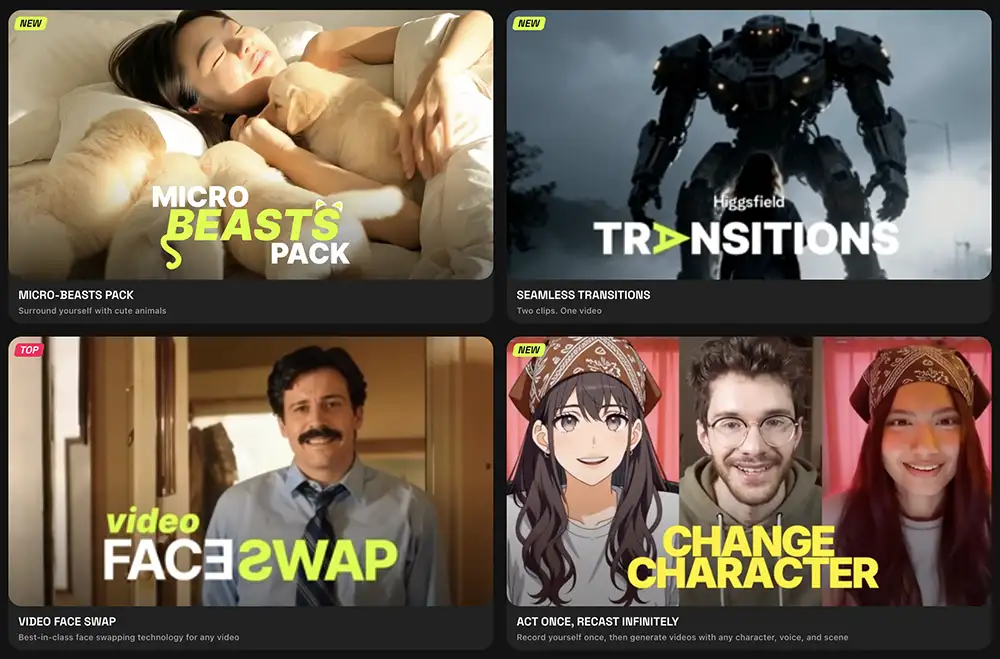
A few of Higgsfield’s built-in effects/tools
Think of it less as a simple “text-to-video” generator and more as a component in a larger production pipeline. It’s built for creators who already have a strong vision and technical understanding of filmmaking and motion graphics, and who need a tool that can translate that vision into motion pixels with a high degree of fidelity. It’s not about replacing the creative director, the cinematographer, or the editor; it’s about providing them with a powerful new way to generate footage, create previs, or develop visual concepts.
How Creative Professionals Can Use Higgsfield AI
This is where the rubber meets the road. A tool is only as good as its application. Learning how to apply it to a professional workflow is the key to unlocking your potential and determining if Higgsfield AI has a place in your toolkit.
Character and Scene Consistency
This is Higgsfield’s primary value proposition. For any project that requires a character or subject to appear in more than one shot, consistency is non-negotiable. Early AI video models would generate a different face and costume for the “same” character in every clip. This is an instant dealbreaker for professional use.
Higgsfield addresses this by allowing you to lock in character and stylistic attributes. While the exact methodology is part of their proprietary technology, the workflow allows you to reference a character from a source image or a previous generation. This means you can create a shot-reverse-shot sequence where the character actually looks the same. You can generate a wide shot of a subject, then a medium shot, and then a close-up, and maintain visual continuity. This opens the door for using AI-generated footage in narrative sequences, product commercials, and music videos where a consistent subject is essential.
Advanced Prompting and Cinematographic Control
To get professional results, you need professional-level controls. Higgsfield moves beyond basic prompting to include parameters that mimic real-world cinematography. This is where your existing expertise as a creative becomes a massive advantage and a key step toward becoming an undeniable creative.
Camera and Lens Specification:
Your prompts can and should include specific camera movements and lens choices. Instead of just writing “a video of a car,” you can be far more granular.
A low-angle tracking shot of a vintage sports car on a winding coastal road, shot on Arri Alexa with a 35mm anamorphic lens, lens flare hitting the camera.A dramatic push-in on a character's face, revealing a subtle emotional shift, shallow depth of field, 85mm prime lens.A handheld, shaky-cam shot following a character running through a crowded market, documentary style.
By using the language of cinematography, you can guide the AI to generate footage that aligns with established filmmaking conventions.
It also has a great app for creating new angles and the brand new “Vibe Motion.”
Lighting and Color Direction:
Lighting is everything in visual storytelling. Your ability to describe it is crucial for getting the right mood.
Golden hour lighting, soft shadows, high contrast.Hard, dramatic lighting of a detective in a dark office, film noir style, venetian blind shadows.Flat, sterile, overhead fluorescent lighting in a hospital corridor.Vibrant neon-lit street at night, cyberpunk aesthetic, shot on Kodak Portra 800 film stock.
Your knowledge of color theory, film stocks, and lighting techniques directly translates into more powerful and specific prompts.
A Sample Workflow: Concept to Final Clip
Higgsfield AI doesn’t exist in a vacuum. It’s a tool that integrates into a modern creative workflow. Here’s a practical example of how to turn your idea into action using it for a short commercial spot.
- Concept and Storyboarding: You start where you always start: with the idea. You flesh out a creative brief and develop a storyboard. This can be done with pen and paper, or using tools like Figma, Milanote, or Pitch. Your storyboard outlines the key shots, camera angles, and action.
- Style-Framing: Before generating video, you need to establish the visual language. You can use an image-generation tool like Midjourney or Stable Diffusion to create high-fidelity style frames for your key shots. This allows you to dial in the color palette, character design, wardrobe, and environment. For example, you might generate a key image of your main character in the primary setting.
Style frame of a female astronaut with a silver-blue metallic suit, inside a clean, white, minimalist spaceship cockpit with a nebula visible through the main viewport, cinematic, hyperrealistic. - Video Generation in Higgsfield: With your style frames as a reference, you move into Higgsfield. You can use your style frame as a direct image input to guide the aesthetic of the video generation. You then generate the shots from your storyboard one by one, using your detailed prompts and ensuring you lock the character model for consistency.
- Shot 1 (Wide):
An establishing wide shot of the female astronaut from [style frame reference], she is floating in zero-gravity inside the minimalist spaceship cockpit, gentle camera drift to the right. - Shot 2 (Medium):
A medium shot of the same astronaut, she turns her head to look at a control panel, her face shows concentration, soft fill light from the control panel's screen. - Shot 3 (Insert):
A close-up insert shot of her gloved hand pressing a glowing red button on the control panel.
- Shot 1 (Wide):
- Editing and Post-Production: The generated clips are assets, not the final product. You’ll export these clips and bring them into your NLE of choice, whether it’s Adobe Premiere Pro or DaVinci Resolve. Here, you’ll perform your edit, assemble the sequence, and add sound design, music, and voiceover. You’ll then move into color grading, using your style frame as a reference to ensure the final grade matches the initial creative vision. You might need to use stabilization or VFX tools to clean up minor artifacts, just as you would with real-world footage.
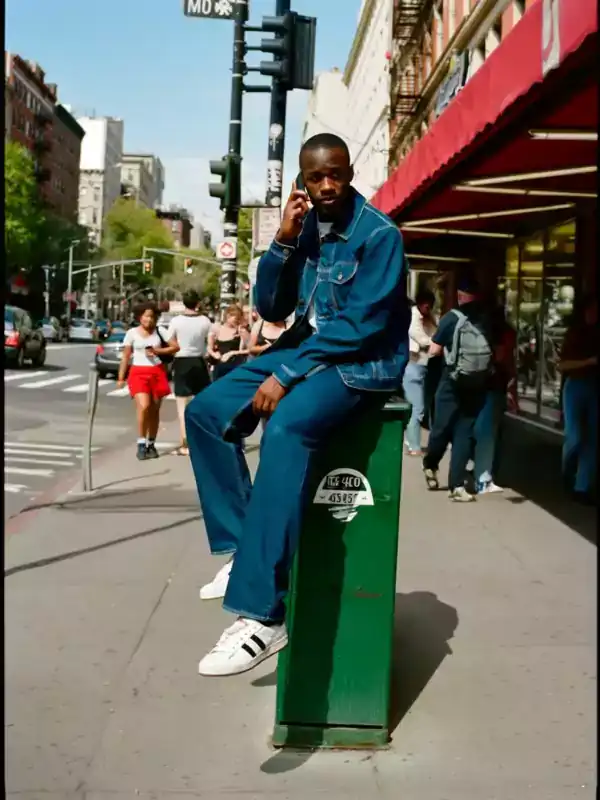
It’s particularly strong at editorial-style images like this
Current Limitations and Considerations
No tool is perfect, especially not in its early stages – Higgsfield is no exception. Being a professional means understanding the limitations you’re working with. AI video generation still has its quirks. You may encounter strange motion artifacts, moments of uncanny valley, or slight physics impossibilities. It struggles with complex interactions between multiple characters and can sometimes misinterpret nuanced prompts.
And because many of it’s effects are essentially presets, they may not be as flexible as you’d like – but that’s the tradeoff for creating such visually polished effects right out of the box with a couple clicks.
The Bottom Line on Higgsfield AI
Higgsfield AI represents a significant step forward in generative video. By focusing on character and stylistic consistency, it moves beyond the realm of novelty and into the world of professional tooling.
This product is for you if:
- You are a filmmaker, animator, art director, or VFX artist who needs to generate specific, narrative-driven video content.
- You have a strong understanding of cinematography and can write detailed, technical prompts.
- You see AI as a powerful component to be integrated into a larger workflow that includes tools like Premiere Pro, DaVinci Resolve, and After Effects.
- You need to create consistent characters and scenes for projects like animated shorts, music videos, product commercials, or concept visualizations.
This product might not be for you if:
- You are looking for a one-click, fully automated video creation solution.
- Your work doesn’t require strong narrative or character consistency.
- You are a casual user who is just beginning to explore AI tools.
Ultimately, your creative output is a direct result of the choices you make—the projects you take, the skills you develop, and the tools you master. Higgsfield AI is a powerful new tool that, in the right hands, can unlock new levels of creative expression and efficiency. Staying ahead of the curve requires a commitment to lifelong learning and a willingness to embrace the technologies that will define the future of our industry. If you’re serious about building a creative career that lasts, that mindset is everything. For more on building a fulfilling and successful creative life, check out the Seven Levers For Life. It’s a free 7-day email course that delivers actionable insights right to your inbox.