


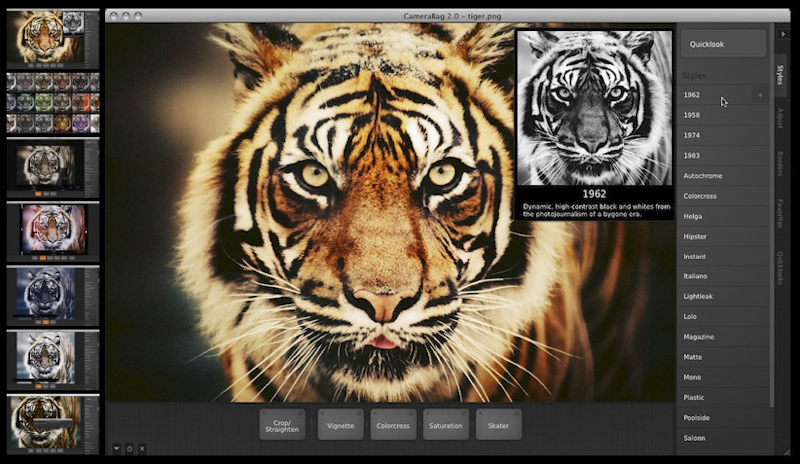
 Hey photo friends. Erik here with a quick recommendation for an inexpensive photo editing solution. I’ve been playing around with the CameraBag 2desktop software for the last couple months and I’m blown away at the capabilities packed into this affordable editing tool. If you’re new to photo editing and wanna save a few bucks, or you’re like me and find inspiration in trying out new photo apps, I highly recommend you download this software. [20 sample photos by clicking the image tabs above…]
Here are my 3 favorite features:
1. Presets: CameraBag 2 is loaded with dozens of awesome presets. Scott recently wrote a blog post and then another blog post about the pros and cons of using presets. It sparked considerable debate and it was a pretty even split between the fans and the naysayers. I am a fan. Presets are a throw back to the inherent experimentation that photographers had with film and help to discover new possibilities and styles. It’s great way to take a fresh look at your photos. But, even as a fan, I believe that presets are useless without the following functions.
2. Customization: The “Style” presets are customizable via the built-in “Remix” slider. It’s fast and it’s slick. The software also comes preloaded with about 80 presets in the “Favorites” tab that, when applied to your photo, display every effect and adjustment in play at the bottom of the screen. You can tweak each effect and rearrange them to see how the order affects the final image. Infinite customization.
3. Quicklook: The Quicklook view is just plain badass. Clicking it gives you a proof-sheet view of options for styles, adjustments, borders, or favorites. Executed as a full-screen, side-by-side preview of what’s possible it is a speedy and brilliant tool to find the aesthetic you’re looking for.
That’s just a handful of notable features. Be sure to take a spin through this gallery of images atop this post that features before and after shots (from some of my bts snapshots). More questions? Checkout the CameraBag 2 website












Sometimes the original is better …. This time the original is much better. Looks like an interesting tool though.
Is camerabag 2 compatible with iPhoto? Will I be able to edit my photos on camerabag 2 and save them back into iPhoto?
Because, I really like the organizing features of iPhoto, and would love to start editing my photos with this new software too!!
Help!!
What a pic! Love it!
We have been playing with snapseed – very similar to CameraBag
Look god – we have been trying out snapseed which is offers some similar – though CameraNag does look better