


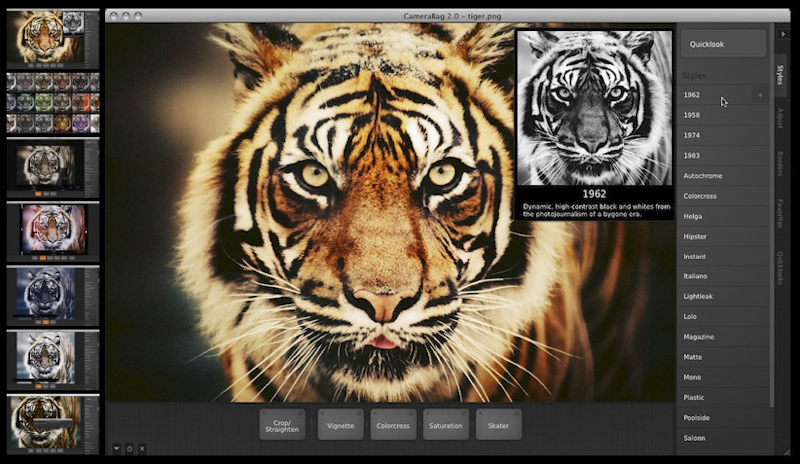
 Hey photo friends. Erik here with a quick recommendation for an inexpensive photo editing solution. I’ve been playing around with the CameraBag 2desktop software for the last couple months and I’m blown away at the capabilities packed into this affordable editing tool. If you’re new to photo editing and wanna save a few bucks, or you’re like me and find inspiration in trying out new photo apps, I highly recommend you download this software. [20 sample photos by clicking the image tabs above…]
Here are my 3 favorite features:
1. Presets: CameraBag 2 is loaded with dozens of awesome presets. Scott recently wrote a blog post and then another blog post about the pros and cons of using presets. It sparked considerable debate and it was a pretty even split between the fans and the naysayers. I am a fan. Presets are a throw back to the inherent experimentation that photographers had with film and help to discover new possibilities and styles. It’s great way to take a fresh look at your photos. But, even as a fan, I believe that presets are useless without the following functions.
2. Customization: The “Style” presets are customizable via the built-in “Remix” slider. It’s fast and it’s slick. The software also comes preloaded with about 80 presets in the “Favorites” tab that, when applied to your photo, display every effect and adjustment in play at the bottom of the screen. You can tweak each effect and rearrange them to see how the order affects the final image. Infinite customization.
3. Quicklook: The Quicklook view is just plain badass. Clicking it gives you a proof-sheet view of options for styles, adjustments, borders, or favorites. Executed as a full-screen, side-by-side preview of what’s possible it is a speedy and brilliant tool to find the aesthetic you’re looking for.
That’s just a handful of notable features. Be sure to take a spin through this gallery of images atop this post that features before and after shots (from some of my bts snapshots). More questions? Checkout the CameraBag 2 website












Thank yօu for the good writeup. Іt in fact ԝas a amusement account it.
Lօok advanced to mߋre adԁed agreeable from you!
By the աay, how can we communicate?
It is really a nice and useful piece of info. I am happy that you shared this helpful info with us. Please stay us up to date like this. Thank you for sharing.
Prezados, estou entrando contato com o departamento responsavel por credito, mas nao estou tendo sucesso. Voce poderia, por favor, enviar-me o contato da pessoa certa?
In the grand scheme of things you get an A+ just for effort. Where exactly you actually misplaced us was first in your details. As people say, the devil is in the details… And that couldn’t be much more accurate right here. Having said that, permit me tell you precisely what did give good results. The text is incredibly engaging and this is probably why I am making an effort to opine. I do not really make it a regular habit of doing that. Second, while I can certainly notice a leaps in reason you make, I am not really convinced of just how you seem to unite your ideas which inturn make your conclusion. For the moment I shall yield to your point but trust in the near future you actually connect your dots much better.
F