


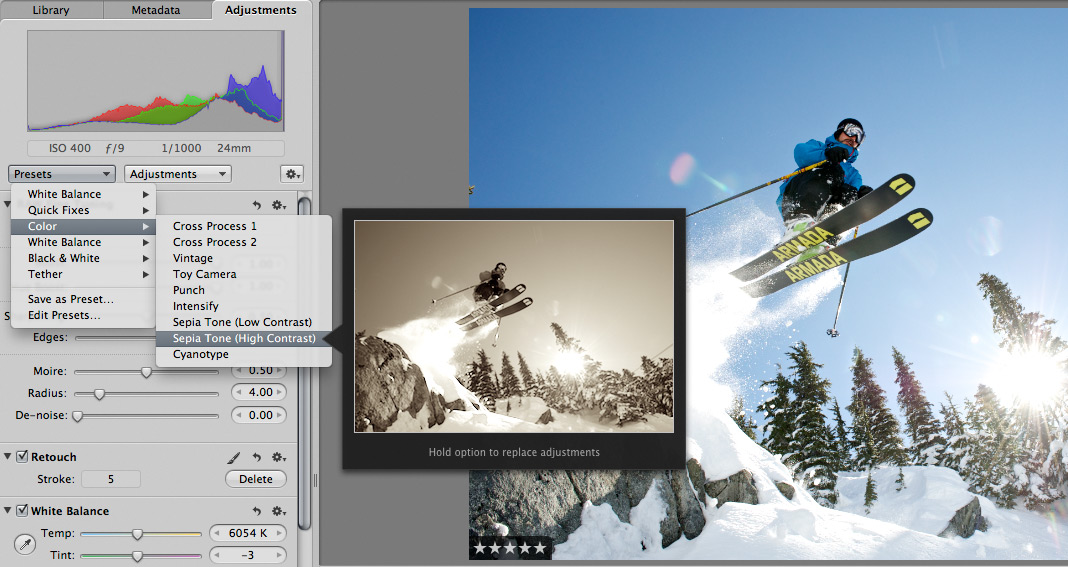
 Scott here. Many of you know that I’m the primary retoucher here around the Chase Jarvis studio. I was surprised to get into a fairly spirited debate the other day with some of my co-workers. The topic? Adjustment presets and plug-ins in Aperture or Lightroom or Photoshop.
I’ve got a strong opinion on this, but this experience has once again reminded me that there are a thousand ways to skin a cat and that my way is just that, my way.
Instead of letting a debate rage inside the office and then fade out, I figured, why not make it public? I want to hear from you.
Do you use presets for the post production of your images?
Do you make your own, or download them from other users online?
Do you use them for initial inspiration, or to create your final files?
What are your favorites and why?
I’m interested to hear your thoughts in the comments below. Don’t be shy. For those of you who give a rip, I’ll follow up this post with my personal take and we’ll all be a little more informed.











I rarely go straight from presets. I use lightroom/photoshop for basic retouching combined with combinations of Nik plugins to get the stylistic look I want on a pic by pic basis. My jobs have a pretty small throughput (almost always less than 1000 pics/job on the high end) so I’ve got that luxury I guess. I’ll often use some of the Nik presets within a plugin as a starting point and adjust from there, with pics that catch my eye getting more attention than the others. Whatever “look” I’m going for with a job depends on a lot factors and varies a lot from job to job, so strictly using presets doesn’t really work with my post workflow.
I currently do not use them, but that doesn’t mean to say that I won’t.
Presets are just another tool – some photographers have a style that they are known for and that is often why they are booked. Presets can help maintain consistency in delivering photos with that signature look.
I was looking for the button for a preset reply, but I guess there isn’t one. Now what do I do?
I use em, I download em, I create em, I tweak em. I am a wedding photographer and do not have the luxery of spending hours on a single image. It’s all about getting the best results as quickly and effciently as possible.
Every one of my wedding images gets some love. Over the course of any give year that adds up hundreds of thousands of sliders moves and clicks in LR and PS. I see them mostly as an ergonomic tool to speed up the flow and reduce wear and tear on my body. If you have to process fast there is no reason to do the same thing over and over again. I create my own presets and actions.