


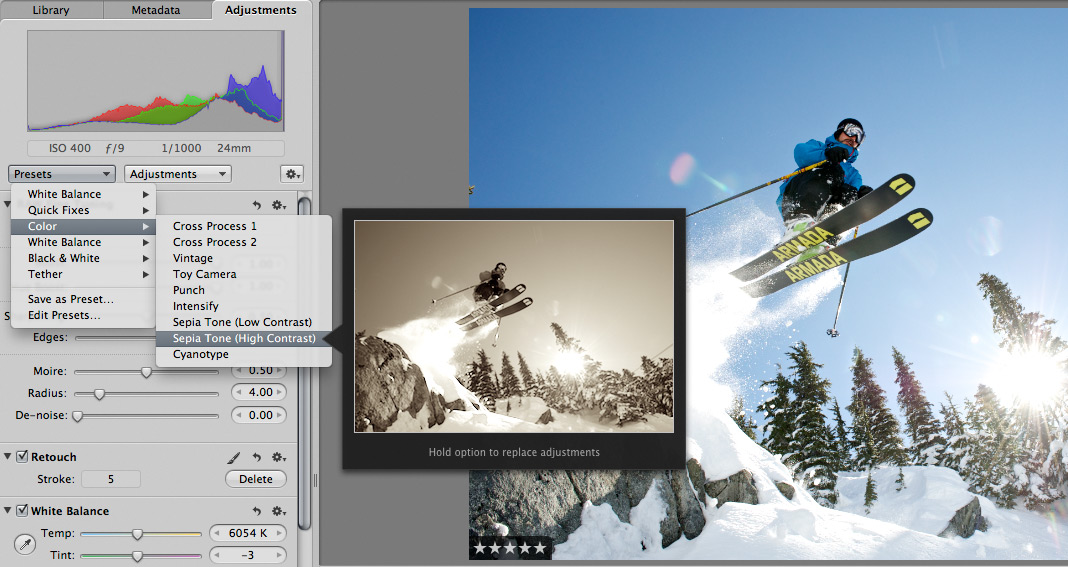
 Scott here. Many of you know that I’m the primary retoucher here around the Chase Jarvis studio. I was surprised to get into a fairly spirited debate the other day with some of my co-workers. The topic? Adjustment presets and plug-ins in Aperture or Lightroom or Photoshop.
I’ve got a strong opinion on this, but this experience has once again reminded me that there are a thousand ways to skin a cat and that my way is just that, my way.
Instead of letting a debate rage inside the office and then fade out, I figured, why not make it public? I want to hear from you.
Do you use presets for the post production of your images?
Do you make your own, or download them from other users online?
Do you use them for initial inspiration, or to create your final files?
What are your favorites and why?
I’m interested to hear your thoughts in the comments below. Don’t be shy. For those of you who give a rip, I’ll follow up this post with my personal take and we’ll all be a little more informed.












It depends on the situation but i have done all of the above.
If i’m doing nightclubs i do a batch process of my own preset set of that event in lightroom.
I do download presets for lightroom and PS (Nik software stuff) but i’ll always refine them to my taste or have them as a starting block (or finishing touch).
If i’m doing a low volume job where i’m providing 10-15 images (which almost never happens) then i would do most of them individually. I think presets are kinda like actions in photoshop, you use them to cut down on your editing time. If the final amount to be sent to the client is low, then yeah, taking loads of time on each image is awesome, but if shooting a wedding and you need to provide 400+ final images then spending hours/days on each one individually just isn’t possible unless they are paying 20G’s upwards, and the price point in scotland is a maximum of around £1500-£2000 for a full day wedding.
I can’t say I have ever downloaded a preset, so any presets I have we’re created by me and the only reason they exist is through the course of an edit, in which the final result was effective or appealing to me. Since their creation, their only use can be compared to any photo editing app found on a smart phone – A quick, yet effective “spice up” of a photo for casual use online or whatever. Rarely the exact equation to a piece of art or commercial media. Mostly fun.
A lot of my pictures are from weddings and natural light portraits so lighting is always inconsistant. In LR3, I’ll import with a color/clarity/contrast/sharpness default to get closer to natural skin tones and have a good baseline. From there I have a few presets for each different item I’m trying to fix. ie. I have +.30 , .00 , and a -.30 exposure presets so I can quickly fix exposures. These all use shadows, highlights, exposure, brightness, etc to get the changes. I have things built like this for quick tweaking of skin tones, noise reduction, sharpening, vignetting, lens distortion, grain and a few B&Ws. All of these adjust independantly of the others.
This typically will get me where I want to be. It’s quick and I don’t heavily process my files. Also, I typically edit only one of a group where the pictures have similar wb/background/subjects and then I sync that group to the edited picture.
Using this method I’m clicking presets 90% of the time instead of scrolling up and down the editing bar on the right.
I create my own presets in Aperture if i know what i’m looking for from a particular shoot. Then individually fine tune each image.
When it comes to Photoshop i don’t use Plugins. why?.. To be honest i haven’t really looked into Photoshop Plugins… interesting, time to start researching… Thanks Scott!!
How about you scott?
Raman,
Thanks for joining the conversation. I’ll put up a follow up blog post once you all have had a chance to chime in.
I think presets are great. I use them quite often. THey are always a starting point though. I almost never set a preset and then say thats the final image. I choose one to get the image going in the direction i want to take it, then tweek from there. Good topic!!