


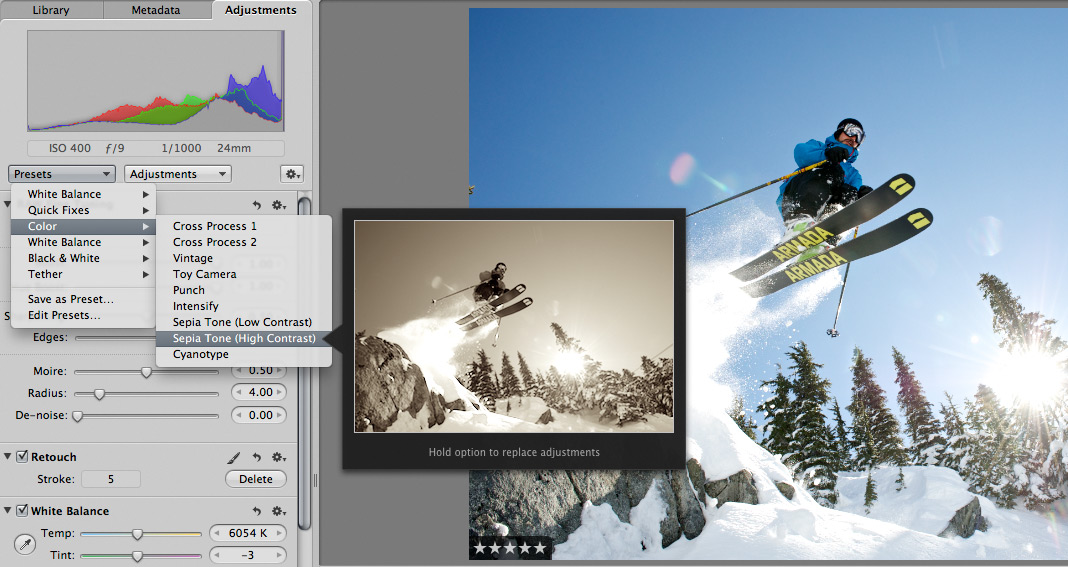
 Scott here. Many of you know that I’m the primary retoucher here around the Chase Jarvis studio. I was surprised to get into a fairly spirited debate the other day with some of my co-workers. The topic? Adjustment presets and plug-ins in Aperture or Lightroom or Photoshop.
I’ve got a strong opinion on this, but this experience has once again reminded me that there are a thousand ways to skin a cat and that my way is just that, my way.
Instead of letting a debate rage inside the office and then fade out, I figured, why not make it public? I want to hear from you.
Do you use presets for the post production of your images?
Do you make your own, or download them from other users online?
Do you use them for initial inspiration, or to create your final files?
What are your favorites and why?
I’m interested to hear your thoughts in the comments below. Don’t be shy. For those of you who give a rip, I’ll follow up this post with my personal take and we’ll all be a little more informed.











Initial inspiration man. For sure. They don’t always mesh well with the raw shot. I have a look, then tone it up/down. I like seeing what the photo *could* look like, then I’ll make it my own. I also save my favourite cross tones, and black and whites.
Nice shot btw. Was auto focus used out of interest?
I use a mixture. Depends on what I want. If a preset does what I could initially spend hours doing then it’s a no brainer. If there’s not a preset for what I want then I create one. There’s always a little more than just using a preset though. Things like sharpening, retouching or adding vignetting I normally do separately because most presets I use alter the color and nothing more. But I think it’s a silly argument, there’s no right way or wrong way to do things, use a preset, don’t use a preset, who cares? As long as you get what you want at the end of the day. I wouldn’t label them as instant gold or drab repetition, they’re helpful for amateurs new to P&P, a good starting point for some and inspiring for others looking for direction and experimentation.
I’m about to look at presets for a batch process on our latest wedding but we’ve had to do a lot of edit to get consistent enough images for batching, Generally the lighting varies to much through a wedding shoot for us to be able to use a magic button.
I do see the benefit though, particularly if you have a regular “look” like a lot of pro ‘togs do.
Moto
I actually have used them in the past. and when I did I tweaked them to fit the image I wanted to convey. I prefer not to use them now however, I see each photograph I take as an original work, from shutter click to export. I think presets take that away for me.
The only presets I tend to you are for contrast (I typically apply a linear contrast and then adjust as needed). From time to time I will also use a B&W adjustment layer which I will sometimes adjust depending on whether or not it gives the photo the look I’m going for.
I don’t really have any issues with people using presets, I guess it depends on what works best for you and your vision. I can say that in a few cases I have edited one photo using a few presets and then edit another nearly identical photo completely from scratch and have come up with 2 similar looking images, so I guess it all just depends on what works for you.