


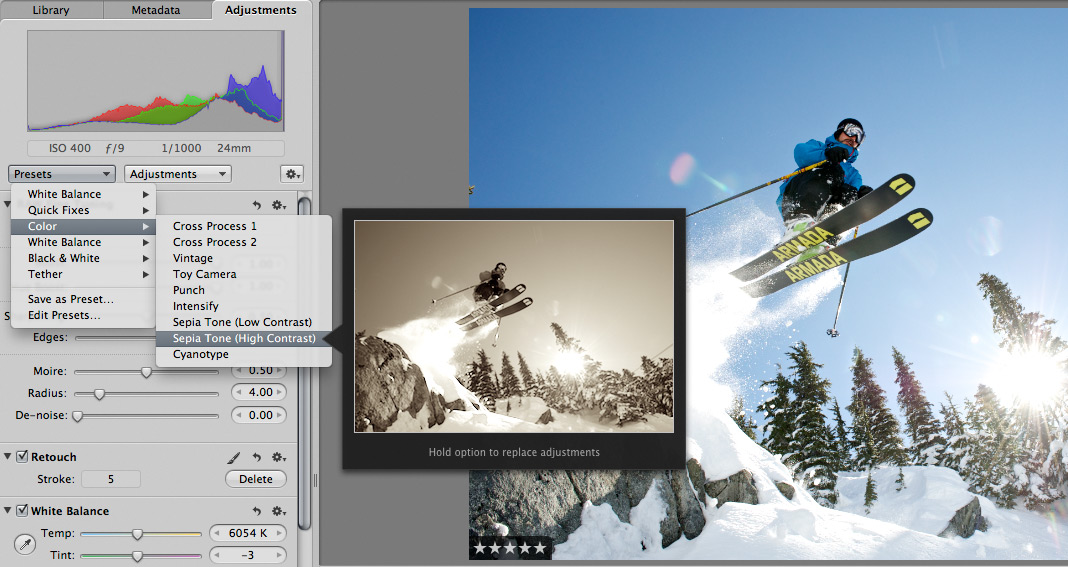
 Scott here. Many of you know that I’m the primary retoucher here around the Chase Jarvis studio. I was surprised to get into a fairly spirited debate the other day with some of my co-workers. The topic? Adjustment presets and plug-ins in Aperture or Lightroom or Photoshop.
I’ve got a strong opinion on this, but this experience has once again reminded me that there are a thousand ways to skin a cat and that my way is just that, my way.
Instead of letting a debate rage inside the office and then fade out, I figured, why not make it public? I want to hear from you.
Do you use presets for the post production of your images?
Do you make your own, or download them from other users online?
Do you use them for initial inspiration, or to create your final files?
What are your favorites and why?
I’m interested to hear your thoughts in the comments below. Don’t be shy. For those of you who give a rip, I’ll follow up this post with my personal take and we’ll all be a little more informed.












Sometime I use preset as to scout different look possible. I always make some change. I habitualy edit lot of image at same time in lightroom and do final adjustment for some of them at the end, Beeing consistent in a shoot is important for me but different shoot inspire me different look as the light and color are different. Final touch pass trough Photoshop where I use most of the time Niksoftware plug-in.
I find them useful to get a quick and dirty preview without going down and tweaking a bunch of images but in practice what I do are two things:
1. For a really big shoot where I don’t want to edit each image but most will be delivered (an event, let’s say). I’ll do a basic preset just for contrast, exposure, color etc. Then I’ll go in and and edit the better ones by hand.
2. Create presets for specific scenarios as a baseline before going in and doing further adjustments. Let’s say, every single one will need a definition (Aperture) adjustment. That sort of thing.
Scott,
We never got your take!
Theon,
I’m interested to see what the community has to say on the topic before I offer my 2cents. I’ll follow up with a post detailing my outlook on the subject.
I have downloaded hundreds of presets over the years of having Lightroom as my primary workflow portal. I have used these to help start an edit but I have developed a set of about four presets that I will use and one main preset that I apply on ingest before culling my jobs. That one thing has taken my workflow from a couple of days of work to a couple of hours of work. I can see what my photos look like on my primary preset and then tweak and edit and clean the photos after culling out my best photos.
Presets make my life a TON easier; they give me a launching point and help me maintain a consistent aesthetic across my photos.
I use them mostly as a starting point. What I do a lot is sync settings between images to have the same look for some of them.