


Howdy Y’all, Dartanyon again responding to an important gear question we get asked all the time. We spend a great deal of time out on location, and as Chase’s last series of blog posts clearly shows that it’s not all hotel rooms and poolside locations. Sometimes we’re at 12,000 feet above sea level snowshoeing to location, and carrying “extra” stuff is not practical. Over the last 4 years I have refined my traveling gear considerably, and it is not very often that I find myself wishing I had something I didn’t bring, or carrying stuff I didn’t use [or have a very good reason for carrying]. I’m going to take you through my traveling kit of DAM (Digital Asset Management) goodies and explain why I do certain things, but as I have said before this is MY way and certainly not the only or best way.
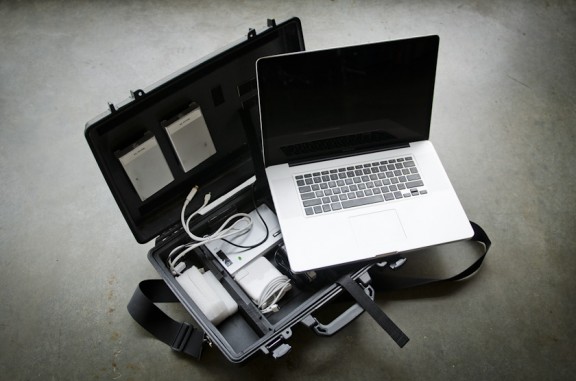
COMPUTER_ I bring a 17″ Mac Book Pro to almost all location shoots, it’s sole purpose is digital asset management, it doesn’t get used by a producer or intern back at the studio, it just sits and patiently waits to be needed in the gear closet. It’s loaded up with…… all the software I could need [discussed more in detail here]. It’s rocking the 7200RPM hard drive [not the biggest capacity drive available from Apple, but the fastest], maxed out with RAM, and as close to as a Mac Pro as you can get at a 1/10th the weight.
STORAGE_ A careful consideration must always be made to ensure that you will have enough storage space for a given job. With experience I can make a pretty good guess on a given shoot, with a given number of days and shots, just how many Gigabytes we’ll fill up. So I make my calculations, and then automatically add 50%, because you just never know for sure. I take two identical hard drives, let’s say 2 500GB bus powered drives. Then I also take a drive to back up the work each night back at the hotel. The “basecamp” drive as it’s called, is a G-Safe it’s a hardware RAID 1 drive enclosure that makes simultaneous copies to 2 different drives. We take special care to keep each drive unit from the basecamp drive in different hotel rooms each day, and during the night the primary and secondary location drives are kept in different rooms too.
CARD READERS_ I make sure I have at least 3 card readers with me. It always seems like if something is going to break it’s going to be the $30 bit or bobble. We’ve gone through the full myriad of card readers and my current favorite is the SanDisk Multi reader. For what ever reason, however unscientific it is, I feel like it’s a faster reader than the FW800 version.
TRAVEL DRIVE_ The essentials for a worst case scenario. Read all about it here.
PERIPHERALS_ The standard fare. We will occasionally bring a monitor with us, for our basecamp setup, either the 27″ LED, or maybe a 30″ Cinema. Mouse; Apple Magic mouse [it lives with the computer] . We bring a wired keyboard with us [instead of the smaller wireless], since with the 10 key you have a few more options on what keys to click for rating images. Cables, lots. A couple of each, even if you don’t need them, it goes back to the idea of the cheap things being the ones that break. [FW800-FW800, USB-Mini, FW800-400, eSATA]. We also always have an external battery pack with us, a HyperMac 222.
PACKAGE IT ALL UP_ If you have been following us for a while you’ve certainly seen the Laptop Case Vid, if not go watch and come back, I’ll wait … It’s a Pelican 1490, all carved up so that it fits everything we need in the smallest [well protected] space that we can. Everything goes in here with the exception of the basecamp drive, my travel drive, and an assortment of cables, which simply don’t fit, and stay at our basecamp anyway.
Further questions about workflow? Make sure to check out our now-infamous workflow video on how we move data through this–or a similar–set of gear.
Hope this is helpful. Let me know what your travel kit looks like in the comments, I’d love to know what y’all are carrying with you.













can you make a video of your laptop set up since it does look a little bit different from the original video.
or post more detailed photos showing how it was modified to fit a 17″ Mac book Pro.
Thanks
I was watching a TECH video of Complete Workflow for Photo and Video and wanted to see if you can provide a step by step tutorial of how everything is hooked up and set up it looks like you had the Card Reader connected to the external drives before you had them going into the computer. When you import the photos from the card thru the card reader is it copying them directly onto the external drives or onto the laptop? I am trying to set up something similar to your setup but using a single external drive for now until i get the money for a second drive. Do you guys ever do photo shoots here in Atlanta, Georgia?
Question for Dartanyon, do you use file (or volume) encryption for external hard disks?
Thanks.
I cannot stand glossy screens
Are you using a glossy (17″) MBP rather than a matte?
I’ve been debating for a month which MBP to get to replace my older one. Was decided on the 17″ (matte) but couldn’t stand the small text (pro apps ‘ menu fonts CANNOT be changed- FCP, Logic, etc). Now I have to go to the 15″ which has lower dpi…but only on the glossy screen, as the 15″ matte’s dpi is as high as on a 17″. I cannot stand glossy screens. Please convince me, my older PowerBook is falling apart.