

 Hey there y’all, Dartanyon here making a guest post appearance… In this installment of [my] Essential Gear, I’d like to talk about something I don’t leave home without: my travel drive.
A travel drive is an external hard drive filled to the brim with the software, tools, and settings, that are so often overlooked as part of location computer setups. There are several scenarios where you may need to carry one of these, perhaps you’re traveling without a backup computer, or even without a computer at all, maybe you’re renting one on location. I would advocate always carrying one of these drives: A tech’s first responsibility is to be prepared, a digital eagle scout, if you will. When things start going sideways with the computers [and they always do], everyone on set is going to be looking to you to fix it, fast, and with grace. Want to be the hero? Hit ‘continue reading below’…
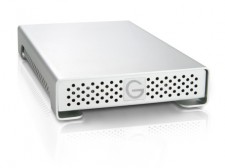
Setting up your travel drive: For my travel drive I chose a G-Tech Mini SSD, because it’s bomb-proof, fast, offers a wide variety of connections, and is bus powered. You have a few different ways of going about getting your drive set up:
- Option A: You could install the software directly to the drive [via your studio computer]
- Option B: You might place an entire cloned copy of your existing studio or travel laptop on it.
- Option C: You may place just the installers [with their associated serial numbers] on it.
My experiences: I have often tried to install software to an external drive [option A], some software goes for it, others don’t, some seem like they are fine with it, but once you get them out in the field they fail. I’ve also gone the clone route on a few iterations of my travel drive [option B], but even with today’s fastest SSDs they just don’t run quickly enough, when having to access the entire OS via USB. I’ve used this technique, it is a painfully slow process, but I should say it’s gotten the job done. The third option [option C] is a trade off between the time to load the software to the “foreign” machine, and the fact that it will be properly installed, with all of the application support files where they need to be.
Reconciling these pros and cons, I have finally come to my perfect solution, a hybrid drive. Two partitions, the first a clone of our Road Warrior, the second filled to the brim with custom made disk images that have the installers as well as the serial numbers. This allows me to properly install the software if I have the time, or go into emergency mode [the cloned partition – option C] if I don’t.
What all is on the drive:
Photo / Video Editing Essentials:
- Aperture
- Photoshop
- Final Cut
- InDesign [As a tech you have the chance to be a true hero, if you have this, and your Art Director’s computer has some sort of problem]
Additional Requirements:
- Coda [or some other coding app]
- Transmit [or your favorite FTP client]
- Compressor [or something to transcode video]
- Motion & Color [or something to dress up video]
- Data Rescue [or something else to help recover corrupt cards]
- DiskWarrior
- iWork [or some other word processor]
- LogMeIn [or some other backup way of getting to your studio computer]
All the other goodies:
Part of what makes these tools so useful to us is the way that they are set up. So you might get to a rental computer that has the software you need, but it’s laid out all wrong … making your workflow slow and clumsy. These things have taken me a lot of smacking my hand to my head to learn.
- Aperture presets
- An empty Aperture library, so I can have everything laid out the way I work most effectively
- Photohop settings/presets/brushes/workspaces
- FinalCut preferences/export presets
- Compressor codecs
- Transmit favorites
- A fonts folder
- A not to be underestimated my current 1000 or so, favorite tracks from iTunes.
There are other approaches and you may not need to have all of these on your drive, you may not even need a drive at all, maybe you can manage to get all of your necessary–but often forgotten widgets–via Dropbox. [If that’s your thing I wrote up a handy little post on that a while back], or some similar cloud service, just remember you may not always have fast internet access.
Now, certainly this is a lot to keep maintained, but often I have coming out looking like the hero because I carry this with me. Take it from me, it is totally worth it. The bottom line, digital tech, a team, or just a one-man, one-woman photography powerhouse, you should always be prepared for things on your computer to go south, and hopefully you’ll have the exact solution with you to come out smelling like roses.
Your “digital” Eagle Scout – Dartanyon












Thanks, Dartanyon. Must be nice to have digital genius such as yourself on staff. JEALOUS!
So the first partition is a CLONE — do you use SuperDuper, or what?
And the second partition is the software in case the clone doesn’t load? I’m a bit confused, as you can tell… and I’ve just spilled yogurt all over my sweater while typing this Q at my desk on the east coast :-\
@hs Sorry about the yogurt, mate. I could use SuperDuper, but I use Carbon Copy Cloner [just always have, no particular reason]
So the reasoning is thus: Running an entire bootable operating system from an external drive, is slower than it running from inside you computer. So the clone is actually the backup in my scenario. My preference would be to have the time to use the installers to install the missing software or setting to the computer I am using …. but in an emergency I can “option-boot” the computer to the external drive, essentially bypassing the hard drive that is installed in the computer.
oops, just realized Dartanyon posted this, not Chase… Thanks Dartanyon!
Great post Dartanyon! Backing up your files is crucial, but so many people forget to take backups of their apps when they travel!
Can you have updates as part of the installers, or do you carry only the original releases? To update after installation might not always be possible with restriction on internet connections and or speed.
I grab either the latest full installers for things like transmit and the like, or the update disk images as they are loaded on to my desktop machine [as an example adobe downloads all those updates to a directory, before installing them]
I like this concept and SSD drives are the way to go in the field. Price shouldn’t matter when you think about the cost if all the images go south.
Perhaps this is a silly questions but what is your “Road Warrior”? Is this a software program or is it your collection of must have programs?
Cheers!
The “Road Warrior” is our name for our primary travel laptop. It’s a 17″ MBP, and it’s assorted goodies that we’ve done a couple of case videos about.
Cool, man!
Thanks
Hey Dartanyon, with all the storm surrounding the FCP X release, I was wondering if you and your shop would be looking into a different NLE? Adobe etc…..
Do you have a page/blog of your own?
cz