
If you’ve wondered what the highest-end creative pros are using to make the jaw-dropping images you see on social media, there’s a very good chance that it’s ComfyUI.
Comfy is a node-based canvas app that’s the tool of choice for the elite tier of AI pros, and you’ve seen it’s output in work for Coca-Cola, Puma, Salesforce and countless games, movies, TV shows, etc. And did I mention it’s also free, open source, and runs locally on your computer??
It’s incredibly powerful, and if you want ultimate control, ComfyUI is probably your tool of choice. BUT – fair warning, the learning curve is steep and intimidating – but that’s the price of total control and flexibility.
Is it right for you? Let’s find out.
What Is ComfyUI?
At a basic level, ComfyUI is a node-based canvas app similar to Weavy or Freepik Spaces. The notable difference is that it (primarily) runs locally, and it’s also free and open source.
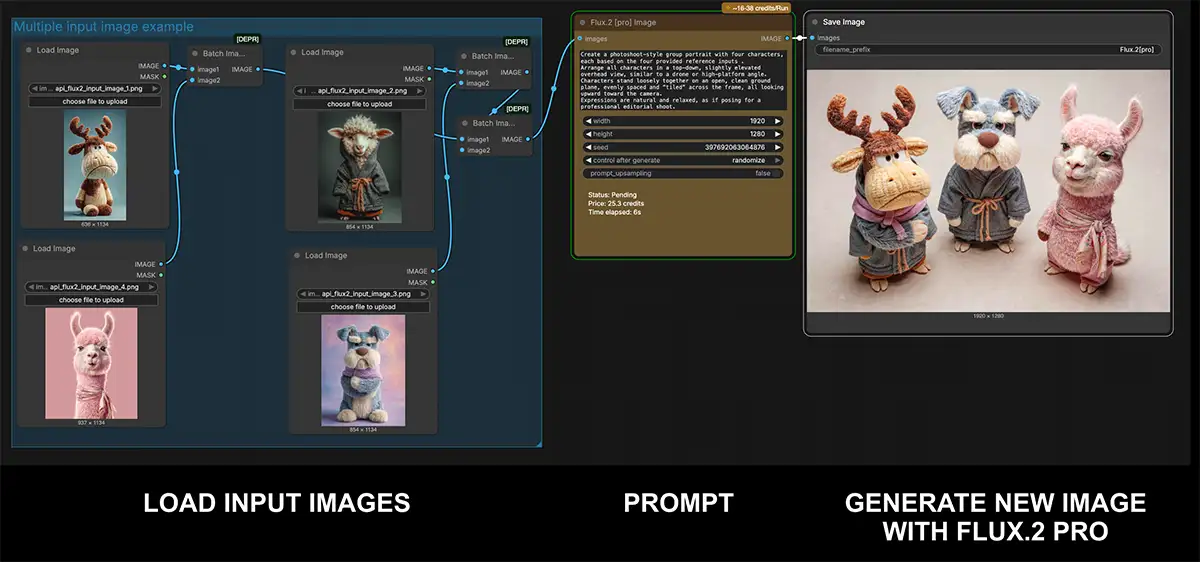
So what does “node-based” actually mean? It visualizes the entire generation process as a flowchart or a graph. Each node in this graph is a box that represents a specific, discrete operation.
For example, you might have the nodes above that load some reference images, a prompt with instructions to combine them, and all of those feed into a node that uses Flux .2 Pro to combine them into a new image with an overhead view and studio lighting.
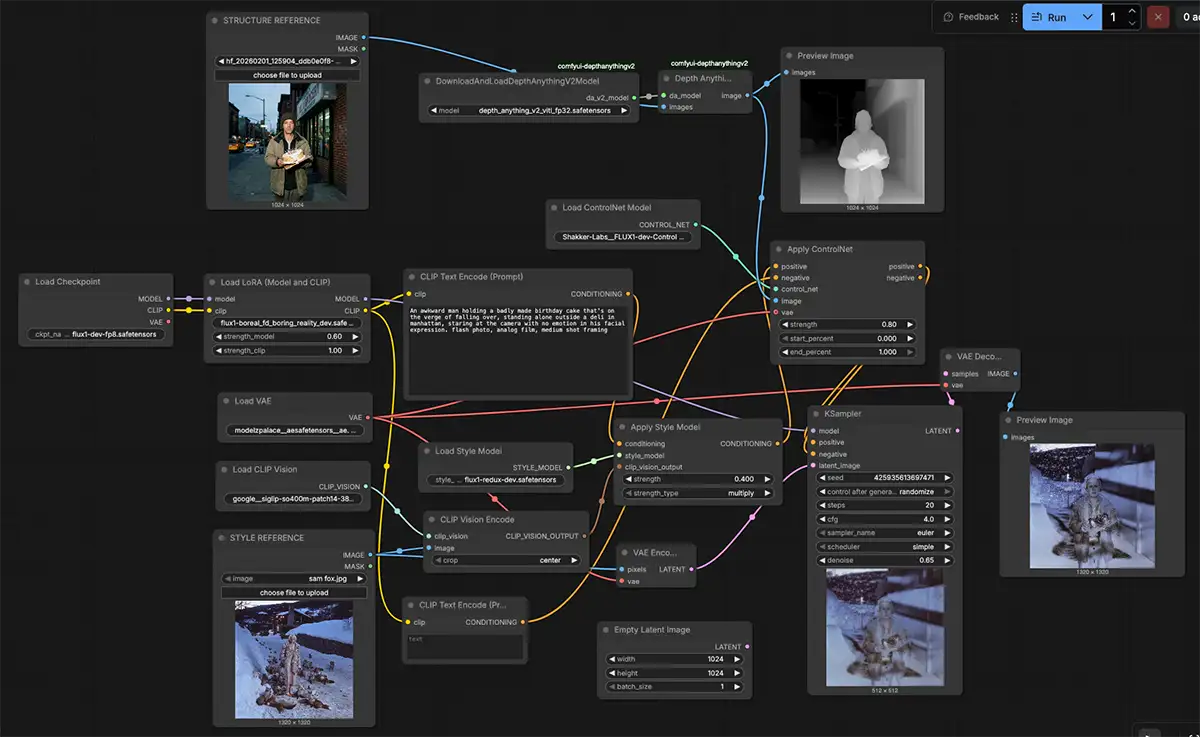
Some of these flows can get very complex (this one is actually pretty moderate)
That image could get piped into other nodes to do things like masking, blurring, etc, be used as input to another image generator, or turned into a video with any of the vast number of video models that Comfy supports.
You, the artist, connect these nodes with lines, directing the flow of data from one operation to the next – very different from Midjourney.
You can find the project and download it from its official website.
How Can Creative Professionals Use It?
The leap to a node-based system can seem intimidating, but the payoff is a level of power and consistency that simple prompters can’t match. This is about building a system that works for you, not just hoping a magic algorithm gives you what you need.
Achieve Granular Control Over Every Asset
The core advantage of ComfyUI is a level of control that is simply unavailable in most other platforms. Because you construct the workflow node by node, you can intervene, adjust, and experiment at every step.
Want to see how two different text prompts affect the same starting noise seed? You can build a workflow that branches, runs both prompts simultaneously, and shows you the results side-by-side. Want to blend the influence of two different stylistic LoRAs at a precise 70/30 ratio? There’s a node for that. You can change the sampler, adjust the scheduler, and manage the denoising steps with surgical precision. This transforms the act of generating an image from a guess into a deliberate, engineered process.
Build Repeatable and Consistent Workflows
For any professional project, consistency is a must-have. Whether you’re creating a series of illustrations for a brand campaign or developing character concepts for a game, you need to be able to replicate and build upon your results. This is where ComfyUI excels.
A complex, multi-step workflow can be saved, shared with a collaborator, and re-used indefinitely so you can maintain a perfectly consistent style across an entire project. Even better, ComfyUI has a game-changing feature: it can save the entire node-based workflow as metadata embedded directly within the final generated PNG file. This means you can simply drag an image you created weeks ago back into ComfyUI, and the entire flowchart used to create it will reappear, ready for you to tweak or reuse. It’s a bulletproof system for consistency.

Incredible work in ComfyUI from AI S.A.M.
Get the latest and greatest models before everyone else
Because ComfyUI is open-source, it’s supported by a massive community of developers and technical artists who are constantly creating and sharing new tools. This means you get access to the very latest, most advanced techniques in the AI space, often long before they’re integrated into commercial products.
The library of custom nodes is vast. You can install nodes that provide advanced functionality for everything from posing characters with extreme precision using ControlNet to training your own custom style models. It supports the latest models (eg LTX video as of the time I’m writing this) and a huge array of LORAs and other tools.
If a new, groundbreaking technique emerges in the AI world, chances are it will be available as a set of custom nodes for ComfyUI within days.
The Reality: Is the Learning Curve Worth It?
ComfyUI isn’t for everyone. Its primary limitation is a notoriously steep learning curve – and I’ll be real with you, it’s HARD. Prepare to spend many hours if not days before you get a usable image or video.
The user experience is not that of a polished, consumer-facing application; it’s really more like a developer tool. You have to manually install it, manage all your models and components, and learn the logic of its node-based system from the ground up. There will be trial and error.
Worth it? That’s up to you – but know that there will be a substantial time investment on your part.
Two somewhat easier options:
- Weavy, which has most of the ComfyUI functionality but is a more polished SaasS product
- Comfy Cloud, which runs ComfyUI in the cloud so you don’t have to manage it (and can now import LORAs)
Is ComfyUI for you?
The bottom line on ComfyUI is that it’s not a simple image generator; it’s a professional-grade workflow orchestration tool.
You should seriously consider ComfyUI if:
- You’re a technical artist, power-user who wants absolute, granular control over every parameter of the image/video generation process.
- You want to run locally and have a relatively powerful PC
- You love to experiment with the latest, cutting-edge AI techniques and want a platform you can customize and extend
You should probably skip ComfyUI if:
- You need a simple, intuitive tool for generating quick concepts with little technical overhead
- You prioritize a polished, user-friendly interface over deep technical control
- You are not prepared to invest significant time in learning a new, complex system
The evolution of creative AI points to a future where the most valuable skill isn’t just writing a good prompt, but designing an intelligent, repeatable creative process. Tools like ComfyUI are the instruments for this new era. Learning to conduct that orchestra is the challenge and the opportunity.