

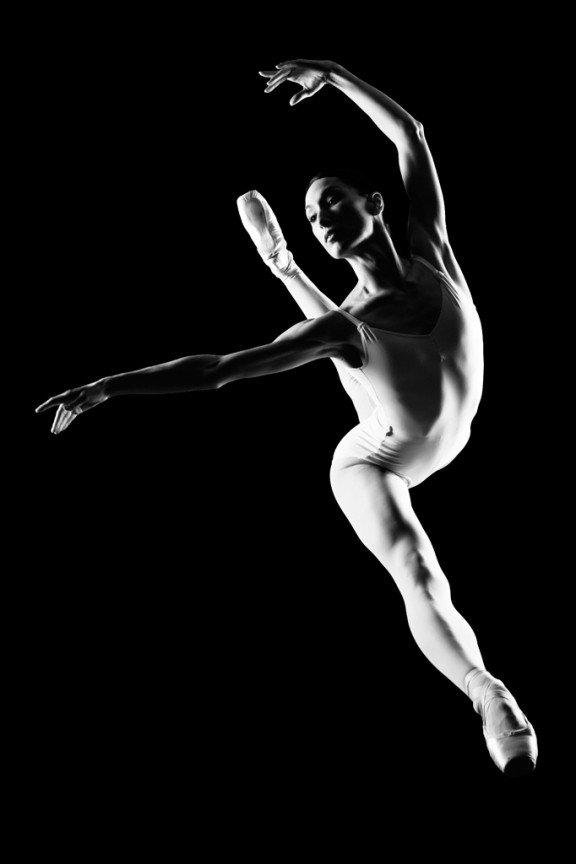
I learned to light after years of deconstructing the work of other photographers. And I know from your previous feedback that you guys are fond of these posts, so let’s dig into another one.
How did I make this picture?
Is it a lucky snapshot?
Is it lit?
If so, how?
The camera Settings?
The direction?
Post production?
Whatever details you think are needed to make this image.
Looking forward to you trying to pick this apart… I’ll reveal everything in a followup post. The person who gets the closest gets… …a chest bump and a pizza, or signed book or something. Don’t be shy. Let er rip.










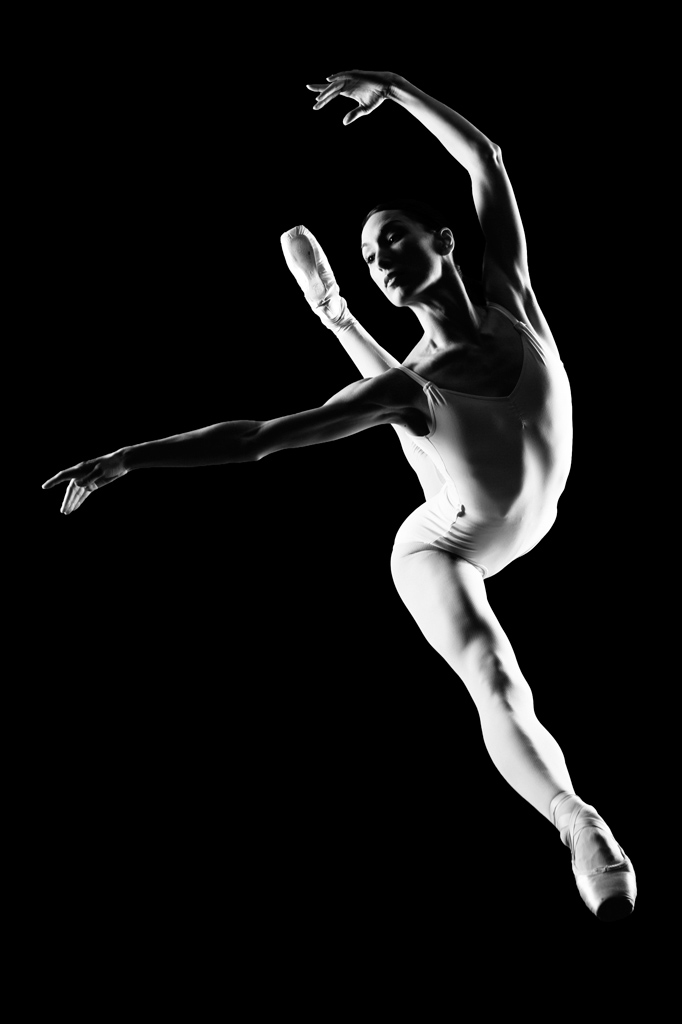
This was shot in theatre or performance house.
She is wearing point shoes so they have that flat toe area but the is no tension on the ankles so she’s jumping. I think that’s all light from the stage lights since theres a hard light fall off from the stage… I Think chase would Have her face lit better if he was in the studio…chase is stage left or right so the spot lights are hitting one side strong and getting a little top light only on the left side… Common spacing for stage lights…and it’s a photoshop Cutout… Thanks chase for sharing
1. I’m going to bet that you made this on set or perhaps during a warmup session for a shoot.
2. Not likely a lucky snapshot; you don’t typically work that way. 🙂
3. Two large strip lights on light stands, vertically, about 30 degrees behind subject at 6-8 feet, to provide falloff and depth; 1/8th power
4. ISO 200 to preserve soft details of female figure, 1/250th to 1/500th at f/8 to cancel out the background and maintain just enough DOF for tight focus front to back of subject.
Nothing complicated in post, shot in RAW and then converted in Capture NX. You kept it simple….
That. Was. Fun. 😉
f/8
1/500
Lit from right and left rear of subject.
Subject is on plexiglass.
Maybe some level/exposure adjustments in post-production to get the shadows just right.
probably stripboxes either side, likely w/ diffusion removed. grids in place? or a couple stacked hard lights. the key is not the camera settings, but the strobe settings. camera is likely at max sync speed and f8-11, but the strobes are dialed into a setting that fires them at around 1/2000 sec. it’s the light that stops the motion, not the camera. and so you have enough lights to keep the power at an appropriate setting for this flash duration.
dancer repeats jump until you have the frame that works for both you (aesthetically) and her (technically). my guess is you guys did this specific jump 10-12 times with slight variation, and this is frame 4 or 5 in the series. you are prefocused on a floor mark that she is using. this is just beyond the peak of the jump, on the way down.
what do i think? very beautiful capture. she’s obvioulsy a professional; her lines, musculature and relaxed face make that clear. i would like to see a bit of increased separation between her right-side torso and rear leg. at least on my monitor, i’m losing the edge line of her back in that beautiful bend. all-in-all, excellent. i’m also very biased as a ballet photographer myself. thanks for sharing!
Light 1: 45* behind the subject onto the left
Light 2: 90* straight to the subject on the right
Both strobes evenly lit
Image is cropped
Camera Settings: F 5.6 to F11 | ISO 200 | WB DayLight / Flash | Shutter 160 – 200
Direction: Straight to the subject
Other Details:
May be possible there was no need of worrying about the background itself since there are only two lights pointing at the subject
Photoshop used to bring some highlights and contrasts and B&W conversion made using some plugins (NIK)