

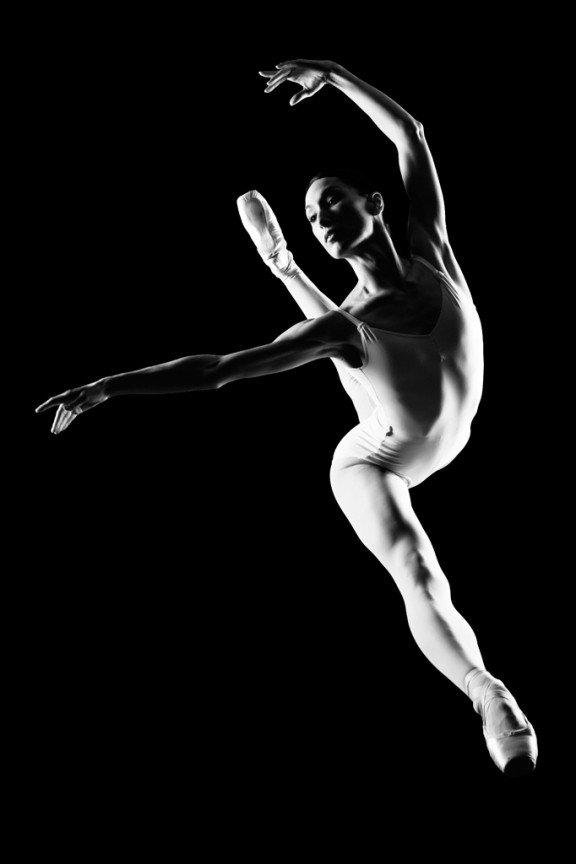
I learned to light after years of deconstructing the work of other photographers. And I know from your previous feedback that you guys are fond of these posts, so let’s dig into another one.
How did I make this picture?
Is it a lucky snapshot?
Is it lit?
If so, how?
The camera Settings?
The direction?
Post production?
Whatever details you think are needed to make this image.
Looking forward to you trying to pick this apart… I’ll reveal everything in a followup post. The person who gets the closest gets… …a chest bump and a pizza, or signed book or something. Don’t be shy. Let er rip.











2 soft boxes one on camera left and right, both are to the rear and slightly angled upwards to the dancer who is doing her move, shot mid air.
How did I make this picture? D3s 🙂
Is it a lucky snapshot? Not unless you happened to be at a ballet that had no other lighting than side.
Is it lit? Is this a trick question? Of course, it isn’t a black frame.
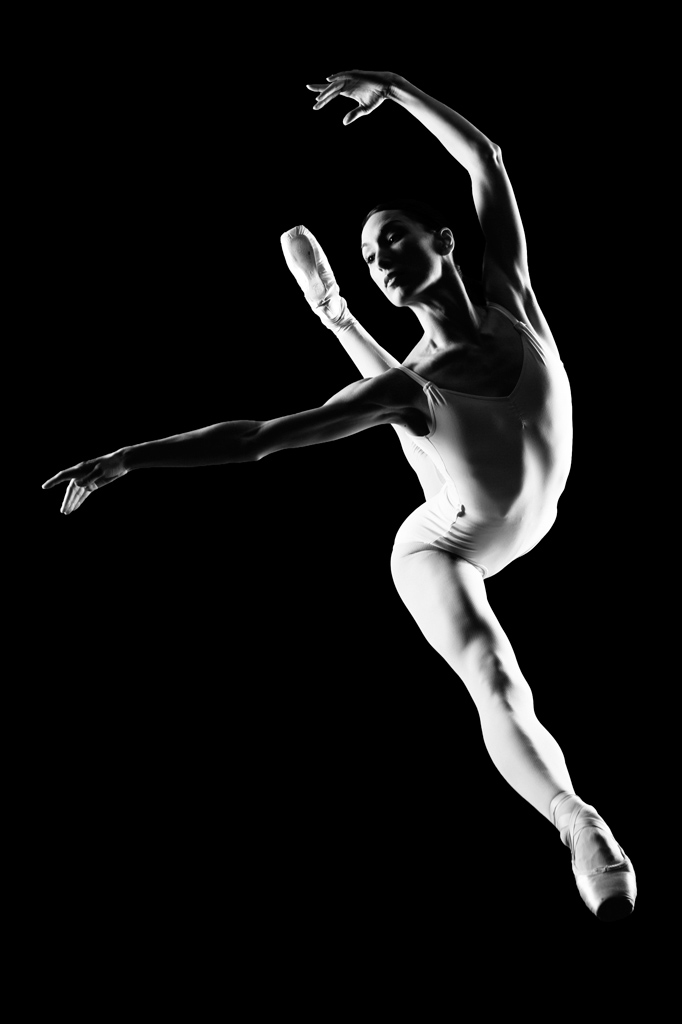
If so, how? L and R strip boxes with grids – slightly off axis to rear on both sides. Enough power to have a short flash duration so there is no movement in arms and legs.
The camera Settings? 85mm ISO100 1/250 f10
The direction? foot of stage shooting up or on floor laying down.
Post production? bring up blacks to be solid in levels, curves or blacks.
Whatever details you think are needed to make this image. Could be trampoline to make jumping repetitive easy.
How did I make this picture? Let’s play this like ‘Clue’. Chase, in the studio, with the Nikon D3S.
Is it a lucky snapshot? Absolutely not. Jumping shots aren’t lucky if they’re planned and you have a decent trigger finger.
Is it lit? Subject is lit, Background is not. I can’t imagine any stage lighting like this.
If so, how? 2 strip banks on either side of model (falloff indicates the lights are behind the model even), flagged to not hit BG. studio strobes to freeze motion and maintain good recycle time. broncolor?
The camera Settings? 1/250s f/8 ISO 200
The direction? Subject jumping out of frame to the right. Or are you talking about artistic direction? In which case just letting her do her thang and snapping the shots.
Post production? adjust black, sharpen, selective dodge/burn, levels, b&w (saturation)
Whatever details you think are needed to make this image. Truth be told, this could be done anywhere with dim ambient but I’d like to think it was in a studio. I wouldn’t imagine this taking more than 3-4 takes.
I think you lit the subject as follows:
The main light on camera left, parallel with the subject, either an umbrella or beauty dish pulled back to create a harder light, ( zoomed in the catchlights don’t look square enough to be a softbox). You also had a light powered down for fill camera right, but I think it was pulled back towards where the backdrop area would be so that you have more angles of light and shadow instead of wrap around.
Your shutter speed would have to be fairly high in order to freeze the motion, depending on your setup and lighting equipment I would say around 200 or 250, and aperture was fairly closed to get a deeper focal plane, the dancers foot is very in focus as well as her face, so it wouldn’t have been shallow. I’m thinking 11 or more and I think you used a 35mm lens to get slight distance to avoid distortion but still have the ability to frame her in without getting too far away.
I would imagine you worked a lot with the logistics of the shot to get the dancer in the exact position you wanted her to be in, you probably had her execute this move several times in order to frame her properly before you achieved the perfect shot, and you would have waited until she was at the peak of her movement just before she began her descent to hit your shutter button, that also helps ensure that composition, framing and movement are exactly where you want them to be:)
That’s all I got:)
Ok, now that I read some of the other comments she absolutely is being photographed from below a sheet of plexi glass! That’s amazing! Well done!
The subject looks cross lit with possibly a larger soft box or may be an octa bank on the left, a smaller soft box for a harder light on the right and it looks like there’s a little fill coming from the top way up high something with a grid spot pointed a her head and chest.
My guess would be f/16 or f/22 to black out the back ground completely unless it was done in post. The camera was positioned close to the ground (unless the subject was on a trampoline but that maybe taking it a bit too far).
Some contrast was added in post ,blacks were increased and the eyes were sharpened and slightly brightened to bring out the catchlights. .