Your portfolio is your single most important marketing tool. In a crowded digital world, a generic, template-driven website signals a lack of originality. It says you’re willing to fit into a pre-made box. For a serious creative professional trying to build a remarkable career, that’s a non-starter. You need a site that is as unique as your work, one that gives you total creative control without forcing you to become a full-time web developer. This is the exact problem that has plagued creatives for years: do you choose the simplicity but creative constraint of a template-based builder, or the power but technical headache of a platform that requires coding?
This is where Webflow enters the conversation. It’s a design and development platform built to bridge that gap, promising the power of code in a completely visual interface. It’s not just another drag-and-drop website builder. It’s a professional-grade tool that lets you build bespoke, production-quality websites from the ground up, visually. For photographers, designers, filmmakers, and other creative entrepreneurs who need to stand out, it demands a serious look. The real question isn’t just “what is it,” but whether it’s the right tool for you and your creative business.
What Is Webflow?
Webflow is a browser-based platform for visual web development. That description is intentional. It’s not just a “website builder” in the same category as Squarespace or Wix, and it’s not a traditional Content Management System (CMS) like WordPress. Instead, Webflow provides a visual canvas that writes clean, semantic HTML, CSS, and JavaScript as you design.
Think of it this way: instead of manipulating abstract code, you’re manipulating visual elements on a canvas. But unlike simpler builders that hide the underlying structure, Webflow exposes the fundamental properties of web design—things like the box model, flexbox, and grid—through a user interface. You are, in effect, coding visually. This gives you granular control over every element, every interaction, and every responsive breakpoint.
The platform is an all-in-one solution, much like choosing a complete software suite in the ongoing debate between platforms like Affinity and Adobe. It combines the design tool (like Figma or Sketch), the content management system (like WordPress), and the hosting infrastructure (like WP Engine or Kinsta) into a single, integrated environment. You design, build, launch, and manage your site all in one place. For more details on their specific offerings, you can visit the official Webflow site at https://webflow.com.
How Creative Professionals Can Use It
This is where it gets interesting. Webflow’s power isn’t just in its technology, but in how that technology can be leveraged to build and grow a creative business. It’s built for the kind of custom, visually rich experiences that define a strong creative brand.
Total Visual Control with the Box Model
If you have a background in graphic design, you already understand composition, hierarchy, and spacing. Webflow translates these concepts directly to the web. The platform is built around the “box model,” the fundamental principle of web design where every element on a page is a rectangular box.
Webflow gives you direct, visual control over every property of that box:
- Content: The text, image, or video inside the box.
- Padding: The space between the content and its border.
- Border: The line around the padding.
- Margin: The space outside the border, separating it from other elements.
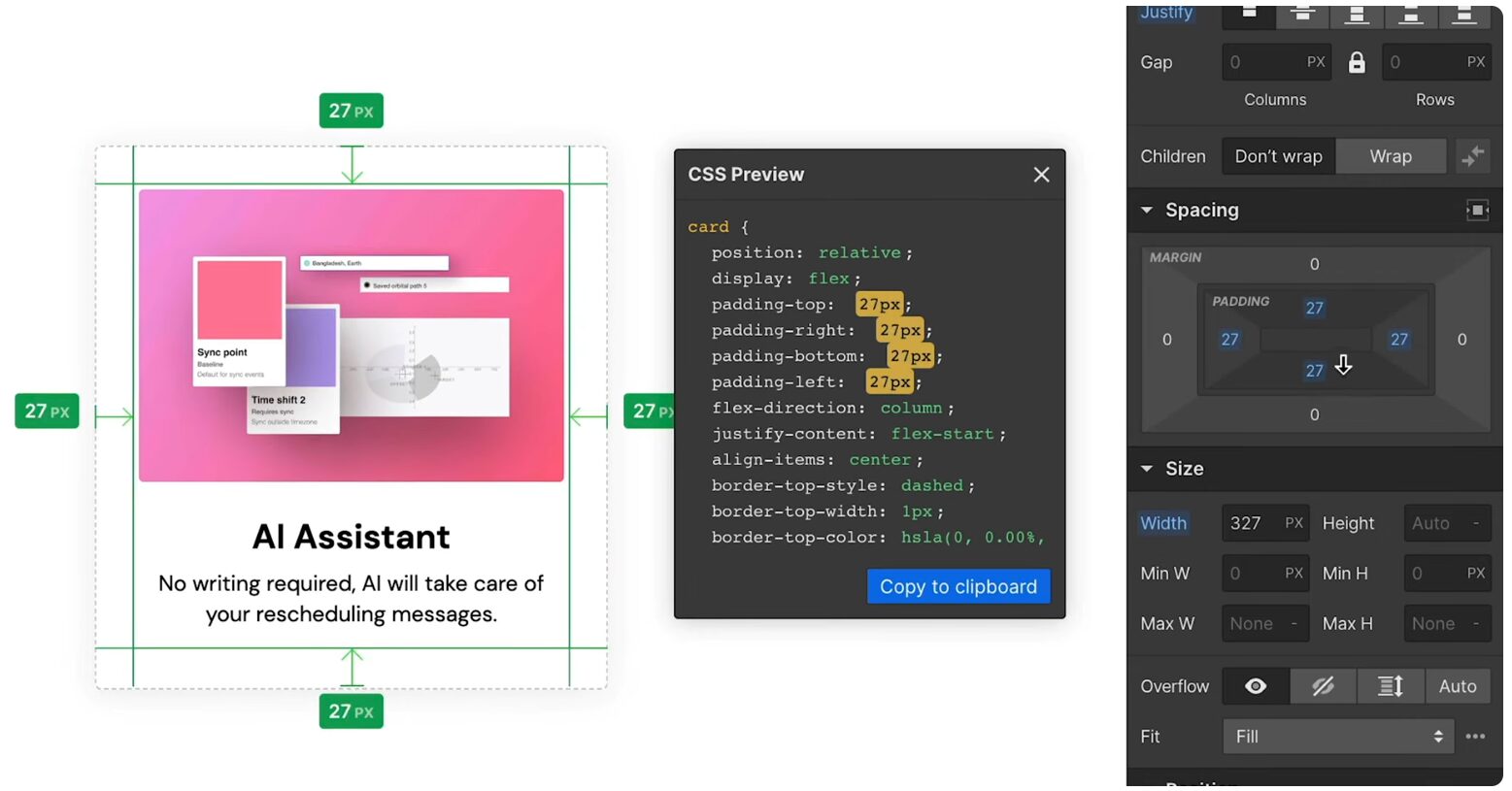
This isn’t a dumbed-down approximation. You’re not dragging elements into loose “strips” or “blocks.” You are setting precise pixel, REM, or viewport-based values for margin and padding, just as a developer would in a stylesheet. You can control element states (like hover, pressed, and focused) to design interactive buttons and links. You can build layouts using modern CSS tools like Flexbox and CSS Grid through a visual interface, allowing you to create complex, asymmetrical, and responsive layouts that are simply impossible in most template-based builders.
Building Uniquely Custom Portfolios with the CMS
A creative professional’s portfolio is a living thing. You’re constantly adding new projects, updating case studies, and refining your presentation. This is where the Webflow CMS (Content Management System) becomes a game-changer.
Instead of creating a static page for each portfolio piece, you design a “template” for a project. You define the structure: a project needs a title, a main image, a gallery of supporting images, a text description, a client name, and the date. You design this template once, laying out exactly how all those elements should look on the page.
From then on, adding a new project is as simple as filling out a form in the Webflow Editor. You upload the images, paste in the text, and hit publish. Webflow automatically flows that content into your pre-designed template, creating a new, perfectly formatted page. This separates the design of your site from the content within it, which is critical for long-term scalability and ease of use. You can have collections for anything: blog posts, case studies, testimonials, services, or team members.
Advanced Animations and Interactions
One of Webflow’s signature features is its Interactions panel. This is a powerful, timeline-based tool that allows you to create complex animations and micro-interactions without writing a single line of JavaScript.
For creatives, this is a massive opportunity to bring a site to life and guide the user experience. You can build animations triggered by specific user actions:
- Scroll-based triggers: Create parallax effects, reveal elements as the user scrolls down the page, or animate progress bars.
- Mouse movement: Design elements that react to the user’s cursor position for a more immersive feel.
- Element triggers: Animate dropdowns, create custom hover effects on images, or build multi-step form reveals.
These aren’t canned, pre-built effects. You have full control over the timing, easing, and properties of each animation. You can animate size, position, color, opacity, rotation, and more. This level of control allows you to craft a user experience that feels intentional and aligned with your brand, rather than being limited to the generic fade-ins and slide-ins of simple builders. Stepping outside your comfort zone and mastering these tools is key to true creativity and fulfillment. For a deeper dive into this mindset, check out this free chapter from Chase Jarvis’ book “Never Play It Safe,” which explores why daring to push boundaries is essential. The link is: https://mailchi.mp/chasejarvis/npis-free-chapter.
E-commerce for Selling Your Work
Webflow also offers a built-in Ecommerce platform, which is a solid option for creatives looking to sell products directly. This is ideal for photographers selling prints, designers selling digital assets like fonts or templates, or artists selling merchandise.
The e-commerce functionality is fully integrated with the rest of the platform. You design your product pages, checkout flow, and transactional emails with the same visual designer you use for the rest of your site. This means your store will feel completely seamless with your brand, not like a bolted-on third-party solution.
While it may not have the sheer volume of apps and extensions as a dedicated platform like Shopify, it provides all the core functionality needed for many creative businesses: physical products, digital products, inventory management, custom checkout flows, and integration with Stripe and PayPal.
Client Work and Project Handoff
For creative professionals who also build websites for clients (like graphic designers expanding their services), Webflow presents a powerful business case. You can design and build a completely custom site without needing to hire a developer or wrestle with a clunky WordPress backend.
The handoff process is especially clean. Webflow’s “Editor” mode provides clients with a simplified interface. They can log in directly to the live site and change text, swap out images, and add new CMS items (like blog posts or portfolio projects) without ever seeing the main Designer interface. This is crucial because it prevents clients from accidentally breaking the design you so carefully crafted. You can even specify exactly which elements on a page are editable. This provides a professional and safe way to hand over a site, positioning you as a more capable and trustworthy partner.
Summary
So, what’s the bottom line?
Webflow is for the creative professional who values design independence and is willing to invest a bit of time to achieve it. It’s for the photographer who is tired of their portfolio looking like everyone else’s. It’s for the designer who wants to build pixel-perfect websites without writing code—a stark contrast to emerging trends in manual development like “vibe coding,” which focuses on the developer’s intuitive process. It’s for the creative entrepreneur who needs a scalable platform to build a sustainable creative business in one seamless package.
It is not for someone who wants the absolute fastest, easiest, five-minute solution. The learning curve is steeper than a template-based builder because it’s a more powerful tool. You need to understand basic web principles like the box model to use it effectively. It’s also not for those who rely on a massive ecosystem of third-party plugins for niche functionality, which is a strength of the WordPress ecosystem.
Webflow occupies a unique and powerful middle ground. It offers the design freedom of custom development with the efficiency of a visual tool. For the creative professional ready to build a web presence that truly reflects the quality of their work, it is arguably the best platform on the market today. Building a business around your creative skills is about choosing the right tools and building the right systems.
PS – If you’re serious about taking that next step, consider signing up for the Seven Levers For Life, a free 7-day email course on freedom, creativity, and building a life you love. You can sign up here: https://mailchi.mp/chasejarvis/seven-levers-signup.