


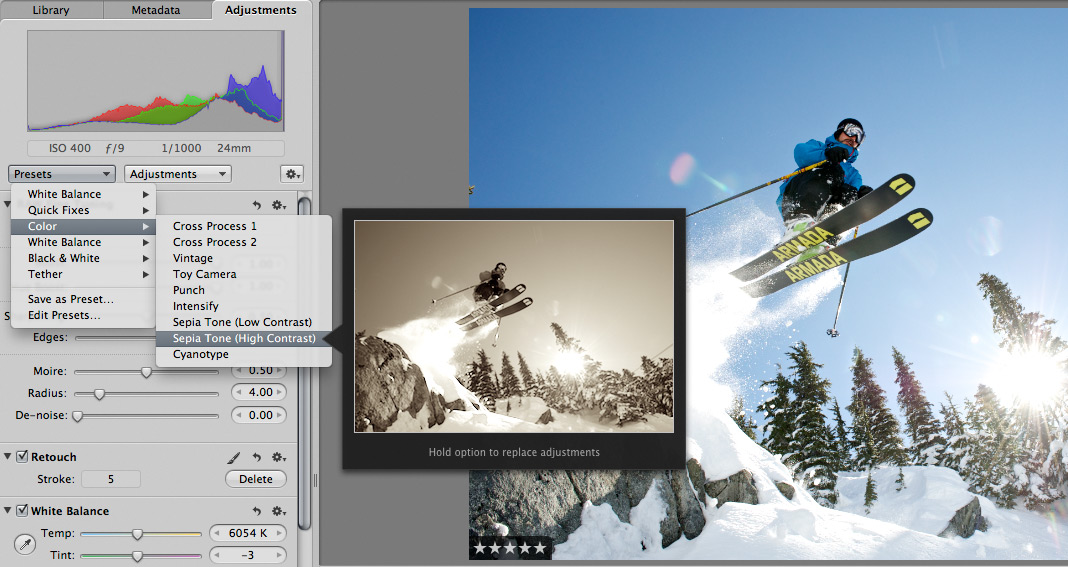
 Scott here. Many of you know that I’m the primary retoucher here around the Chase Jarvis studio. I was surprised to get into a fairly spirited debate the other day with some of my co-workers. The topic? Adjustment presets and plug-ins in Aperture or Lightroom or Photoshop.
I’ve got a strong opinion on this, but this experience has once again reminded me that there are a thousand ways to skin a cat and that my way is just that, my way.
Instead of letting a debate rage inside the office and then fade out, I figured, why not make it public? I want to hear from you.
Do you use presets for the post production of your images?
Do you make your own, or download them from other users online?
Do you use them for initial inspiration, or to create your final files?
What are your favorites and why?
I’m interested to hear your thoughts in the comments below. Don’t be shy. For those of you who give a rip, I’ll follow up this post with my personal take and we’ll all be a little more informed.











I do not own PS (too expensive for me). and only use Aperture with Nik plugins. I downloaded a lot of presets but I don’t use them a lot. I use the buitl-in W&B ones but that’s all.
I created some for RAW import but most of the time I remove them from the picture before post processing.
I will never buy a preset pack
Personally, I use presets constantly for starting points, edit them to my liking and create a new ones. I put them in the same category as fonts, stock vectors, or music samples. You try your best to come up with something that’s 100% yours, but when you’re stuck creatively and that deadline is getting closer then, on occasion, you turn to the “the dark side”. Sometimes even the most creative people need help 😉
No, I never really use them, since I believe that everyone can use them with ease and my style ( if you wanna call post “style”) gets lost in them….. though I look at them, its a good way to gather ideas and inspiration… So to answer the question, no I dont use presets at all…
But to create presets is also an option… I never did it though.. cheers from vienna
I don’t like presets. I have PS actions but all of them are pretty much geared toward making skin retouching faster/easier. Why use an action or preset on your work that anyone else can use?
I do a lot of motorsports photography, and use presets a lot based on weather conditions. I have presets that work for sunny, cloudy, clear, etc, and use those as starting point in my editing that reflect my style. I’ll go through each individual photo after applying a preset and tweak each one for cropping, exposure, and minor color correction.