


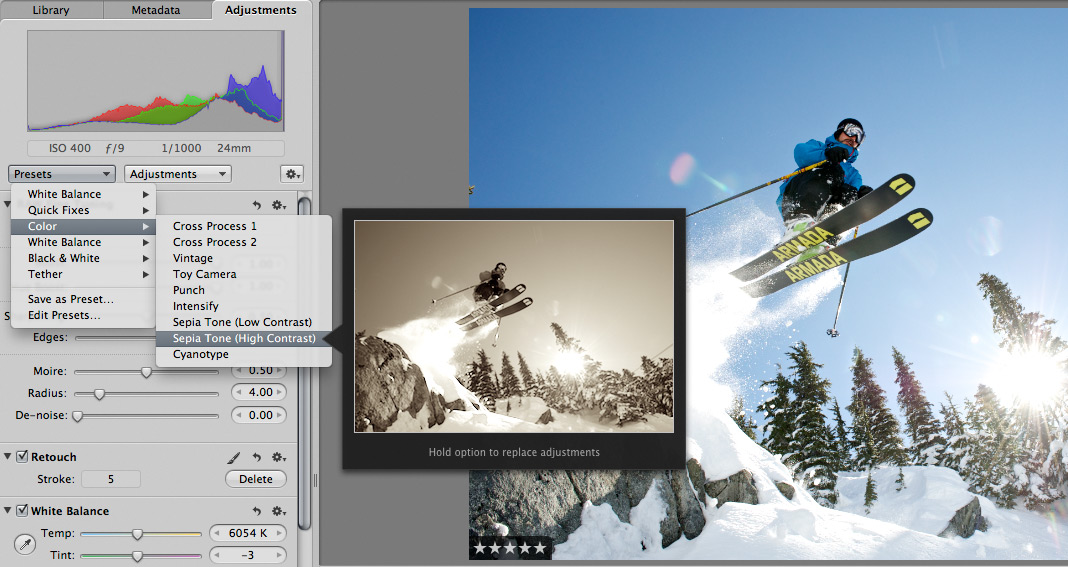
 Scott here. Many of you know that I’m the primary retoucher here around the Chase Jarvis studio. I was surprised to get into a fairly spirited debate the other day with some of my co-workers. The topic? Adjustment presets and plug-ins in Aperture or Lightroom or Photoshop.
I’ve got a strong opinion on this, but this experience has once again reminded me that there are a thousand ways to skin a cat and that my way is just that, my way.
Instead of letting a debate rage inside the office and then fade out, I figured, why not make it public? I want to hear from you.
Do you use presets for the post production of your images?
Do you make your own, or download them from other users online?
Do you use them for initial inspiration, or to create your final files?
What are your favorites and why?
I’m interested to hear your thoughts in the comments below. Don’t be shy. For those of you who give a rip, I’ll follow up this post with my personal take and we’ll all be a little more informed.










One of my favorite moves is to start with a specific preset (I’m not saying which one), and then I make one very specific adjustment (again, not saying which one), and that’s how I get my secret sauce. Maybe, I could just take the preset, make the adjustment once, and make it my own preset, but thus far I haven’t. As far as using the presets, I typically find them as good starting points for playing, but I never use them straight up.
Do you use presets for the post production of your images?
I do use presets for the post production of my images. Personally I use it as starting point and adjust from there. But I don’t use them for all of my images.
Do you make your own, or download them from other users online?
I do both.
Do you use them for initial inspiration, or to create your final files?
I use presets as the starting point, build from there, and let my initial vision for the photograph dictate the final files.
What are your favorites and why?
I like using Nik Software’s Efex presents for lightroom and Kubota Presents. I like those two the best because they provide a wide variety of presets. Also both companies make it very easy to incorporate into the workflow.
I’m a wedding photographer, so my process may be a bit different than what y’all are used to.
After culling my images, I send the .NEFs to Colorati in Carlsbad, CA via Next Day UPS. In 5 business days I have a .zipped email with level and color-corrected .XMPs to my specification.
After that, a batch process that I’ve built to work with the level and color-corrected files gets run. The batch consists of customized versions of:
Boutwell Magic Glasses from Totally Rad Actions (sharpening)
Exposure 3 by Alien Skin (film simulation)
Contrast adjustment
Daily Multi-Vitamin by Kubota (color and contrast boost)
It’s the look I like for my vision in a wedding context. It took hours and hours of trial an error with each component of the mix, but it saves me MASSIVE amounts of time to consistently create the look I’m known for. As such, I’m a big fan.
I start with OnOne presets that I like but I’m not married to them. I find each image needs a little something different, and there is a BIG bag of tricks. 🙂
I make my own presets based on the type of job as a starting point and then adjust per client/job/image.