


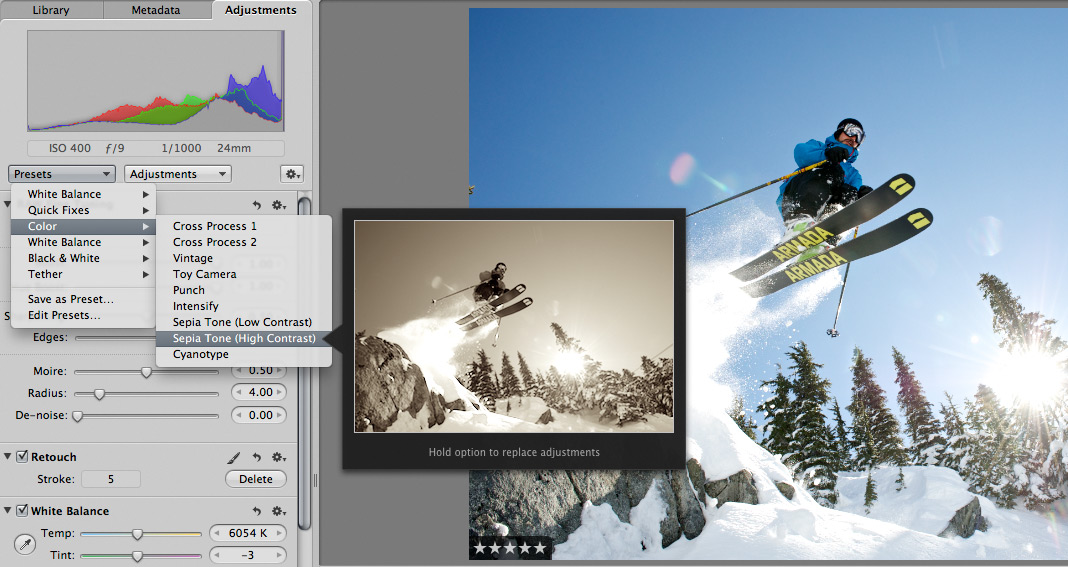
 Scott here. Many of you know that I’m the primary retoucher here around the Chase Jarvis studio. I was surprised to get into a fairly spirited debate the other day with some of my co-workers. The topic? Adjustment presets and plug-ins in Aperture or Lightroom or Photoshop.
I’ve got a strong opinion on this, but this experience has once again reminded me that there are a thousand ways to skin a cat and that my way is just that, my way.
Instead of letting a debate rage inside the office and then fade out, I figured, why not make it public? I want to hear from you.
Do you use presets for the post production of your images?
Do you make your own, or download them from other users online?
Do you use them for initial inspiration, or to create your final files?
What are your favorites and why?
I’m interested to hear your thoughts in the comments below. Don’t be shy. For those of you who give a rip, I’ll follow up this post with my personal take and we’ll all be a little more informed.










I think presets often are a good starting point, especially for black&white, cinematic style and sometimes even HDR. Hierher every image you shoot is a whole new story so in my opinion it’s best to always make modifications on your own and also never be afraid to work entirely from scratch if none of your presets is able to achieve the look you’re after.
I have a bunch of Lightroom presets that I use as starting points for retouching. Sometimes the preset works perfectly, but, more often than not, the image requires additional tweaking to get the right look.
Many of my presets are downloaded/purchased from 3rd party sites. I rarely use them as-is though. I’ll use them to figure out how different looks are achieved, and then I’ll roll my own based on how I shoot and retouch images.
I use LR presets at my salaried job because I have to shoot dozens of products that goes on the company’s eCommerce sites -consistency and speed are important.
My freelance gigs are another story since each image is unique in itself. Every image gets personalized attention. The most I’d do is “Lift and stamp” or “Sync” settings (mostly contrast, saturation, and vibrance) to process proofs for the client.
I don’t use presets. I approach each edit uniquely. I know my own post processing basic recipe in my head that I use for a starting point but from there I let the image take me where it needs to go. I am not anti preset but I just feel like if I depend on them, they will become a crutch.
I make my own presets with basic adjustments like contrast, definition and raw processing settings. Then each picture gets its own adjustments. Never made picture just by aplying a preset to it. Best use of them is to store your favorite edits and speed up editing.