

The landscape of AI-driven video has exploded. What was a weird creative experiment just a couple of years ago is now a full-blown industrial sector. The conversation is no longer about the novelty of generating pixels from a text prompt; it’s about production-grade workflows. For creative professionals, the question has shifted from “Can AI make a video?” to “How can I control AI video and integrate it into a real, professional pipeline?”
This is a critical distinction. The market is fragmenting, with different platforms solving different problems. OpenAI’s Sora 2 is targeting deep integration with giants like Adobe and Microsoft, making it an enterprise and editorial workhorse. Google’s Veo 3 is built for enterprise-scale prompt adherence. On the other side of the globe, models like Kuaishou’s Kling are winning on price, while Alibaba’s Wan is a game-changer for VFX artists with its open-source architecture and native transparency.
Amidst this chaos, Runway has carved out a specific and powerful niche. While others chase pure realism or mass-market accessibility, Runway is building tools for the director, the VFX artist, and the 3D generalist. It’s a platform built on the principle of creative control, aiming to give the human operator a steering wheel, not just a suggestion box. For any creative who wants to do more than just roll the dice on a prompt, understanding what Runway brings to the table is non-negotiable.
What Exactly is Runway AI?
Runway is a web-based creative suite that uses artificial intelligence to offer a wide array of “magic tools” for video and content creation. While it includes features like background removal, motion tracking, and generative audio, its flagship product is the Gen series of AI video models. The current iteration, Gen-4, represents the company’s core focus: turning AI video generation from a passive act into an interactive, controllable process.
Unlike platforms that function as a black box—where you type a prompt and hope for the best—Runway is designed to be a component within a larger creative workflow. It’s built for the professional who doesn’t just want to create a final clip from a single prompt, but who needs to generate specific visual elements, control camera motion with precision, and maintain character consistency across multiple shots.
Think of it less as a simple “text-to-video generator” and more as a director’s toolkit. It’s for the creative who needs to dictate the terms of the shot, not just suggest them. You can find their platform at runwayml.com.
How Can Creative Professionals Use It?
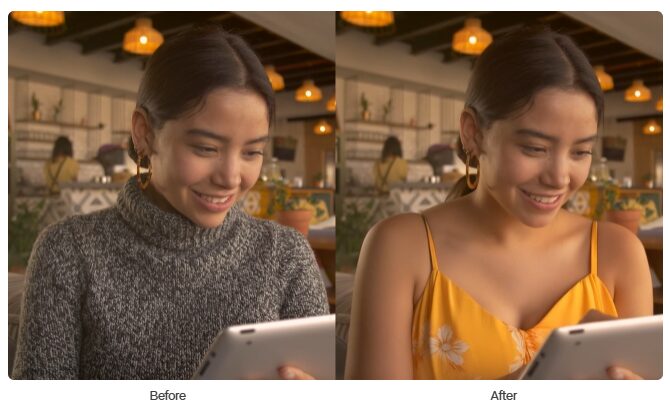
The real power of Runway isn’t just in its generation quality, but in the features that allow its output to be manipulated and integrated with other professional software. This is where it moves from a novelty to a utility.
Camera Data Export: The 3D Workflow Game-Changer
This is arguably the single most important feature for any professional working in a hybrid 2D/3D environment. When Runway’s Gen-4 model generates a video clip, it has to create a virtual camera move to produce the shot. Whether it’s a pan, a dolly, or a complex orbital track, that camera data exists within the model. Runway allows you to export this camera tracking data as a JSON or FBX file.
For anyone working in post-production, this is a massive breakthrough. Here’s a practical workflow:
- Generate a dynamic video clip in Runway (e.g., a drone shot flying through a generated cityscape).
- Export the FBX camera data from that generation.
- Import both the video clip and the FBX file into your 3D software of choice, like Blender, Cinema 4D, or a compositing application like Adobe After Effects.
The camera in your 3D scene will now move in perfect synchronization with the camera from the AI-generated footage. This solves one of the biggest headaches of working with AI video: trying to match 3D elements to the unstable, often unpredictable perspective of a generated shot. Now, you can perfectly track and composite 3D text, motion graphics, user interface elements, or character models directly into your Runway footage. This “reverse pipeline,” where the AI dictates the camera move for your 3D software, is a powerful new workflow that bridges the gap between generation and professional compositing.
Creating Consistent Characters
Character consistency has been a major hurdle in AI video. You generate a great shot of a character, but in the next prompt, they look like a completely different person. Runway’s Gen-4 directly addresses this with its “Consistent Character” tools.
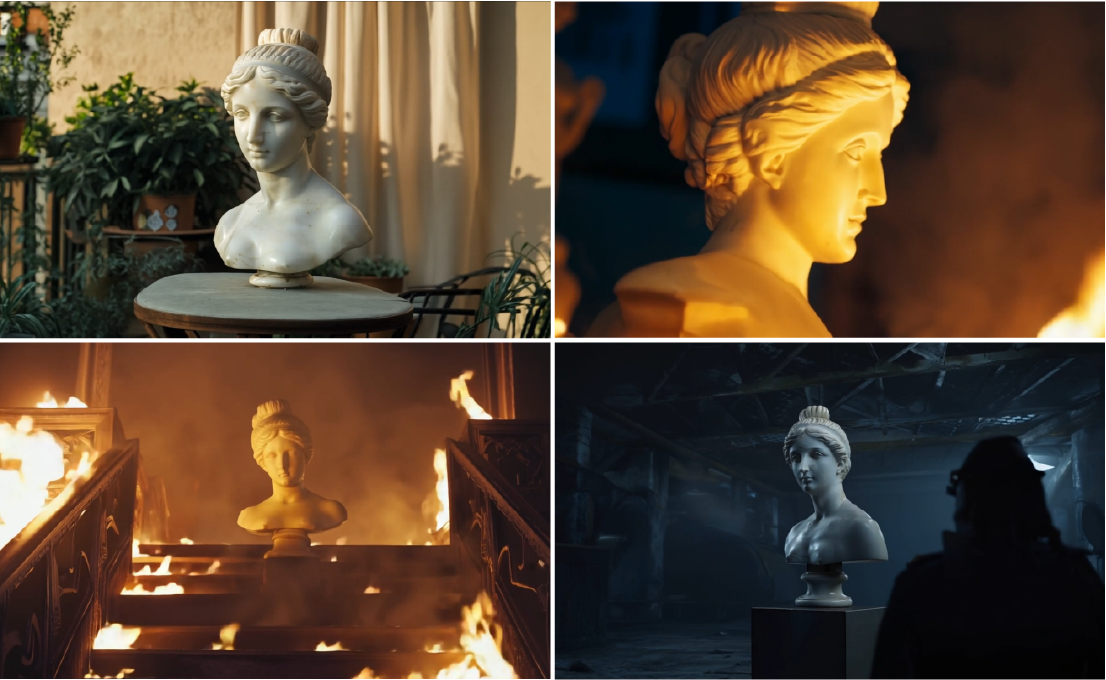
The workflow allows you to upload a reference image of a character—either a real person or a generated persona—and use it as a driver for new video generations. The model will maintain the core identity of that character, including facial structure, hair, and clothing, across a variety of new scenes, angles, and lighting conditions.
This is further enhanced by “Act-One,” a tool that can transfer the performance or motion from a source video to your generated character, an approach also being pioneered by competitors like Higgsfield AI. This combination gives you a suite of tools for character-driven storytelling that is far more reliable than prompting alone. You’re no longer just describing an action; you’re directing a consistent digital actor.
The Core Generation Toolkit
Beyond these advanced features, Runway provides a robust set of core tools that creative professionals expect.
- Text-to-Video: The foundational tool where you generate video from a descriptive prompt.
- Image-to-Video: Bring a static image to life by providing a source image to guide the generation. This is particularly useful for animators and concept artists.
- Video-to-Video: Apply a style or effect to an existing video clip, transforming its aesthetic while retaining the original motion.
- Motion Brush: A feature that allows you to “paint” motion onto specific areas of a static image, giving you granular control over what parts of the frame come to life.
Limitations and Professional Constraints
No tool is perfect, and it’s critical to understand Runway’s limitations in a professional context.
- Duration Limit: Gen-4 generations are capped at 16 seconds. This is a hard limit. For creating anything longer than a short clip, you will need to generate multiple shots and stitch them together in a non-linear editor like Adobe Premiere Pro or DaVinci Resolve. This makes it excellent for B-roll, establishing shots, or specific visual effects, but less ideal for generating long, continuous narrative takes.
- Resolution: The current maximum resolution is 1080p. While serviceable for many web and social applications, this may be a limitation for projects requiring 4K or higher-resolution deliverables.
- No Native Alpha Channel: Unlike a specialized model like Alibaba’s Wan Alpha, Runway does not generate video with a native transparent background. If you’re generating an element like smoke, fire, or a character that needs to be composited over other footage, you’ll need to use Runway’s background removal tool or other rotoscoping/keying methods after the fact, which adds a step to the workflow.
Is Runway AI Right for You?
Runway has made a clear choice: it’s the AI video platform for the creative professional who values control. It isn’t trying to be the cheapest, the most photorealistic, or the easiest one-click solution. It is positioning itself as an essential component in a modern digital artist’s toolkit.
You should seriously consider integrating Runway into your workflow if:
- You are a director, 3D generalist, or VFX artist whose work involves combining generated footage with elements from other professional software like After Effects, Blender, or Cinema 4D. The camera data export feature alone makes it indispensable for this kind of work.
- Your projects are character-driven, and you need a reliable way to maintain a character’s appearance across multiple shots and scenes.
- You prioritize director-level control over camera movement, character performance, and motion effects more than generating a 30-second continuous clip in a single go.
You may want to look at alternatives if:
- Your primary need is generating VFX assets with perfect transparency for compositing. Alibaba’s Wan Alpha is the undisputed leader in this specific area.
- You need to generate long, coherent scenes with multiple cuts in a single prompt. ByteDance’s Seedance (powering apps like VEED) is specifically built for this kind of multi-shot storytelling.
- Your workflow is entirely based within Adobe Premiere Pro and you need the most seamless NLE integration for generating B-roll on your timeline. OpenAI’s Sora 2 is built for this tight integration.
- Your main concern is budget, and you need to generate a high volume of clips for the lowest possible cost. While free options like Meta AI are compelling, a subscription-based model like Kuaishou’s Kling offers significantly more output for your money.
The era of using a single tool for everything is over. The modern creative professional is an orchestrator, pulling from the best platforms to suit the specific task at hand. For any task that requires you to bridge the gap between AI generation and a 3D or compositing pipeline, Runway isn’t just an option—it’s building the essential workflow.
















