Your online presence is your most critical business asset. The debate of how to build it often boils down to two heavyweights: Squarespace and Webflow. Both are dominant forces in the web design space, but they represent fundamentally different philosophies and are built for different types of creative professionals. This isn’t a simple question of which one is “better.”
That’s the wrong frame. The right question is: which platform is the superior tool for your specific creative workflow, your technical comfort level, and your long-term business ambitions?
This guide cuts through the marketing jargon and feature-list noise. It’s a direct, unvarnished comparison from the perspective of a working creative professional. We’ll dissect what matters, what doesn’t, and where each platform gives you leverage—or where it gets in your way. This is about helping you make a decisive choice so you can get back to the work that actually matters.
The Basics: Squarespace vs Webflow
Understanding the core purpose of each platform is the first step. They may both produce websites, but they get there via entirely different routes.
What is Squarespace?
Squarespace is a polished, all-in-one website builder. Think of it as a beautifully designed, self-contained ecosystem. It provides award-winning templates, intuitive drag-and-drop editing tools, integrated e-commerce, marketing features, hosting, domains, and customer support, all under one roof. Its core value proposition is simplicity and speed. The entire system is engineered to help you create a professional, aesthetically pleasing website with minimal technical friction. You aren’t building from the ground up; you are customizing a high-quality foundation.
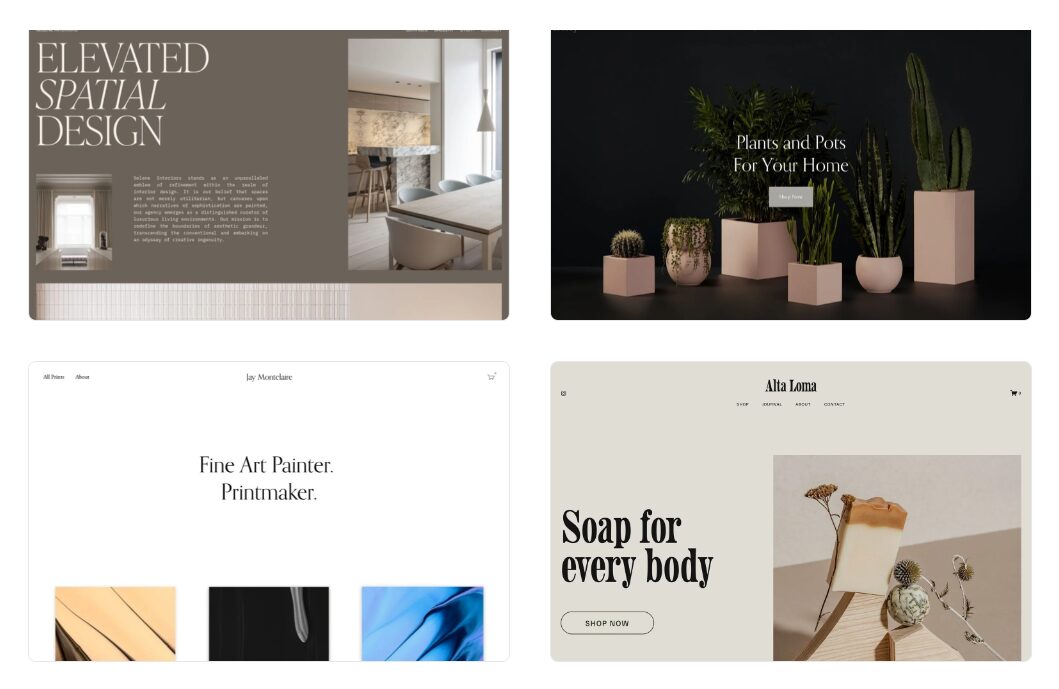
Website templates on SquareSpace
For a creative professional, this means you can get a stunning portfolio or a simple online store live in a matter of hours or days, not weeks. You work within a set of well-defined boundaries that ensure the final product looks clean and works flawlessly on all devices. You can learn more at the official Squarespace website.
What is Webflow?
Webflow is a professional visual development platform. This is a critical distinction. It’s not just a website “builder” in the traditional sense; it’s a tool that allows you to design and build production-ready websites visually, without manually writing code. It gives you direct access to the underlying principles of web design—HTML structure via the Navigator, CSS styling via the Style panel, and JavaScript interactions via the Interactions panel—all through a graphical interface.
Its core value proposition is total creative control. If you can design it in a tool like Figma, Adobe XD, or Sketch, you can build it in Webflow. This makes it a formidable platform for web designers, agencies, and any creative professional who refuses to be limited by a template. You are given a blank canvas and a professional-grade toolset to build exactly what you envision. You can see its full capabilities on the official Webflow website.
How Creative Professionals Can Use The Platforms
Your discipline dictates your needs. A photographer selling prints has different requirements than a brand designer building interactive case studies. Here’s how these platforms stack up in the areas that matter most to creatives.
Design and Customization: The Core Difference
This is the most significant point of departure between the two platforms. Your choice here hinges on a simple question: Do you want to customize a template or do you want to build from scratch?
Squarespace: The Template-Driven Approach
With Squarespace, you begin by selecting a template. These templates are meticulously designed and fully responsive. From there, you use their Fluid Engine, a grid-based drag-and-drop editor, to customize the layout, swap images, change fonts and colors, and add new sections.
- How to Make the Most of It: The key to a successful Squarespace site is choosing the right template from the start. Don’t pick a template for its photos or colors; analyze its underlying structure and layout capabilities. Use the Fluid Engine to create overlapping, dynamic layouts that defy the typical blocky feel of older builders. Focus your energy on high-quality assets—stunning photography, sharp video, and concise copy. Since the design framework is handled for you, your creative input on the assets themselves is what will make the site stand out.
- Who It’s For: Photographers, writers, artists, consultants, and small business owners who need a polished and professional online presence fast. If your goal is to showcase your work in a clean, elegant, and proven format without a steep learning curve, Squarespace is the efficient choice.
- Limitations: You are always working within the confines of the Squarespace ecosystem. You cannot fundamentally alter the structure of your template or add custom code in a way that truly changes core functionality. For designers who demand pixel-perfect control and a unique brand expression that breaks the mold, these constraints can be frustrating.
Webflow: The Blank Canvas Approach
Webflow offers the opposite experience. You start with a completely blank canvas. Instead of dragging and dropping pre-built sections, you build your site structurally, element by element. You add a div block, style it by applying CSS properties like padding, margin, and flexbox alignment, and build your layout from the ground up, just as a developer would by writing code.
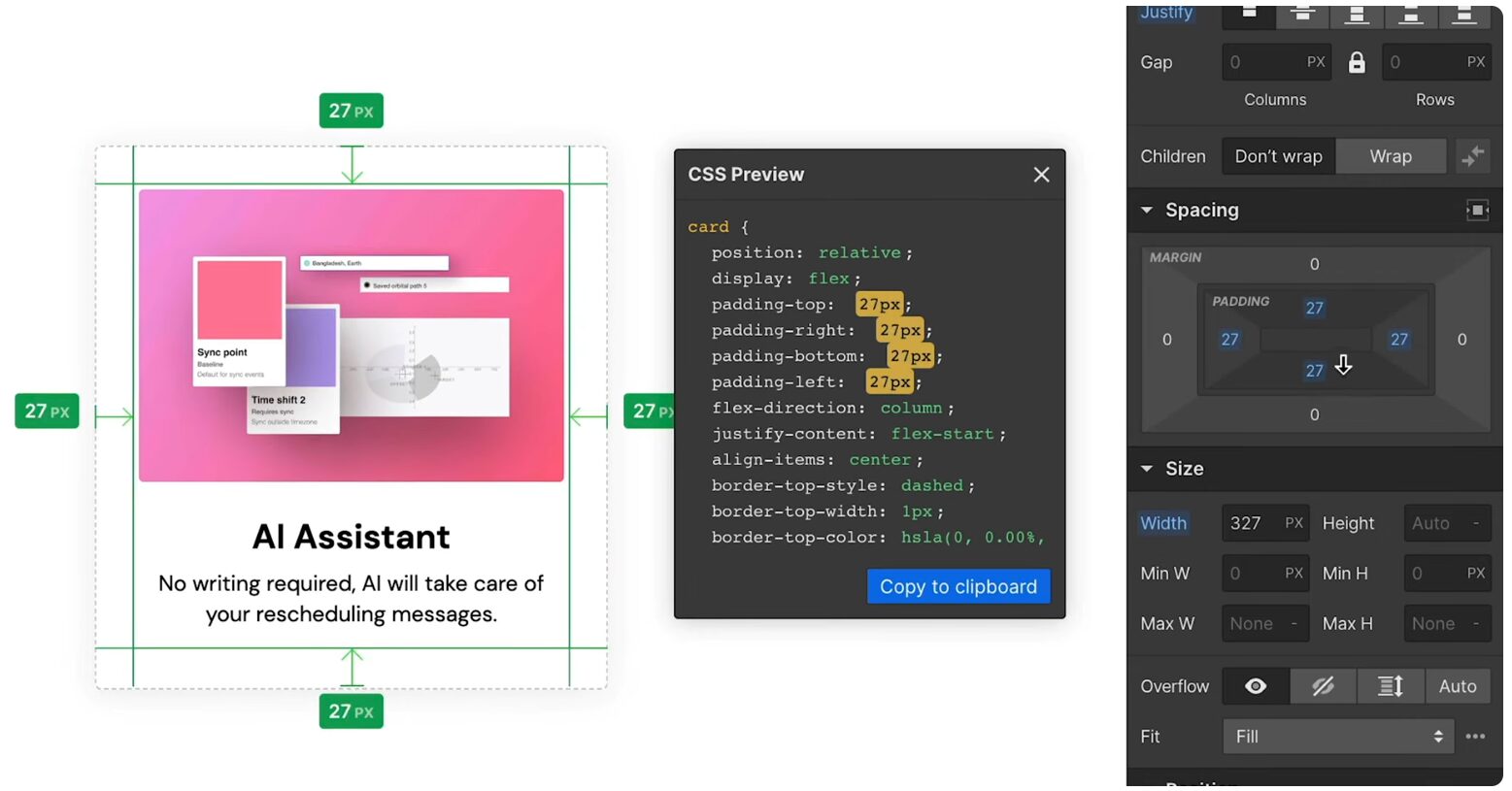
CSS styling via the Webflow style panel
- How to Make the Most of It: A successful Webflow project requires a design-first mindset. It’s best to have a clear wireframe or even a full design mockup from a tool like Figma before you start building. Leverage Webflow’s “Components” feature (formerly Symbols) to create reusable elements like navbars and footers for site-wide consistency. Dive deep into the Interactions panel to create sophisticated, timeline-based animations and micro-interactions that bring your design to life. This is Webflow’s superpower—use it to create a signature browsing experience that a template could never replicate.
- Who It’s For: Web designers, UX/UI designers, brand and digital agencies, and any creative who wants their website to be a showpiece of their craft. If you need to build a completely custom, interactive site for yourself or for clients, and you’re not afraid of a learning curve, Webflow provides unmatched creative freedom.
- Limitations: The freedom of Webflow comes at the cost of complexity. To use it effectively, you need a solid understanding of web design fundamentals, including the box model, responsive units (px, %, vh, em), and CSS properties like flexbox and grid. For someone just needing a simple portfolio, the toolset can be overkill and intimidating.
Content Management (CMS): Curating Your Work
Your work is your content. How you organize, display, and manage it is crucial for a successful portfolio or creative business website.
Squarespace CMS
The content management system in Squarespace is straightforward and effective for standard use cases. You have built-in collections for Blog Posts, Portfolio Projects, Events, and Products. You create a new item, fill in the predefined fields (title, image, body text, tags, categories), and Squarespace populates it into the correct page based on your template’s design. It’s reliable and easy for clients and non-technical users to manage.
The limitation is in its rigidity. You cannot create fully custom content types or establish complex relationships between different types of content. For example, creating a “Team Members” collection and linking each member to the specific “Projects” they worked on is not something Squarespace is built to handle elegantly.
Webflow CMS
This is where Webflow truly distinguishes itself as a professional tool. Its CMS is essentially a visual, user-friendly database. You can create your own custom “Collections” for any type of content you can imagine: Projects, Clients, Case Studies, Team Members, Job Openings, etc. For each Collection, you define the exact fields you need—plain text, rich text, images, video links, dates, colors, reference fields, and more.
The “Reference” and “Multi-Reference” fields are game-changers. They allow you to link items from different collections together. A designer could create a “Services” Collection and a “Case Studies” Collection, then link each case study to the specific services that were provided. This allows you to build sophisticated, dynamic, and interconnected websites that are easily managed by a client through the back-end “Editor.” It’s a system designed for building bespoke, content-rich digital experiences.
E-commerce for Creatives: Selling Your Wares
Whether you’re selling prints, fonts, digital courses, or client services, a seamless e-commerce experience is non-negotiable.
Squarespace Commerce
Squarespace offers one of the most streamlined and beautiful e-commerce platforms available. It’s built directly into the system, making it incredibly easy to set up and manage. It’s ideal for selling physical products, digital downloads, services, and even subscriptions. For a photographer wanting to sell prints in various sizes, a designer selling a book, or a consultant booking paid discovery calls, the system is robust and intuitive. The entire process, from product page to checkout, is cohesive and branded. It’s a closed system, which means less complexity but also fewer integrations with third-party payment gateways or niche fulfillment services.
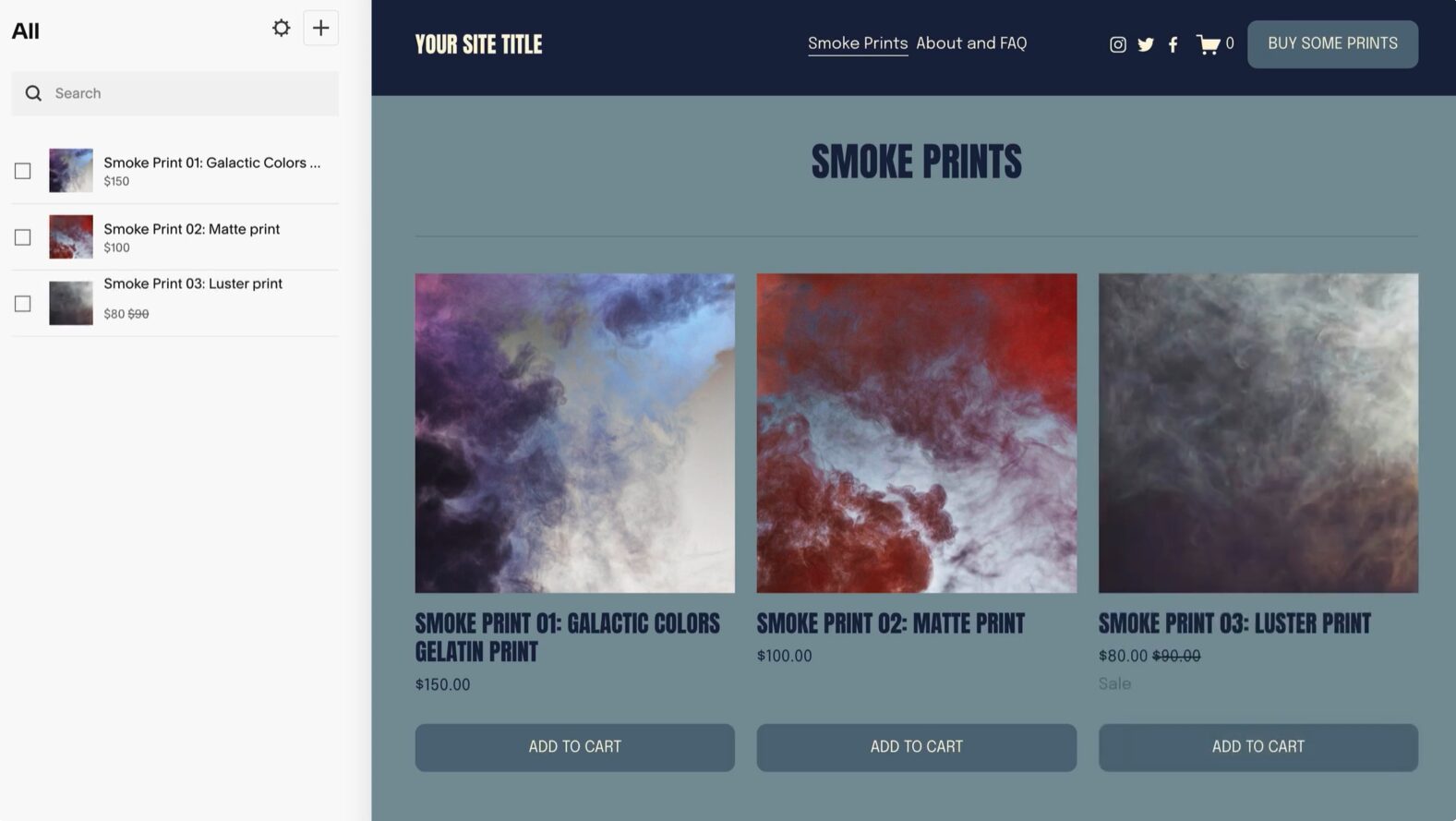
Squarespace E-commerce
Webflow E-commerce
Webflow E-commerce is also very powerful, but its primary advantage lies in the complete design control you have over the entire customer journey. You can design product grids, product pages, and checkout flows that are completely unique to your brand, full of the same rich interactions and animations you use on the rest of the site. This is a huge advantage for brands where the shopping experience itself is a key differentiator. The backend management is solid, but for creatives with extremely high-volume or complex inventory needs, some eventually opt to use Webflow for the front-end design and integrate it with a dedicated e-commerce backend like Shopify.
The Bottom Line: Which Platform is For You?
There is no single right answer, only the right tool for the job. Making the wrong choice means wasting your most valuable resources: time and creative energy. Be honest about your goals, your skills, and your priorities.
Choose Squarespace if…
- You are a photographer, writer, artist, or consultant whose main objective is to showcase your body of work in a beautiful, professional, and reliable format.
- You prioritize speed and simplicity over ultimate design control. Your time is better spent creating your art, not fine-tuning CSS properties.
- You want a true all-in-one solution that handles your blog, portfolio, and online store without you having to worry about separate hosting, plugins, or security updates.
- Your personal motto is “get it done and get back to creating.” The website is a means to an end—a clean, effective vessel for your work.
Choose Webflow if…
- You are a digital designer, brand strategist, or web design agency, and the website itself is a demonstration of your craft.
- You require absolute, pixel-perfect control and want to build sophisticated animations and micro-interactions that are impossible with a template-based system.
- You need to build complex, content-driven websites with a powerful and flexible CMS for yourself or for paying clients.
- You are willing to invest the necessary time to learn a professional-grade tool because the payoff is complete creative freedom and a more valuable service offering.
Ultimately, being a successful creative professional means being a ruthless strategist about your tools and your time. Fighting a platform that doesn’t align with your workflow is a losing proposition. The real challenge today isn’t just creating brilliant work; it’s building a sustainable system that amplifies your creativity and business.
Choosing the right platform is a foundational part of that system. If you’re serious about building a framework for success that extends beyond your website, the free 7-day email course Seven Levers For Life provides a roadmap for building a life you love around your creative work. For a powerful look at why moving beyond your comfort zone is essential for true growth, grab a free chapter from the book “Never Play It Safe.”