


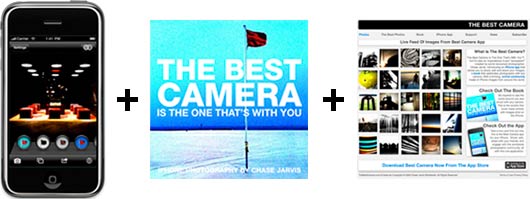
Today I’m really pumped to share with you the results of many months of hard work, a whole lotta fun, and–in many ways–a dream come true. It’s a trifecta of projects that I’ve just launched moments ago:
Introducing:
1. Best Camera = An iPhone photo app that allows you to shoot, add creative effects, and share your images more simply and powerfully than ever before. Virtually limitless creativity, and the ability to share photos directly from Best Camera to Facebook, Twitter, via email at a new iPhone photo sharing site, www.thebestcamera.com. I’ve poured all my experience into creating this app, and I’ve partnered with my ubersmart software developer friends, Ubermind, to bring you Best Camera. Read more and/or buy it from iTunes here.
2. The Best Camera Is The One That’s With You = A book of my iPhone photography from around the world. The first of its kind. It’s both a playful celebration of mobile photography and a serious artistic endeavor. It’s the production of my ideas and the way I see the world. It’s real and it’s RAW. I hope you dig it. Learn more and/or buy it here on preorder now – should be shipping this week.
3. www.thebestcamera.com = This is the hub of this ecosystem and a new photo community. It gives you the how-to videos for the app, the nuts and bolts of the book and is the support and feedback center. But most importantly, it’s a living, breathing feed of images from around the world created with Best Camera iPhone app. From within the app share your iPhone work here at the first photo community of its kind. Buy the app, login from your iPhone and join the revolution.
That’s right–you’re getting the picture–each of these elements is tied together with that goofy-but-strangely-sticky phrase I inadvertently coined rallied a while back, “The Best Camera Is The One That’s With You”. This is the first ecosystem–app, book, community–of its kind, and I’ve put a heckuva lot of work into creating it. I’m dying to know what you think.
A complete video tour, some informative links and a free, unlocked iPhone 3Gs after the jump… [click the ‘continue reading’ link below]—
If you buy the app, book, or both and like what you see and experience, please consider doing the following things:
a. Tell your friends. Unlike my commercial photography, this is entirely a community-based endeavor and it depends on your patronage and good will to succeed. If you believe in this, please spread the word.
b. Rate the app and the book at iTunes and Amazon or wherever you purchase. Being in your favor is in large part an indicator of how good of a job I’ve done in creating this ecosystem, and it tells those who aren’t in your immediate network what you think. I want it to be fun and I want it to be good and I want it to evolve. Your feedback matters.
c. Participate in the community. Snapping photos everyday with my iPhone changed my life. I am more in touch creatively now than ever before. It’s contagious in the very best way, from professional artists to my 63-year-old mother. Take pictures and share them. It can change the world.
And here’s some fun that might get your attention: On Monday Sept 28th, I’m choosing my favorite image that’s been created using Best Camera and posted to www.thebestcamera.com , and I’m giving away a brand new, unlocked iPhone 3Gs, loaded with the Best Camera app. That’s right. I look at your pictures, I like one, and then give you an unlocked iPhone 3Gs loaded with my app. Can’t wait to see your photos.
Here’s a video tour of the iPhone app Best Camera:
Lastly, lots more details and behind the scenes to come this week. Until then, some helpful links:
[Buy Best Camera app via iTunes.][Buy The Best Camera Is The One That’s With You via Amazon, Barnes & Noble, or Borders.][Visit www.thebestcamera.com, the hub that tells you more about the app, the book, and the community.][Visit the new iPhone portfolio on my website, created entirely using Best Camera.][Big thanks to the gentlemen of Mad Rad for their track on the video. Buy their beats on iTunes here.][And of course a huge thank you to my development partner Ubermind, and my book publisher Pearson/Peachpit. You guys/gals rock.]—
Get my every move: Follow Chase Jarvis on Twitter
Get exclusive content: Become a Fan on Facebook




Awesome Chase. Thanks for the great app. Spread the word to fellow iphoneographers.
@Brian Biggs You can use the e-mail sharing options to do an e-mail upload to Flickr.
@Chase good point… Sliders do just confuse the interface… What if you want LESS of a filter though? Like I want just a tiny bit of LIGHT, but not all of it? I guess you could combine LIGHT with something else… Maybe 2 LIGHTS and 1 DARK or something… I'll experiment around. Good point on the sliders though…
This app is ABSOLUTELY AWESOME! There's only 2 things I wish it had:
1) Ability to modify the STRENGTH of each filter applied. Maybe I only want a LITTLE bit of Light or Dark, etc etc… Maybe this can be done with sliders.
2) Ability to swipe to the next photo when browsing the bestcamera.com Recent or Popular photos. The way it is, you have to go back and then the recent photos refresh… Too fast sometimes.
Mind you, those things are very tiny and otherwise this is totally awesome!
Wow. This is an amazing idea! I have not been able to justify the expense of an iPhone, but now…