The first wave of AI image generation relied on simple text prompts—a linear process with unpredictable results. This was sufficient for experimentation, but professional workflows require repeatability, control, and scalability.
The industry is now moving toward node-based “intelligent canvases.” These platforms replace the black-box nature of simple prompting with visual programming. Instead of hoping for a lucky result, you build a visible pipeline where every step—from the initial model to the final color grade—is editable.
Two of the primary platforms in this space are Weavy (now Figma Weave) and Flora (FloraFauna). While they share a similar node-based architecture, they serve fundamentally different functions in a creative pipeline.
The Basics: Weavy and Flora Explained
Both applications use an infinite canvas where you connect “nodes” to create a workflow. A node can be an AI model (like Stable Diffusion or Gemini), a specific process (like “Mask Subject” or “Adjust Curves”), or a logic controller like routing it to node A or node B. Both do similar things, but their overall philosphy and target audience are a bit different.
Figma Weave (formerly Weavy)
Figma Weave is a node-based generative tool recently acquired by Figma. It’s designed to integrate AI generation directly into product design and professional asset production workflows. It offers granular control, allowing users to combine generative AI with deterministic image editing tools. It is effectively a bridge between a design tool and a developer environment, almost like “visual programming.”
Flora (FloraFauna)
Flora is a standalone creative operating system built for visual exploration and narrative development. It is less about building a highly-engineered pipeline and more about serving as a central hub for concept art, storyboarding, and media sequences. It emphasizes ease of use through pre-built templates and narrative-aware tools.
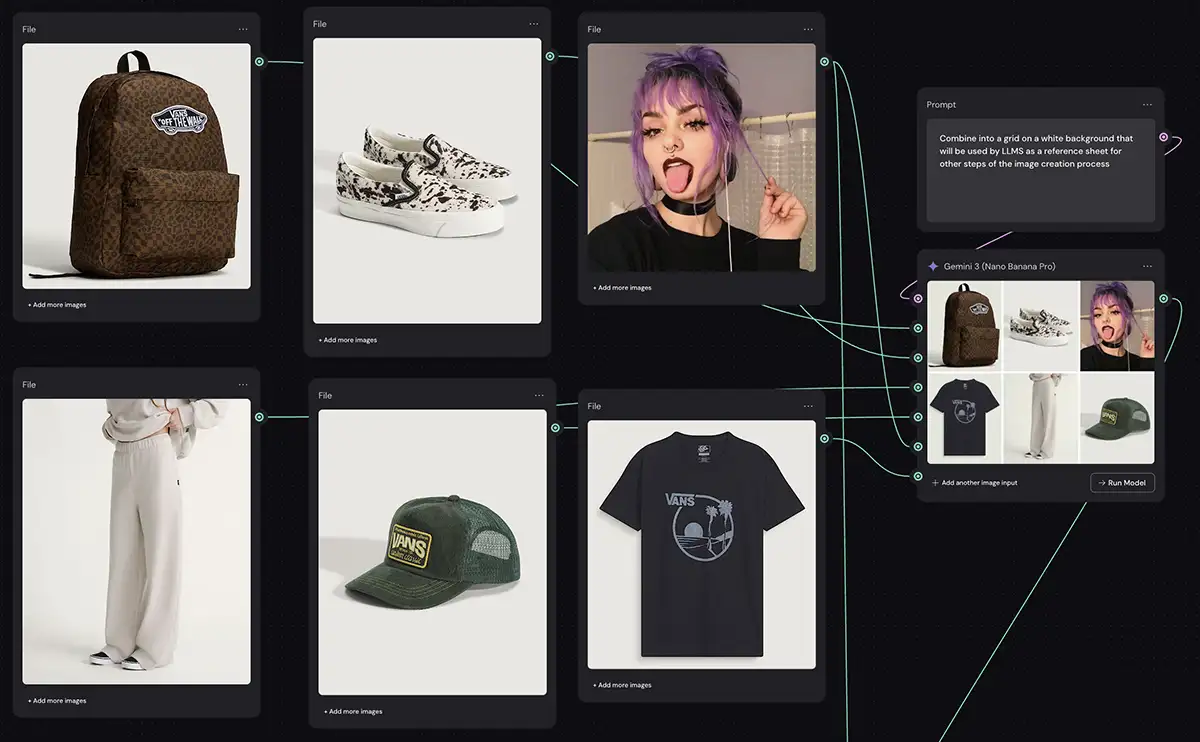
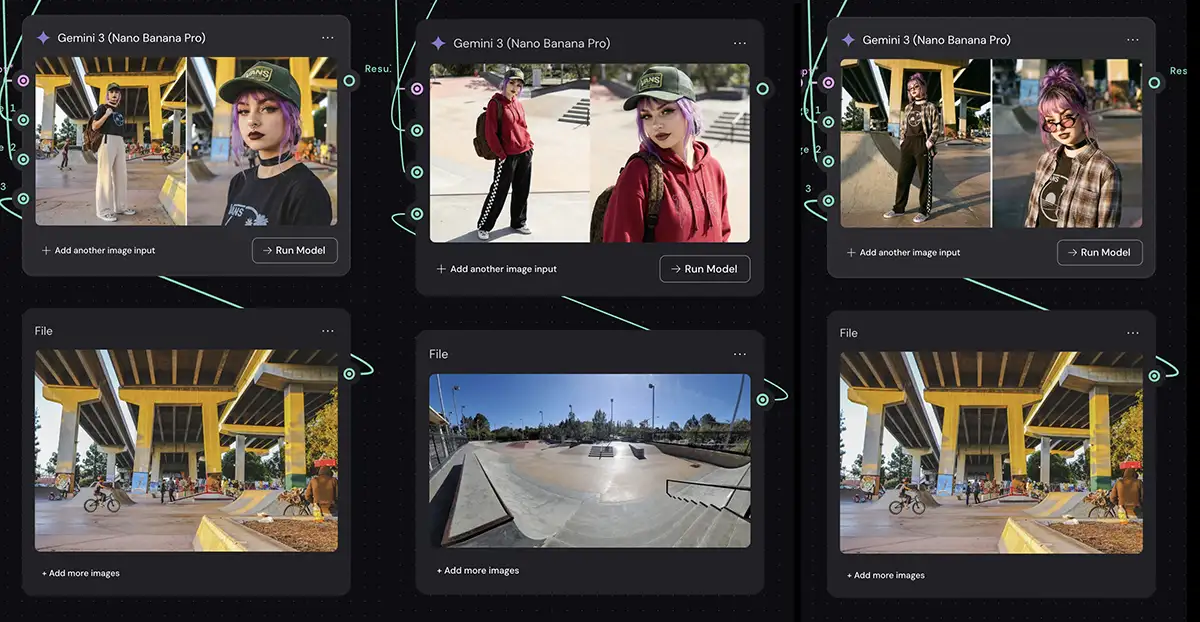
Set up a virtual product shoot in Weavy
Figma Weave: The Programmable Workflow
Weavy is an impressive node-based AI tool that got snapped up by Figma for a reason (now rebranded as Figma Weave). It’s the power user’s choice of the two, with more options and flexibility (for example the prompt concatenator, which allows you to assemble AI prompts from individual pieces of text). It’s not nearly as tough as ComfyUI, but it’s closer to that level of complexity that it is to, say, Canva.
That said, there’s a bit more of a learning curve vs Flora because it doesn’t hold your hand or give you much in terms of presets or guidance. That’s probably a good thing for most pros (who will want complete control and flexibility), but it may be intimidating for people who are new to this UI paradigm or aren’t naturally inclined to this kind of highly structured way.
Hybrid Compositing: Pixel-Perfect Control
This is where Weavy gets seriously powerful for professionals. Purely generative AI often gets you 90% of the way there, but that last 10% requires deterministic control. Weavy combines generative nodes (like running a Stable Diffusion or Flux model) with traditional compositing tools. You can run an image through a generative node, then pipe that output directly into a “Curves” or “Levels” node for color grading, and then apply a mask—all within the same visual pipeline. This hybrid approach gives you the best of both worlds: the limitless possibilities of AI synthesis and the pixel-perfect control of classic editing.
-
Technical Nodes: Weave includes nodes for Alpha Channels, Masking, Levels, and Curves that do the same things you’re used to in Photoshop.
-
Why it matters: You can run an image through a Flux generation node, then pipe that output directly into a “Color Balance” node to force the result to match a specific brand hex code. You aren’t asking an AI to “make it bluer”; you are mathematically adjusting the blue channel. You have the total control that’s often missing from AI.
Logic, Arrays, and Iterators
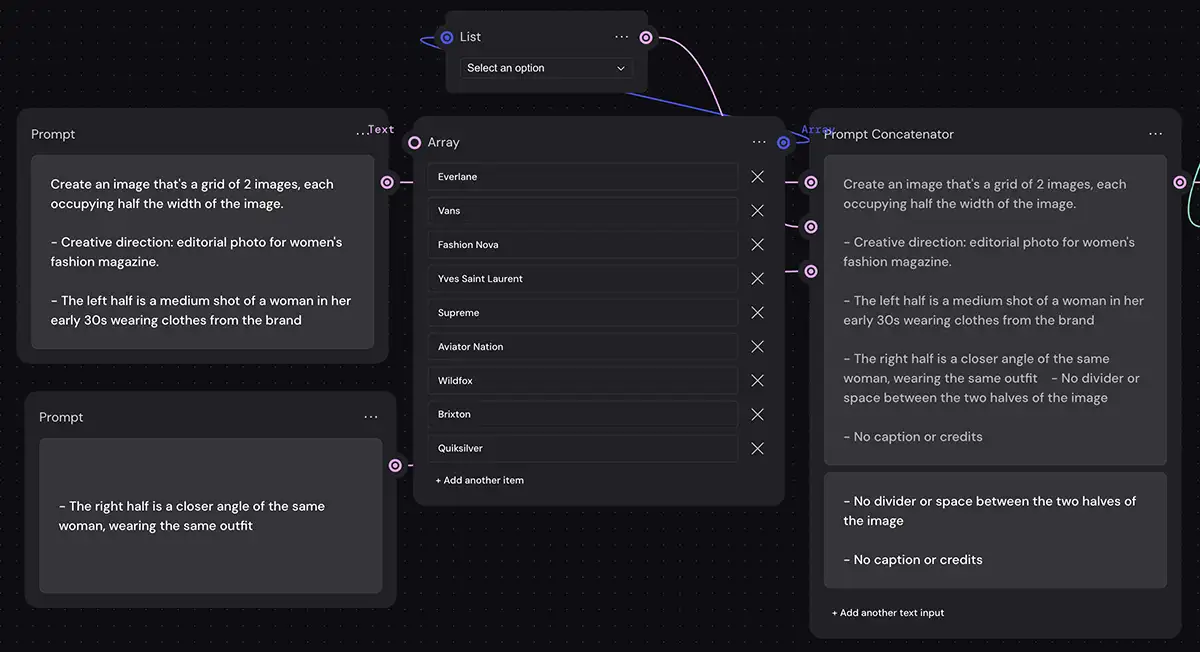
Weavy differentiates itself by allowing you to add nodes that work like simple functions from Javascript or a similar language. Eg “Array” and “Iterator” nodes, which allow you to create a list (array) of images, text, prompts, etc and loop through them. A bit of a learning curve, but it will be welcome to those who use it.
-
How it works: Instead of generating one image at a time, you can create an array of five background colors and an array of three different camera angles. Weave can programmatically generate every possible combination (15 images) in a single run.
-
The Benefit: This turns generation into a controlled manufacturing process, allowing for massive variation testing without manual re-prompting.
Scalability via “App Mode”
You can also save a workflow as a standalone app to be used by the team, allowing them all the power of Weavy without having to learn the admittedly complex tool.
A senior creative or “System Architect” can build a complex node graph that perfectly encapsulates a client’s brand guidelines: the right colors, the right character LoRAs, the right negative prompts. Then, they can publish it as a simplified interface. An “Operator,” like a junior designer or social media manager, sees only a few simple inputs like “Product Name” or “Background Style.” They can generate hundreds of on-brand assets without ever needing to understand the complex ControlNets or IP Adapters running under the hood.
-
The Architect: A senior creative builds a complex node graph that handles all prompting logic, negative embeddings, and brand constraints.
-
The App: This graph is published as a simplified interface.
-
The Operator: A junior designer or marketing manager uses this interface to generate on-brand assets without ever seeing the complex node structure underneath.
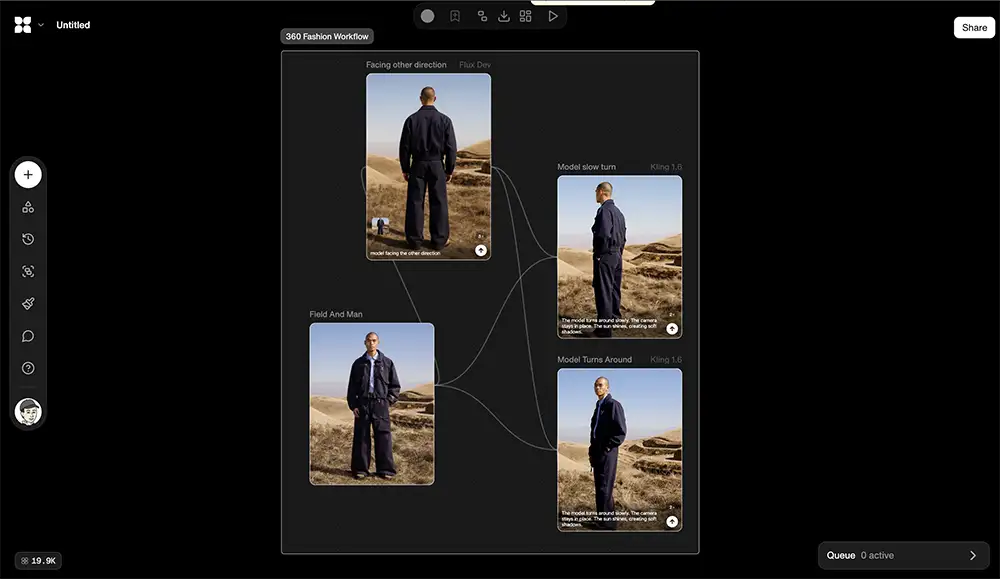
Flora: Visual Storytelling and Pre-Built Flows
Flora, sometimes called FloraFauna, is a different beast. It’s designed to lower the technical barrier to entry, and tt prioritizes narrative consistency and “remixing” existing workflows rather than building new systems from scratch.
Flora’s philosophy is centered on “Flows,” pre-configured node setups for specific creative fields like filmmaking, architecture, or fashion. It’s designed to help you bypass the “blank canvas” problem and dive straight into complex AI workflows without getting bogged down in the technical minutiae.
Think of it as USING the machine vs Weavy’s paradigm of BUILDING the machine.
Accessibility with “Flows”
Flora addresses the complexity of node-based editing with a library of community-built templates called “Flows.” A fashion designer can load a “Garment Try-On Flow” that already has the necessary nodes for human inputs, masking, and diffusion. An architect can use a “Sketch to Render” flow to turn a rough drawing into a photorealistic visualization.
-
How it works: Instead of wiring nodes yourself, you import a pre-configured pipeline—such as a “Garment Try-On Flow” or “Cinematic Storyboard Flow.”
-
The Benefit: This acts as a user-friendly wrapper around complex processes. Users can utilize advanced node structures immediately without needing to understand the underlying mathematics or latent space manipulation.
Generative Editing vs. Technical Editing
Unlike Weave, Flora relies on Generative Repair rather than pixel math. Meaning, you won’t be telling it exactly what to do as you would in Photoshop – you’ll point the AI in the right direction and let it handle the details.
-
Inpainting Nodes: If you need to fix a background, Flora uses an “Inpainting” node where you mask an area and prompt the AI to fill it.
-
The Difference: Flora does not offer “Levels” or “Curves” nodes. You cannot mathematically adjust contrast; you must prompt the AI to “make the lighting higher contrast.” This makes it less precise but more intuitive for non-technical users.
Narrative Context
Flora is built for sequences rather than discrete assets. Its “Story Analysis” feature can ingest a script and generate a consistent sequence of shots by using an LLM to direct the image models. You can lock in a character’s identity using LoRAs and treat them as a constant variable, placing them in different scenes without the dreaded “morphing” effect. For storyboarding, pre-visualization, and concept art, this is absolutely critical.
Advanced Style Control
Flora gives art directors powerful tools for defining and enforcing a project’s visual language. Its “Intelligent Image Analysis & Style Extraction” nodes allow you to upload a reference image – say, a frame from a film with a specific lighting setup – and mathematically apply that style to all subsequent generations. This ensures a cohesive look across an entire campaign or film sequence- you can certainly do style transfer in Weavy (with more control) but it’s a bit more technical.
Weavy vs Flora head-to-head comparison
The choice between Weavy and Flora comes down to the intended output: are you building a system, or are you telling a story?
1. Programmable Logic vs. Narrative Flow
-
Figma Weave is for System Architects. It excels when you need to programmatically generate variations, enforce brand rules, or build tools for other people to use. It is technical, precise, and logic-driven.
-
Flora is for Directors. It excels when you need to guide a character through a scene or explore a visual concept without getting bogged down in technical setup. It is fluid, narrative-driven, and relies on templates.
2. Asset Production vs. Ideation
-
Weavy/Figma Weave integrates with the Figma ecosystem to produce final assets. It eliminates the “tab-switching tax” by allowing you to generate, upscale, and mask UI components inside your design environment.
-
Flora acts as a concept lab. It is best used in the early stages of a project to visualize ideas, create mood boards, and develop storyboards before production begins.

Gorgeous work for Weavy by Maayan-Erlich
Summary Table
| Feature | Figma Weave | Flora |
| Core Philosophy | Engineering: Treat generation as a logic problem. | Storytelling: Treat generation as a narrative medium. |
| Editing Style | Deterministic: Curves, Levels, Alpha Masks. | Generative: Inpainting, Style Transfer, AI Repair. |
| Key Differentiator | Arrays & Iterators: Programmatically generate variations. | Flow Library: Import pre-built pipelines to avoid setup. |
| Best For | UI/UX & Branding: Scalable asset generators. | Media & Concept: Storyboarding and visualization. |
The Bottom Line: Is Weavy or Flora For You?
Both platforms are powerful, but they are built for different creative mindsets and workflows. There’s no single “best” choice, only the choice that’s right for you and your work.
Choose Figma Weave if: You are a UI/UX designer or creative technologist. You need to scale asset production, enforce rigid brand consistency (hex codes, pixel-perfect masks), or build tools for your team. You value precision and logic over experimentation.
Choose Flora if: You are a filmmaker, concept artist, or illustrator. Your work involves sequences, storytelling, or character consistency. You want to start creating immediately using pre-built workflows and prefer “fixing it with AI” rather than “fixing it with math.”