


The Backstory
Innovation is key to making visible, recognizable images.
And there’s almost always an option to photograph something from a cool angle or a unique perspective. One of my favorite techniques to take advantage of this involves creating killer point-of-view (POV) images. While the thought of strapping a large, expensive camera to a model, your buddy, a bike, car, etc, may seem like nothing more than a good way to break some gear, this 1 min 49 sec video called Chase Jarvis TECH: POV Photography outlines how it’s really quite simple. Watch:
The Video
Video Stills to Help Illustrate Some Details
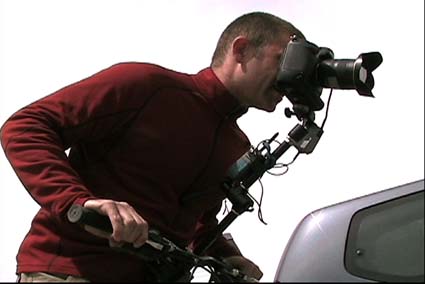
This image below features a decent shot of the Magic Arm attached to the bike handlebars on one end and the camera on the other, with a Pocket Wizard receiver and cord taped to the Magic Arm in the middle. The camera is facing forward in order to shoot nearby moving bikers at close range:
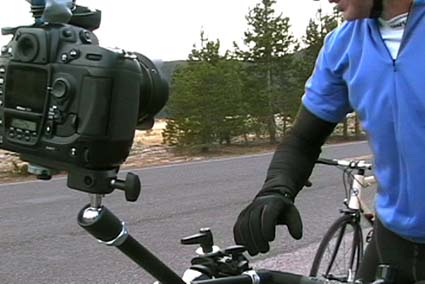
This image below highlights the same camera contraption just pointed back toward the rider:
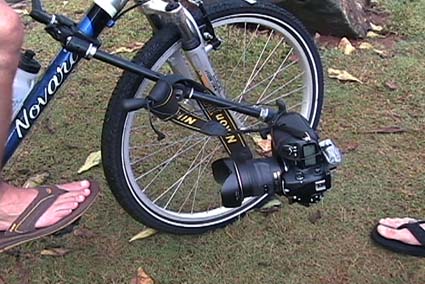
This image below shows another option for using the Superclamp and Magic Arm combo for dropping the camera off the lower tube on the bike frame. Make sure your biker knows how to ride well:
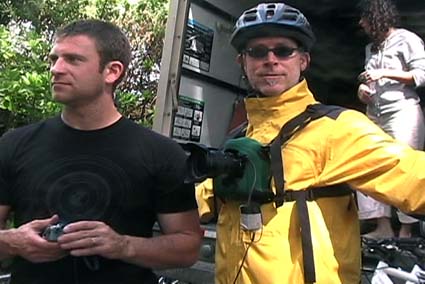
This image below shows our customized chest POV setup. We’ve had a cobbler (that’s right, guy who works on shoes) sew nylon climbing webbing and plastic rings to a neoprene Op/Tech DSLR sleeve and then, using a LowePro harness we’ve affixed the camera to the subjects chest. You can see the Pocket Wizard receiver and cord gaffed to the rigging.
Shopping List
And finally, in case you missed it on screen, here’s a list of items from the video and their approximate costs when purchased online:
Bogen 2915 Super Clamp – $25
Bogen 2929 Magic Arm w/ 2933 Camera Platform – $107
Pocket Wizard reciever – $188
Pocket Wizard transmitter – $188
Pocket Wizard PreTrigger N90M3-P for Nikon – $139
Motorola radio set – $200
Gaffer tape – $12
Op/tech neoprene camera sleeve – $133
Lowepro harness – $10
Nikkor 12-24mm f4 lens – $895
Nikon D2Xs camera body – $4356
(keep in mind that if you don’t want to throw down to purchase these things, that your local pro camera store likely rents all of these items!)
BTW this post was inspired by a comment from reader “DJ” on the Chase Jarvis RAW: New Zealand Spring video post: “Chase, I’d love to see the bike tripod/camera attachment thingy closer. That looked very cool.” In addition to it calling us to action to produce a little video on this topic, it spawned a larger initiative to create yet another concept that is the kissing cousin to Chase Jarvis RAW, and Chase Jarvis FRAMES… From here on out, these photo nerdy, techie ones will be called Chase Jarvis TECH.
Point: Keep sending in your comments and further ideas of what you want to see. I don’t do all that many photo tips, but overall your feedback and direction helps shape this blog and make it a worthwhile community.
Other Vids
[Chase Jarvis RAW: New Zealand Spring]
[Chase Jarvis RAW: Ninjas]
[Chase Jarvis FRAMES: Hasselblad Masters]
Of course, if you have further questions or, better yet, have knowledge or points to add to the discussion, please do so in the comments section below. Let’s make this a great little resource/reference for POV stuff!
Depending on your RSS Reader you may want to watch the Chase Jarvis TECH: POV Photography vid clip here.













thanx nice nice nice
Chase – thought you’d like to see your inspiration at work!
http://www.flickr.com/groups/strobist/discuss/72157607111423973/
Regards,
Jonathan
Wow, great info you shared. Thanks a ton for giving a peek behind the curtain. Always great.
Wow…just wow.