

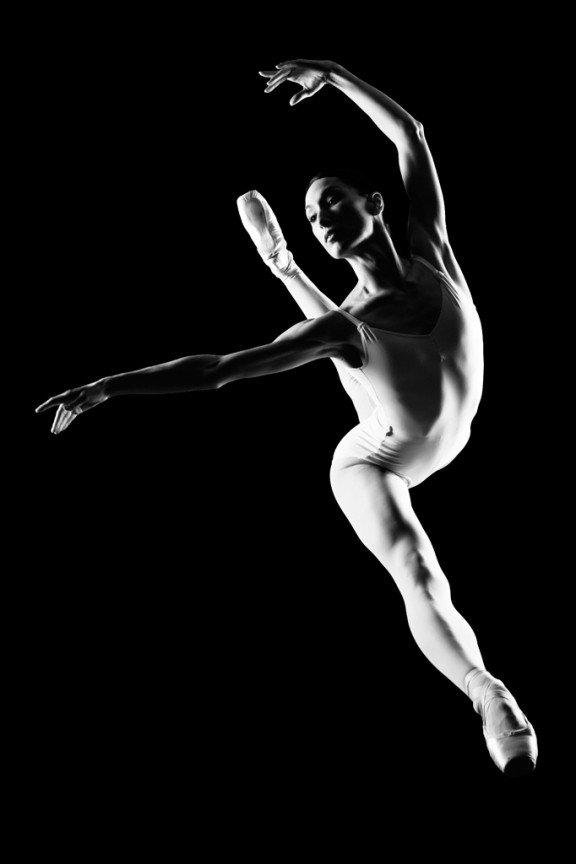
I learned to light after years of deconstructing the work of other photographers. And I know from your previous feedback that you guys are fond of these posts, so let’s dig into another one.
How did I make this picture?
Is it a lucky snapshot?
Is it lit?
If so, how?
The camera Settings?
The direction?
Post production?
Whatever details you think are needed to make this image.
Looking forward to you trying to pick this apart… I’ll reveal everything in a followup post. The person who gets the closest gets… …a chest bump and a pizza, or signed book or something. Don’t be shy. Let er rip.











Dibs.
hi,
i guess:
– this shot was taken in horizontal format
– chase was positioned above dancer
while
– the dancer made the split on the floor
(therefore no jump- i guess that because of her fingers: if it was a jump i think there had to be much more tension in her fingers)
– black background
– two softbox flashes. one next to the ground and behind her/ and the other one just a little bit higher in front.. if i imagine this picture taken in horizontal format the flashes are positioned bottom left and upper right
post:
bw
contrast
more blacks
middle tone contrast increased
perhaps crop
straighten
and flipped 90° left ( i hope it´snot mirrored horizontal;))
cheers
kevin
I’m going with :
You’re/Camera is underneath her shooting up through plexiglass
I think both lights (left and right) are modified. Softboxes maybe with only a single diffusion sheet in it
both are behind her slightly and above her a little
F10-16 for a deep DOF and a fast shutter to kill ambient
Post Production: Clean, make B&W, possible remove any tell-tale remenants of dust/smudges or support for the glass
The shadows from both sides look equally hard to me, so I’m guessing two gridded strip lights on either side. Fast shutter speed, probably around 1/250th. And because there is good depth of field, I would imagine you set the f-stop for the sweep spot, probably around f/8. Probably very little done in post, maybe a little increase in contrast and possibly cleaning up the background if it wasn’t completely dark.
Yeah it looks like she is doing the splits, and you’re taking the picture from a ladder…then she got cut out in photoshop and placed on a black background. The leg lines look to smooth to not be cut out. And there was probably a soft box on either side of her.