If you’ve been following the explosion of generative AI, you know that we’re all looking for the “edge.” We’re looking for that secret syntax, that perfect workflow, or that one hack that turns a chaotic rigorous process into a predictable, high-quality output.
Lately, I’ve been hearing a lot of chatter in the creative community about JSON prompting. The theory is seductive: By feeding AI models prompts formatted as code (JSON) rather than human sentences, you supposedly get more control, more consistency, and better adherence to your vision.
So, I decided to put it to the test with Nano Banana and Midjourney. Does JSON prompting actually help? Or are we just over-complicating our own creativity?
What is JSON Prompting?
For the uninitiated, JSON (JavaScript Object Notation) is a standard text format used to represent structured data. In the context of AI art, “JSON Prompting” means breaking your request down into specific categories and values, rather than writing a sentence.
Instead of writing:
"A cinematic photo of a woman working in a neon-lit office."
You write:
{
  "subject": "woman working",
  "setting": "office",
  "lighting": "neon-lit",
  "style": "cinematic"
}
The Logic: The belief is that LLMs (Large Language Models) are computers, and computers love structure. By explicitly labeling the “lighting” separate from the “subject,” proponents claim the AI won’t “forget” or “hallucinate” details. They think it locks the AI into a rigid template of consistency.
It sounds logical. But does it hold up in the studio?

The Experiment
To get to the bottom of this, I ran a controlled A/B test. I wanted to see if the structure of the prompt changed the quality or consistency of the image.
Here was the workflow:
The Source: I started with a specific image created in Midjourney: the stylized, grainy photo of a creative professional working on a laptop in a vaporwave-aesthetic office you see above.
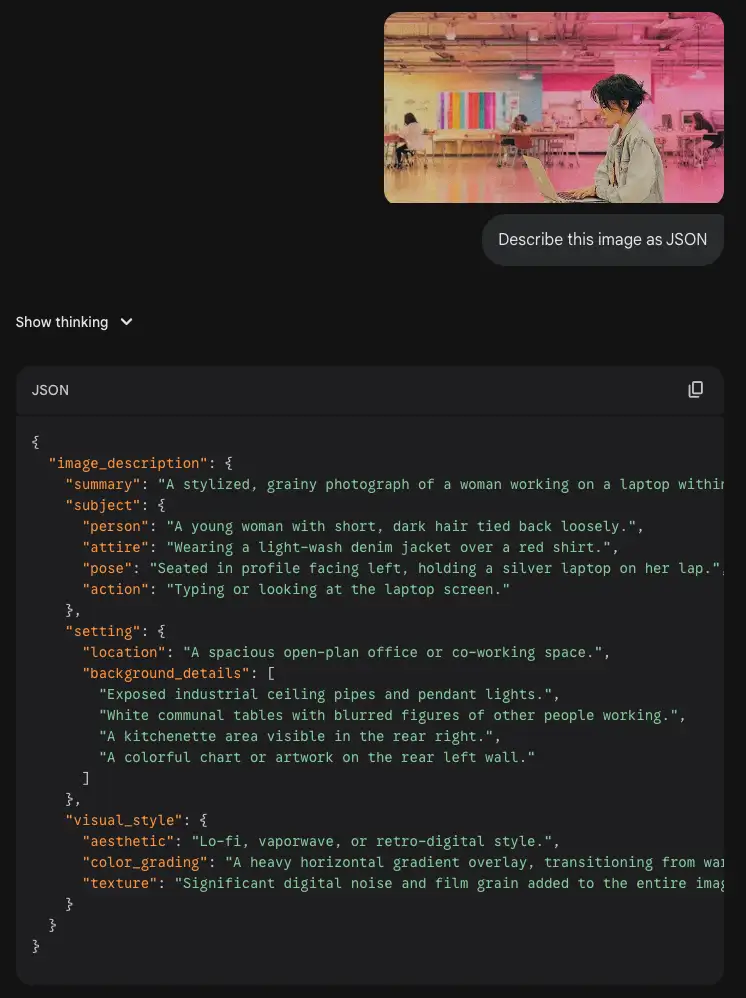
The Data Extraction: I fed that image into Gemini and asked it to describe the image in strict JSON format.

The Translation: I then asked Gemini to translate that exact JSON data back into a natural language description.
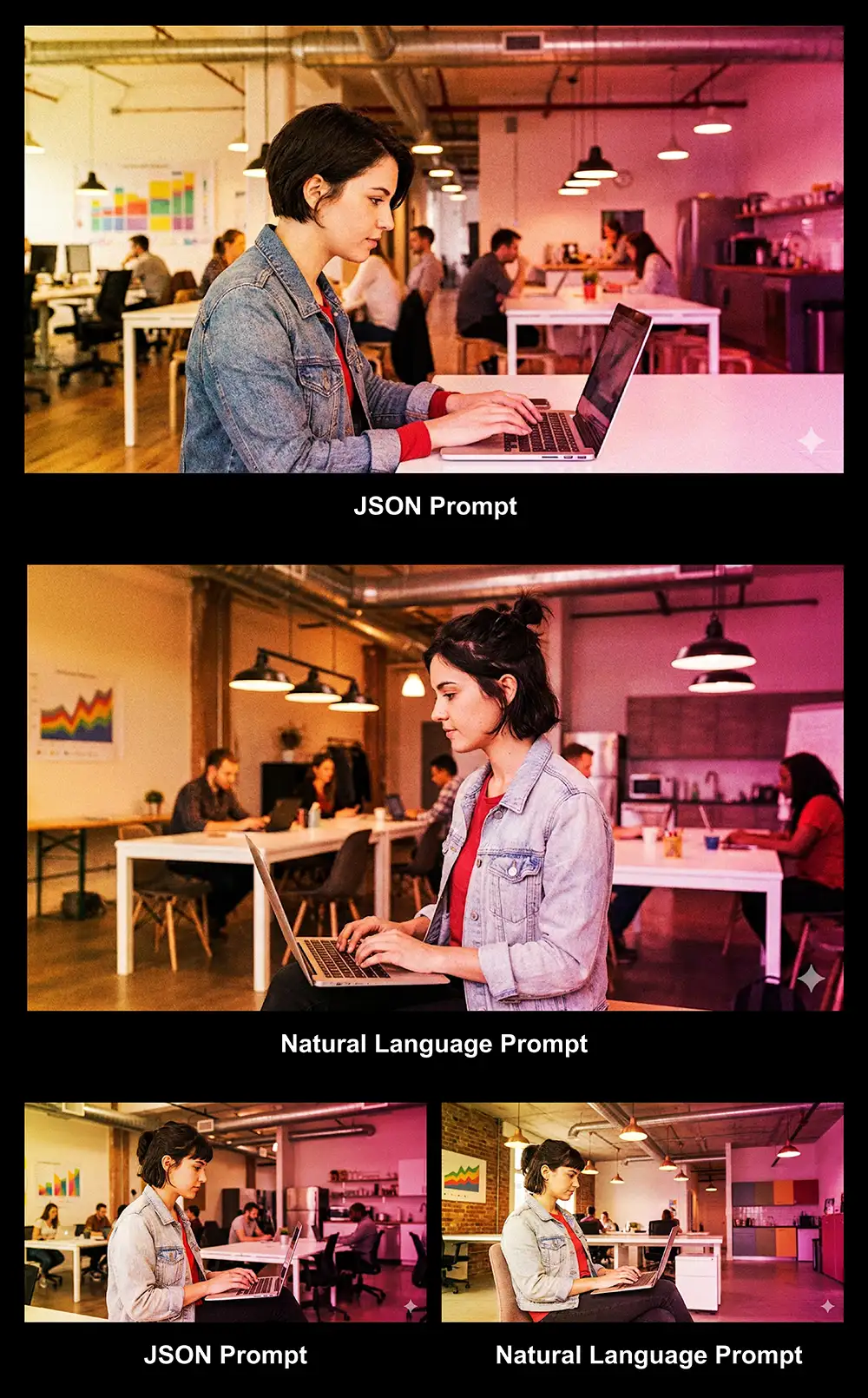
The Showdown: I ran both the JSON prompt and the Natural Language prompt twice each in Gemini/Nano Banana Pro to control for the randomness inherent in AI generations.
The Results: Not Good For JSON Prompting
Now what actually happened when the rubber met the road? If you ask me, these images all look essentially the same, with the expected random variation you’ll get from LLMs (for example how the woman faces left in one of the images).
Contrary to what might seem logical using JSON didn’t “lock the AI into” anything.
And if you try a similar test on your own material, I think you’ll find the same.
Why JSON Prompting Doesn’t Actually Work
So, why did the “better” data structure fail to produce a better image? In short, it’s because AI models don’t actually “run code” – at least, not in this context.
If you’re an artist you can skip this part. But if you want to understand it on a technical level, keep reading.
First, we need to peek under the hood at how these AI models actually “read.” It’s not how you or I read, and it’s definitely not how a computer runs code.
It comes down to a concept called Tokenization.
Tokens Are The “Pixel” of Language
Imagine that AI models don’t read words; they read “tokens.” You can think of tokens as the pixels of language.
-
The word “Apple” might be one token.
-
The word “Ingenious” might be split into two tokens: “Ingen” and “ious”.
When an AI looks at your prompt, it has a limited “attention budget.” It can only focus on so many tokens at once to build the image.
JSON Just Adds Noise
When you write a Natural Language prompt, almost every token is a visual signal.
Prompt: "Cinematic photo of a neon city."

Tokens: [Cinematic] [photo] [neon] [city]
Every “pixel” of text here tells the AI what to draw. It is 100% signal.
Now, look at the JSON prompt.
Prompt: {"setting": "neon city"}

Tokens: [{] ["setting"] [:] ["neon] [city"] [}]
Suddenly, you have flooded the AI’s attention span with brackets, quotes, colons, and category labels. These are non-visual tokens. They are noise.
The AI is forced to spend its processing power “attending” to squiggly brackets and quotation marks that have zero visual value. You are essentially diluting your own prompt with junk data.
It’s not in the training data
Finally, remember how these models were trained. They learned to see by looking at billions of images on the internet paired with captions and alt-text.
They learned that the phrase “sunset over the ocean” equals an image of an orange horizon. They were not trained on database files. They were trained on human language. Yes there are some datasets with relevant JSON data for images but those are much smaller than the billions of solo images.
When you force JSON on an image generator, you aren’t speaking its native language. You are speaking a second language that it barely understands, forcing it to translate your weird code brackets into visual concepts. That translation layer creates friction, not clarity.
The Verdict
If you are a developer building an app that needs to automate thousands of prompts via an API, JSON is great for your code to handle.
But if you are a creative professional trying to make the best art possible?
Skip the JSON.
It’s a placebo. It gives you the illusion of control without the results. It introduces friction into your creative process, forcing you to think like a database administrator instead of an artist.
My advice:
Focus on your adjectives. Focus on your lighting descriptors. Focus on the emotion of the scene. Talk to the AI like you would talk to a concept artist or a set designer.