You’ve seen the noise. The flood of AI-generated images that look impressive at first glance but fall apart when you need to actually use them in a production pipeline. The random artifacts, the lack of consistency, the inability to just move that one element three pixels to the left.
For a creative professional—whether a photographer, art director, game developer, or graphic designer—randomness is not a strategy. It is not enough to type a prompt and hope for the best. You need precision. You need consistency. You need a tool that bends to your will rather than forcing you to accept whatever the algorithm spits out.
This is where Leonardo AI separates itself from the pack. It is not just another “magic button” generator. It is a control suite—not unlike node-based tools such as ComfyUI—designed for those who know exactly what they want and need a machine to execute it.
What Exactly Is Leonardo AI
Leonardo AI is a generative AI platform built on top of Stable Diffusion, but with a heavily modified, UI-rich layer designed specifically for asset production. Unlike many popular Midjourney alternatives that operate primarily through chat interfaces like Discord, Leonardo offers a dedicated web application with a granular dashboard.
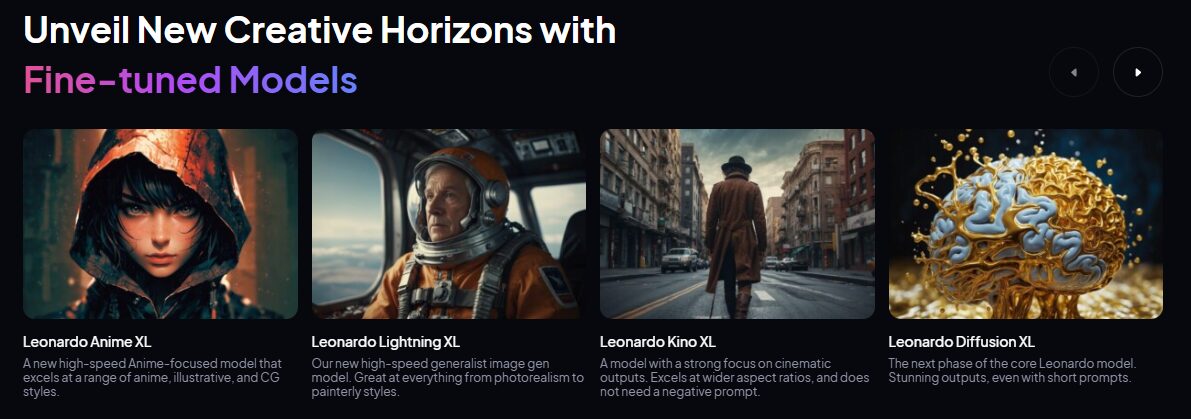
It is designed for workflow. While other tools focus on creating a single, beautiful “hero” image, Leonardo focuses on granular control over the generation process. It allows you to train your own models (called “Fine-tuned Models”) on your specific visual data, ensuring that the output matches a specific art style or brand identity consistently.
It also provides a suite of post-processing and editing tools directly in the browser. You aren’t just generating an image; you are building assets. The platform integrates image generation, AI canvas editing (in-painting and out-painting), texture generation for 3D models, and even motion video generation into a single ecosystem.
Leonardo’s Gaming Origins
To understand why Leonardo feels different than Midjourney, Weavy, Flora, etc you have to look at its founder, JJ Fiasson, and its origin story. Leonardo wasn’t built to make surrealist viral art; it was built to solve the “asset crisis” in indie game development.
Game studios need thousands of assets—textures, UI icons, character portraits—and they need them to adhere to a strict style guide. This “production-first” philosophy is baked into every pixel of Leonardo’s interface.
Visit the official Leonardo AI website
How Can Creative Professionals Use It?
The value of Leonardo AI lies in its ability to integrate into an existing pipeline, not replace it. Here is how to leverage its specific features for high-end creative work.
Rapid Concepting with Realtime Canvas
Waiting 60 seconds for a render kills flow. Leonardo’s Realtime Canvas is one of several powerful generative AI canvas apps designed to be a sketch-to-image tool that updates in near real-time as you draw.
This is an “advanced move” for concept artists and art directors. You start with a rough sketch on the left side of the screen—napkin-quality scribbles represent composition, massing, and lighting. On the right, the AI interprets your lines instantly into a high-fidelity image.
The Workflow:
- Open Realtime Canvas.
- Select a style preset (e.g., “Cinematic” or “Concept Art”).
- Set your Creativity Strength to roughly 0.6. This allows the AI to interpret your sketch without hallucinating wild details you didn’t ask for.
- Sketch your composition. If you need a character in the foreground, draw a rough silhouette. The AI renders it immediately.
- Use the Input Image function to upload a rough block-out from Blender or a photo collage.
- Once the composition works, upscale the result using either Leonardo’s built-in tools or a dedicated AI image upscaler and move it to your main editing software for refinement.
This eliminates the “blank page” paralysis and allows you to iterate on composition before committing to high-res rendering.

Enforcing Brand Consistency with Elements (LoRAs)
One of the biggest failures of generic AI models is inconsistent style. You cannot deliver a campaign where every image looks like it was illustrated by a different artist.
Leonardo solves this with Elements. These are Low-Rank Adaptation (LoRA) models that act as style modifiers. You can train your own Element by uploading as few as 10-20 images that represent a specific look, character, or object.
How to execute:
- Gather 20 high-quality images that define your project’s aesthetic (e.g., “Noir Cyberpunk” or “Pastel Flat Design”).
- Go to the Training & Datasets tab and upload them.
- Train a new model.
- When generating new images, apply this model.
- You can now generate hundreds of assets that all adhere to that specific visual language.
This is how you scale a creative vision. You do the hard work of defining the style once, and the tool scales it infinitely.
Precision Composition with Image Guidance
For photographers and compositors, “ControlNet” is the industry standard for AI control, and Leonardo integrates this directly via Image Guidance.
If you have a specific pose for a fashion shoot or a specific layout for a web banner, you do not want the AI to guess the composition.
The Setup:
- Upload a reference image in the Image Guidance tab.
- Select the control type:
- Pose: Locks the skeletal structure of characters.
- Depth: Maintains the 3D depth of the scene (perfect for architectural visualization).
- Edge (Canny): Forces the AI to strictly follow the high-contrast lines of your reference.
- Adjust the Strength slider. A setting of 1.0 forces strict adherence; roughly 0.4 allows for creative interpretation.
Use this to reskin existing assets. Take a 3D block-out of a product packaging, apply a ‘Depth’ control, and prompt for different environments (“luxury marble counter,” “forest floor,” “studio splash”). You get perfectly lit variations without re-rendering the 3D scene.
Creating Video Mood Boards with Motion
Static images often fail to convey the “vibe” to a client. Leonardo’s Motion feature converts your generated images into 4-second video clips.
This is not a replacement for After Effects. It is a tool for pitch decks and social media.
Specific Settings:
- Select your best generated image.
- Click the Motion button.
- Set Motion Strength to 3 or 4. Anything higher often results in warping artifacts that look unprofessional.
- Use this to add subtle movements—dust motes floating, hair blowing, clouds moving—to bring a storyboard to life during a presentation.
3D Workflows and The Pipeline Connection
Another interesting difference with Leonardo is its tighter integration with 3D pipelines. While Leonardo is not a “3D modeler” in the traditional sense, it is arguably the most 3D-literate 2D generator on the market.
-
Texture Generation: One of Leonardo’s killer features is its ability to generate UV-mapped textures for 3D objects. You can upload an
.OBJfile, type a prompt like “rusty alien metal,” and Leonardo will paint the texture map directly onto the mesh. It even generates the PBR (Physically Based Rendering) maps—Albedo, Normal, and Roughness—which are essential for realistic lighting in engines like Unity or Unreal. -
Skybox Generation: For environment artists, Leonardo can instantly generate 360-degree equirectangular panoramic images. These can be dropped directly into Unity or Unreal Engine to create high-fidelity skyboxes in seconds.
-
The Pipeline: Currently, Leonardo functions best as a “pre-production” or “asset prep” station. While it doesn’t sit inside Unreal Engine as a live plugin yet, its API and bulk-export features allow studios to build their own bridges, automating the flow of textures and concept art directly into their build folders .
Is Leonardo AI Right For You?
If you are a hobbyist looking for funny images to send to friends, this tool is overkill. Go use a chat bot.
If you are a working creative professional who needs to integrate generative AI into a paid pipeline, Leonardo AI is currently one of the strongest contenders on the market.
The Bottom Line:
- For Designers & Art Directors: Yes. The ability to use Image Guidance (ControlNet) and Realtime Canvas gives you the composition control you need to do actual work.
- For Game Devs: Yes. The texture generation and style consistency (Elements) are production-ready features.
- For Photographers: Maybe. It is excellent for generating backdrops and composite elements, but it does not replace a camera. If you’re a photographer looking to get started, checking out a guide to Midjourney for photographers can provide a solid baseline for what’s possible.
- Cost vs. Value: The paid tiers are necessary for commercial ownership and private generation. Do not use the free tier for client work; the privacy risks and lack of ownership rights are not worth the savings.
Leonardo AI respects the fact that you have a vision. It gives you the knobs and dials to execute that vision with precision. Stop playing with slot machines and start using power tools.