The conversation around AI tools is maturing. The question is no longer if you should use AI in your creative workflow, but which tools you should master for specific tasks. While the first wave of generative AI gave us generalist tools, we are now seeing the rise of specialized instruments designed for professional precision.
Two of the most prominent names in this landscape are Seedance and Nano Banana.
While often categorized separately—Seedance for video, Nano Banana for stills—their capabilities now overlap significantly. Seedance has improved its native text-to-video generation quality, and Nano Banana has added robust editing features that challenge external compositing software. This guide compares them head-to-head to help you decide which one belongs in your toolkit.
Core Capabilities
Seedance
Seedance is a commercial AI platform focused on generative video. While its reputation is built on motion consistency, it is also a fully capable image generator. It can create characters and scenes from scratch using text-to-video prompts, meaning it does not strictly require an external image input to function.
Nano Banana
Nano Banana is a suite of fine-tuned diffusion models designed for ultra-realistic still images as part of Gemini 3. It specializes in commercial niches like product photography, architectural rendering, and hard-surface concept art. Crucially, it includes a “Unified Canvas” editing workspace that allows for inpainting, outpainting, and spatial compositional adjustments directly within the browser.
Image Generation Quality
The most direct comparison between the two is how they render a single frame or image.
Seedance Generation Seedance prioritizes temporal stability over high-frequency detail. When you generate a video from text, the individual frames are consistent, but they often lack the razor-sharp texture required for high-end print or commercial still work. If you pause a Seedance generation, skin textures or product labels may appear slightly soft. It is excellent for storytelling and screen-based media but less effective for key art or billboards.
Nano Banana Generation Nano Banana excels at high-fidelity details. Its models are trained on specific metadata regarding lighting and materials. A prompt specifying {material: brushed_aluminum} or {lighting: rembrandt_setup} produces a result with accurate physical properties. If your primary output is a static asset where every pixel matters, Nano Banana produces a higher quality base image than a single frame extracted from Seedance.
Editing and Control Functions
This is where the tools diverge in utility.
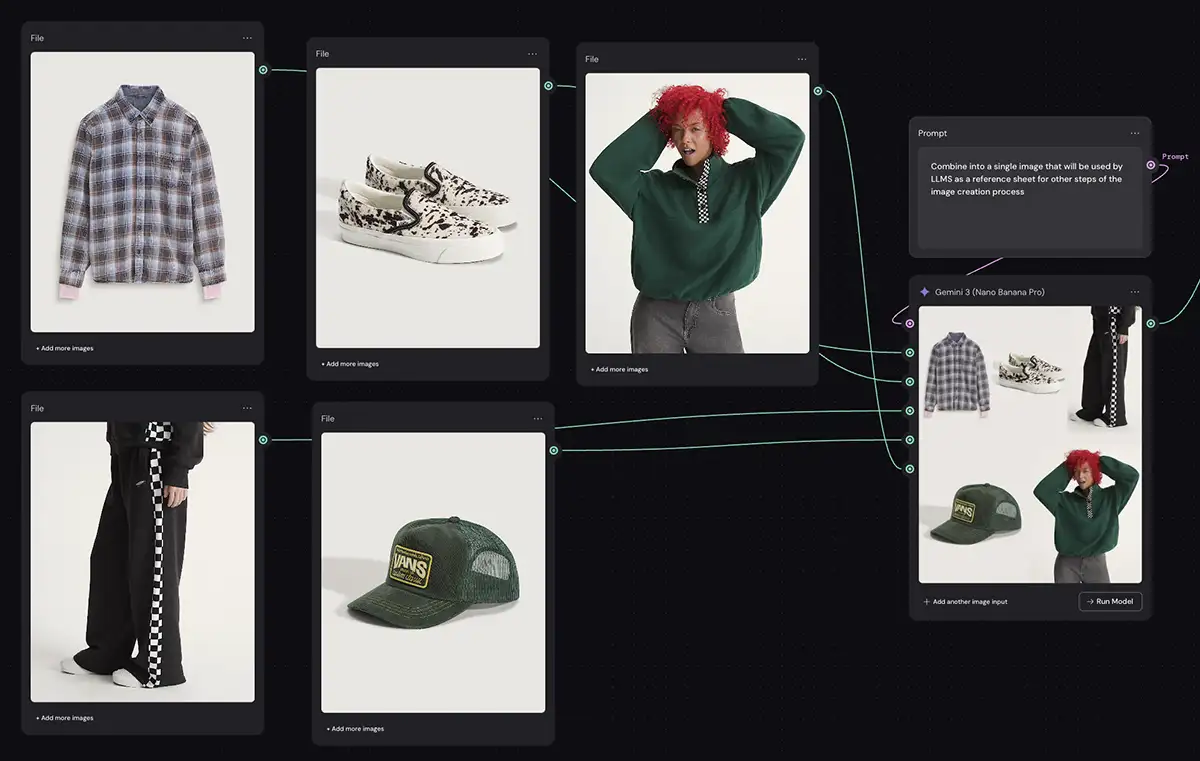
Editing in Nano Banana Nano Banana functions as a compositional tool. You do not need to export to Photoshop to fix errors or change elements.
-
Inpainting: You can highlight a specific area of a product shot (e.g., a bottle cap) and use a prompt to change the material from plastic to cork without altering the rest of the image.
-
Canvas Composition: You can expand the borders of an image (outpainting) or merge two generated elements together. For example, you can generate a model and a background separately, then use the Nano Banana canvas to composite them and regenerate the lighting to match.
Editing in Seedance Seedance focuses on editing movement rather than pixels.
-
Motion Brushes: You can mask a specific area of a static image and direct its movement. For example, you can freeze a character’s face while commanding the background to pan, or highlight a hand to make it wave.
-
Camera Controls: You can dictate camera movement (dolly, truck, pan) with precision parameters.
Workflow Comparison
Scenario A: The Pure Seedance Workflow
Best for: Rapid social media content, storyboards, animatics.
You bypass external image generators entirely. You enter a prompt into Seedance: [char_hero_01] walking through a neon-lit alley. The platform generates the character and the motion simultaneously. This is the fastest workflow but offers the least control over specific textures or lighting details.
Scenario B: The Nano Banana Native Workflow
Best for: Print campaigns, product mockups, detailed concept art.
You select a specialized model (e.g., NB-Product-Gloss-v3.1) and generate your base asset. If the composition is off, you use the internal Canvas tool to move the object to the right and use inpainting to fill the gap. You adjust materials using region-specific prompting. The final output is a static, high-resolution file ready for delivery.
Scenario C: The Combined Workflow
Best for: High-end commercial video spots.
This workflow is necessary only when you need the texture quality of Nano Banana combined with the motion of Seedance.
-
Generate and Edit in Nano Banana: Create your hero asset. Use Nano Banana’s inpainting to ensure the character’s pose and costume are perfect.
-
Import to Seedance: Upload the finished still to Seedance.
-
Animate: Use Seedance solely for its “Image-to-Video” function, applying motion to the high-quality asset you already created.
An Honest Evaluation
Let’s be real about where these tools stand right now. If you are serious about professional output, Nano Banana Pro (powered by Gemini 3) is head and shoulders above the competition.
The gap isn’t just about image fidelity anymore; it’s about intelligence. Because Nano Banana Pro is built on the Gemini 3 architecture, its prompt adherence is nearly telepathic. It doesn’t just “guess” at pixels; it demonstrates a genuine understanding of 3D space and time that older models simply lack. The integration with the broader Google ecosystem is a game-changer—being able to pull real-world geospatial data from Google Maps to accurately light and position a scene is a feature that Seedance can’t touch.
Seedance Edit had its moment during the Gemini 2.5 era. It was a solid, reliable tool for its time. But in the current landscape, it feels like it’s operating a generation behind. It struggles to maintain the complex spatial coherence that Nano Banana handles effortlessly.
That said, Seedance still wins on price. Nano Banana Pro is a premium enterprise-grade tool with a price tag to match. If you are a student, a hobbyist, or working on internal mockups where “good enough” is acceptable, Seedance Edit remains a viable budget option. But for high-stakes commercial work where precision is non-negotiable, Nano Banana has firmly eclipsed it.
Final Verdict
Choose Seedance if:
-
Your deliverables are primarily video files.
-
You value narrative and character consistency over texture fidelity.
-
You are on a budget and need a capable all-in-one tool for motion.
Choose Nano Banana if:
-
Your deliverables are high-resolution static images.
-
You need granular control over materials, lighting, and composition.
-
You require the advanced intelligence of Gemini 3 for complex spatial understanding and integration with real-world data like Google Maps.