If you’ve been following the creative landscape lately, you know the noise level is at an all-time high. We are drowning in tools. You’ve got Midjourney for images, Runway for video, obscure GitHub repos for upscaling, and a dozen other browser tabs open just to get one asset out the door.
That’s why Weavy (recently acquired by Figma and transitioning to “Figma Weave”) has caught my attention. It’s not just another “magic button” generator. It’s a workbench. It’s a tool for people who care about craft and systems, not just slot-machine prompting.
If you’re wondering whether this node-based beast is the right force multiplier for your creative toolkit, I’ve broken down the most common questions I’m hearing.
What the heck is Weavy?
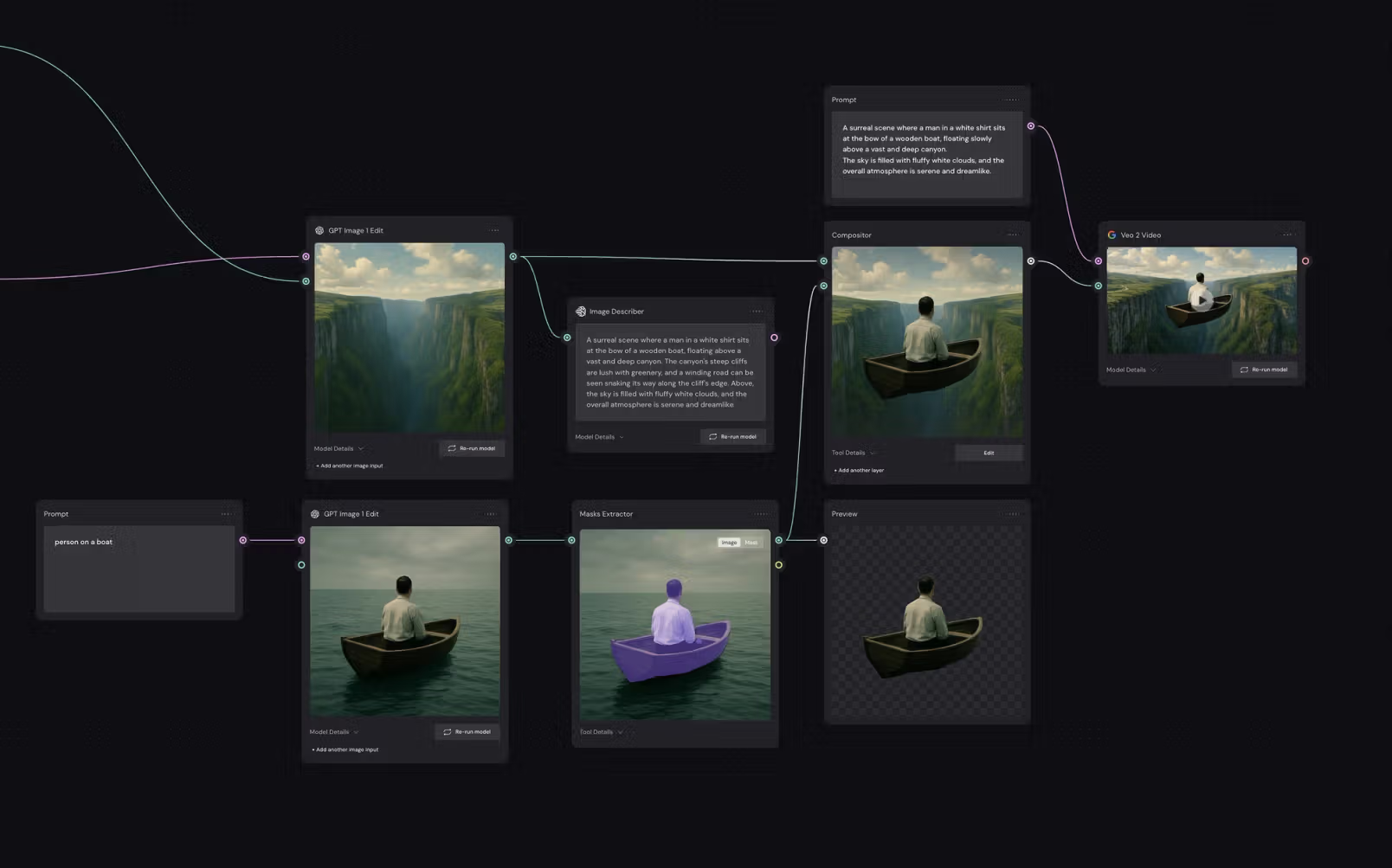
Think of Weavy as a visual control center for AI.
Instead of typing a prompt into a black box and hoping for the best, Weavy gives you a node-based canvas. You connect “boxes” together to build a pipeline.
-
Box 1: An LLM helps refine your prompt.
-
Box 2: That prompt feeds into a generator to create a base image.
-
Box 3: You use a masking node to isolate the subject.
-
Box 4: You send that subject into an animation node to make it move.
All of this happens on one screen. No jumping between tabs. No downloading and re-uploading files. It turns “prompting” into “building a design system.”
Is Weavy just for still images, or can I make videos?
This is where Weavy actually separates itself from the pack. It is multimodal.
Most tools are silos—you make an image in one place, then drag it into another tool to animate it. In Weavy, you can chain these steps together. You can drop in a Flux node to generate a character, feed that output directly into a Runway Gen-4 or Google Veo node to animate it, and then feed that video into an upscaler node.
You can literally build a “Text-to-4K-Video” pipeline that runs automatically every time you hit the button.
What resolution does Weavy output? Is it print-ready?
Yes. If you are doing billboard work or high-end editorial, you know that raw AI output (usually 1024×1024) is useless.
Weavy has native upscaling nodes (similar to Topaz or Magnific) built right into the workflow. You can set up a specific “Finish” node that takes your raw generation and upreses it to 4k, 8k, or specific print DPI requirements. Because it uses cloud GPUs, you don’t need to melt your laptop trying to render these huge files.
Can I train Weavy to learn my specific visual style (LoRAs)?
For a Creative Director, this is the most critical question. The answer is yes.
Weavy allows you to upload or link LoRAs (Low-Rank Adaptations). In plain English: you can train a small model on your brand’s specific illustration style, color palette, or even a specific product, and “plug” that into the workflow.
This ensures that when you generate 50 assets for a campaign, they don’t look like generic AI slop—they look like your brand.
Why should I pay for Weavy when ComfyUI is free?
This is the elephant in the room. Hardcore technical artists love ComfyUI because it’s open-source and free. And it’s great!
Here’s the reality: ComfyUI is “free,” but you’ll pay for it with your time and likely the cost of buying a new computer.
To run ComfyUI effectively, you need:
-
A massive custom PC with an expensive GPU (RTX 4090 etc).
-
Hours of time debugging Python script errors and broken nodes.
-
To work alone (it’s very hard to share Comfy workflows with a team).
Weavy gives you most of what ComfyUI can do, but in the cloud (so you don’t need fancy hardware). You pay for the convenience, the cloud compute (so you can work on a MacBook Air), and the ability to share a link with your team so they can run your workflow instantly.
What AI models can I actually use in Weavy?
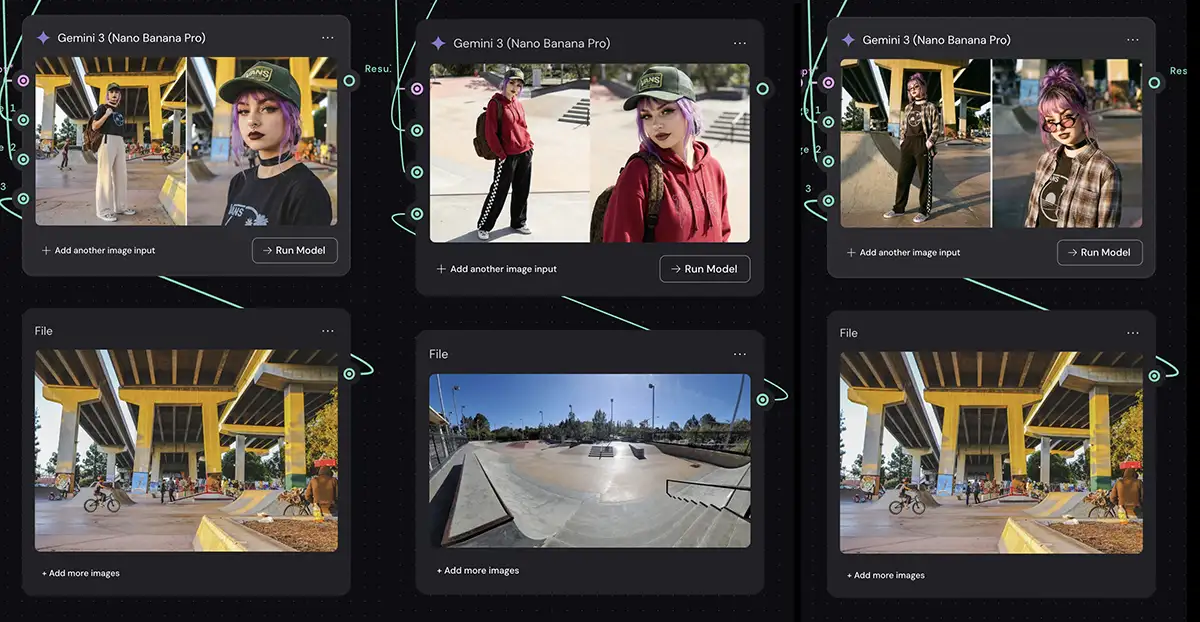
Weavy is model-agnostic. They don’t force you to use “their” model; they give you keys to everyone else’s. As of this writing you can plug in just about every model, including:
-
For Images: Nano Banana, Seedream, Reve, Flux, Ideogram, GPT, and Stable Diffusion (SDXL) among others
-
For Video: Runway, Veo, Kling, and Sora and more
-
For Logic: there’s a “run any LLM” node with ChatGPT, Gemini, or Claude
That means you can run a prompt through (say) Flux and Ideogram simultaneously to see which one creates a better composition. That is a massive time-saver.
I heard Figma bought them. What does that mean?
This is the big news ($200M big). Figma acquired Weavy in late 2025.
For us, this is huge validation. It means this node-based approach isn’t a fad; it’s the future of how we will integrate AI into design. Currently, Weavy is still running as a standalone tool, but we can expect it to become the “engine” behind Figma’s future AI capabilities.
How much does Weavy cost?
You pay for a Weavy plan which gives you a pool of credits. You can always buy more credits as you go, but the standard plans are:
-
Starter (~$19/mo): Good for solo experimentation.
-
Professional (~$36/mo): For the power user. Higher credit limits.
-
Team (~$48/user/mo): Shared workspaces and consolidated billing.
It generally works out cheaper than holding separate subscriptions for Midjourney, Runway, and ChatGPT because you are only paying for the compute you actually use.
The Bottom Line
If you’re a hobbyist who just wants to make funny cat astronauts, stick to the simple tools like Meta AI.
But if you are a creative professional, you are paid to solve problems and deliver consistent, high-quality assets- Weavy is a look at the future of our industry. It respects your intelligence and gives you the controls back.