The way creative professionals use AI is undergoing a fundamental shift. The first wave of generative tools, dominated by simple text-prompt-to-image outputs, was a novelty. It was the equivalent of a slot machine; you’d drop in a prompt, pull the lever, and hope for a jackpot. But for serious, professional-grade work, that model is broken. It lacks the control, iteration, and precision required to deliver on a client’s vision or maintain brand consistency. The “black box” era of prompting is over.
We’re now in the era of the “intelligent canvas.” These are node-based, non-linear environments where you, the creative, are the architect of the workflow. Instead of just writing a prompt, you’re visually programming a pipeline of operations—isolating composition, swapping AI models, grading color, and animating results, all in one space. This gives you the granular control that professionals have always had with tools like Photoshop or DaVinci Resolve, but applied to generative AI. Two of the most significant platforms leading this charge are Figma Weave (formerly the independent tool Weavy) and Krea. They share a similar foundation but are built on two completely different philosophies about the creative process. Choosing the right one depends entirely on the type of work you do.
The Basics: Weavy and Krea Explained
Before diving into a head-to-head comparison, it’s critical to understand what these platforms are at their core and, more importantly, what they’re trying to achieve.
What is Weavy?
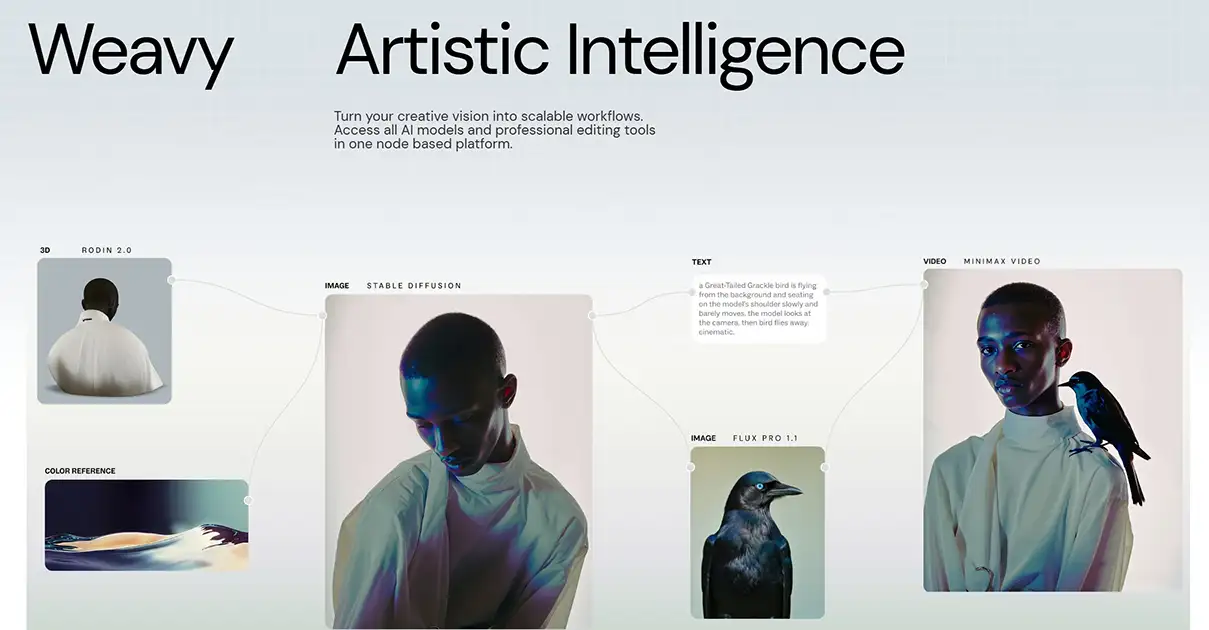
Figma Weave is the result of Figma, the undisputed operating system for interface design, acquiring the powerful node-based AI tool Weavy in 2025. This move wasn’t just another feature addition; it was a statement. Figma recognized that asset generation and interface design can no longer be separate processes.
At its heart, Weavy is a procedural media engine embedded directly into the design workspace you already know. It eliminates the chaotic workflow of sketching a layout in Figma, jumping to Midjourney for an image, using Topaz for upscaling, cutting out the background in Photoshop, and then animating it in Runway. Weave brings the entire media generation pipeline into a single, unified environment. It’s built for teams, for systems, and for a world where AI-generated assets need to be as controllable and consistent as a brand’s hex code. It combines generative AI with traditional compositing tools like layer masks and color adjustments, acknowledging that professional work requires both AI synthesis and human refinement.
What is Krea?
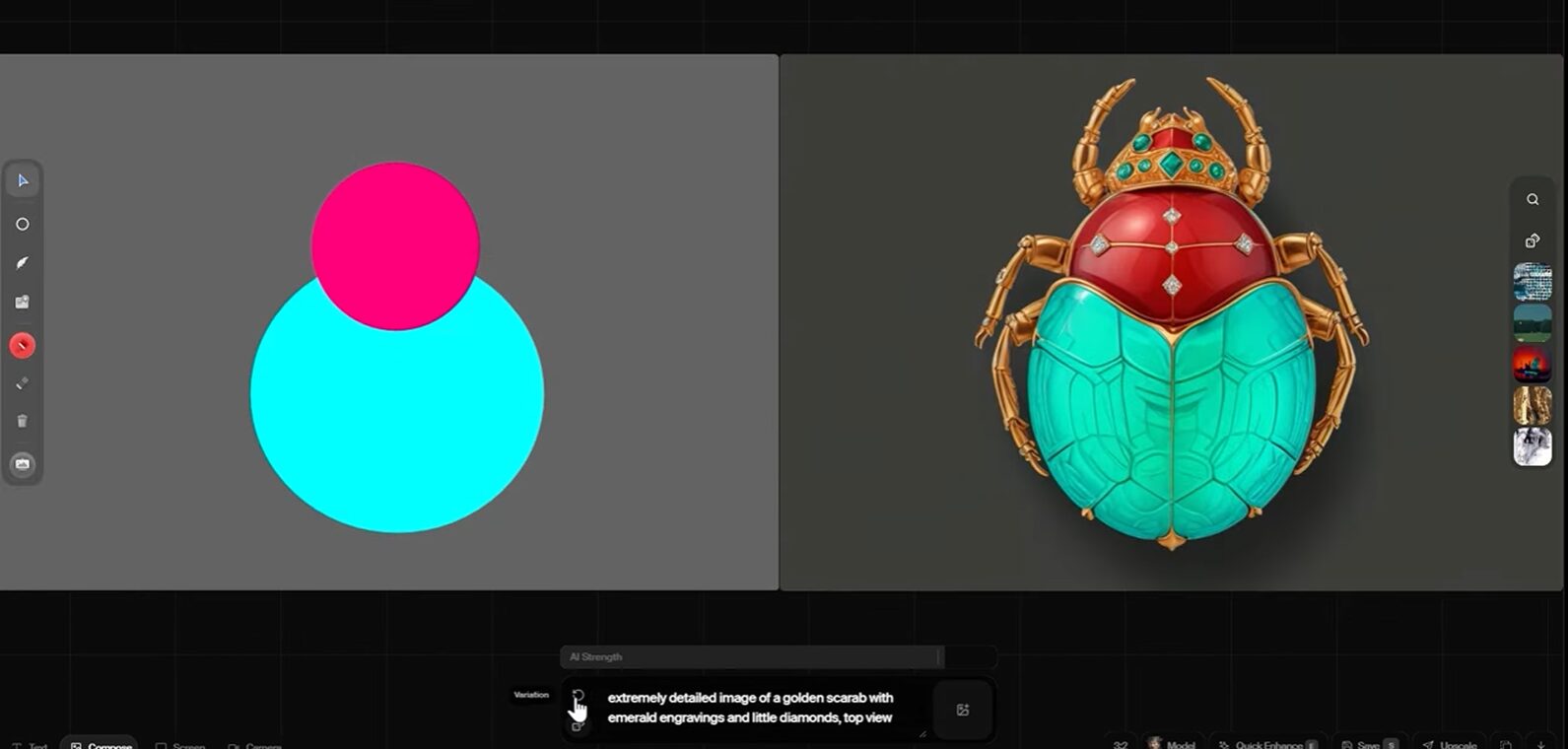
Krea is built around a single, obsessive focus: real-time feedback. While other platforms require you to build a logic chain and then run it to see the result, Krea aims to close the gap between thought and execution. Using technology like Latent Consistency Models (LCMs), it generates and updates images nearly instantly as you type, draw, or even move.
This transforms the creative process from a deliberate, step-by-step execution into a fluid, improvisational dance. Krea’s canvas is a multi-modal playground where you can seamlessly mix image generation, video animation, 3D objects, and even live webcam feeds as inputs. It’s less about building a rigid, reusable system for an agency and more about providing a highly responsive tool for individual creators to experiment, explore, and discover visuals in a state of creative flow. It’s become the go-to for concept artists, VJs, and tech-artists who use AI as an interactive performance instrument rather than just a production tool.
How to Use Weave and Krea in a Professional Workflow
The real difference between these two platforms becomes clear when you see how they fit into a professional workflow. They solve different problems and cater to opposing creative mindsets.
Workflow Architecture: System Building vs. Improvisation
Your fundamental approach to a project will determine whether Weave or Krea is a better fit.
Figma Weave: The System Architect
Figma Weave is designed for those who build creative systems. Its node-based graph is a space where a senior creative can construct a complex “design machine” that defines a project’s visual rules. You can build a workflow that pulls from specific character models (LoRAs), enforces brand color palettes, applies consistent lighting, and sets negative prompts to avoid undesirable clichés.
The killer feature here is “App Mode.” This allows you to take a complex node graph and publish it as a simplified interface for other team members or clients. A technical art director can engineer a sophisticated “Social Media Asset Generator,” but the social media manager only sees a few simple fields like “Product Name” and “Headline.” They can’t break the brand guidelines because the rules are baked into the graph. This bifurcates the creative process into two roles: the “System Architect” who designs the machine and the “Operator” who runs it. For branding agencies, this is a game-changer for scaling asset production without sacrificing quality or consistency.
Krea: The Improviser
Krea is for the creator who thrives on spontaneity. Its real-time engine makes it feel less like programming and more like sculpting. The instant feedback loop allows for a “flow state” that is impossible to achieve when there’s a 30-second delay between every iteration.
A practical example is connecting your webcam as an input. You can sketch a character on paper, and Krea will translate your drawing into a fully rendered image in real-time, matching your lines as you draw them. VJs use this feature to create visuals that react to music during live performances. Concept artists use it to rapidly bash ideas, changing camera angles, character poses, and lighting with simple brush strokes and seeing the results instantly. The workflow isn’t about building a reusable, locked-down system; it’s about using the AI as a high-speed collaborative partner during the ideation phase.
Control and Precision
Both platforms offer deep control, but they manifest in different ways. Weave offers structural control over the entire pipeline, while Krea offers direct, artistic control over the image content itself.
Figma Weave: Hybrid Pipeline Control
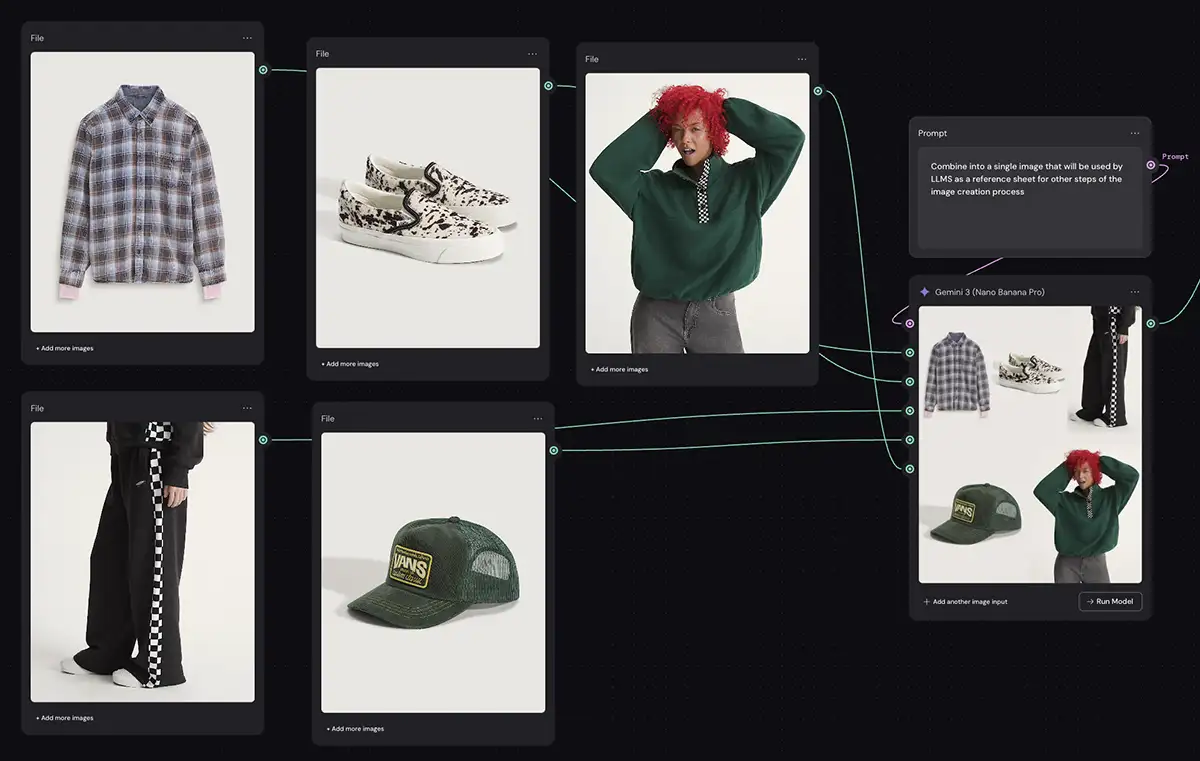
Weave’s power lies in its hybrid architecture. It understands that pure AI output is rarely perfect. A node graph in Weave can start with a generative model like Flux to create a character, but the output of that node can then be fed into a traditional “Levels” or “Curves” node for color grading. You can use a “Mask Extractor” node to isolate the foreground, just as you would in After Effects, and apply effects only to that specific layer.
This blending of generative AI with deterministic editing tools is crucial for professional work. It allows you to intervene at any stage, making manual corrections that propagate through the rest of the pipeline. You get the creative spark of AI without sacrificing the pixel-perfect control you’re used to from the Adobe Creative Suite. In-context editing tools like inpainting and outpainting are built directly into the canvas, so you can fix a mangled hand or remove a stray object without exporting the asset to another program.
Krea: Direct Artistic Control
Krea’s control is more immediate and visceral. It excels at manipulating the content of the image directly and is famous for its “Logo Illusion” capabilities. Using ControlNet technology, you can embed a brand’s logo or a specific pattern into an image in a way that feels organic. For example, you can make a logo appear as if it’s formed by the arrangement of buildings in a cityscape or the trees in a forest. This has become a staple for viral marketing campaigns.
Its control is also expressed through its versatile inputs. You can use your screen as an input, allowing you to upscale or restyle an existing image or video by simply drawing over it. Krea’s approach gives the artist a more tactile sense of control, making the AI feel like a superpowered paintbrush rather than a complex machine.
Video Generation Capabilities
Video is where the next battles in generative AI are being fought, and both platforms have formidable, but different, approaches.
Figma Weave: Compositing and Model Agnosticism
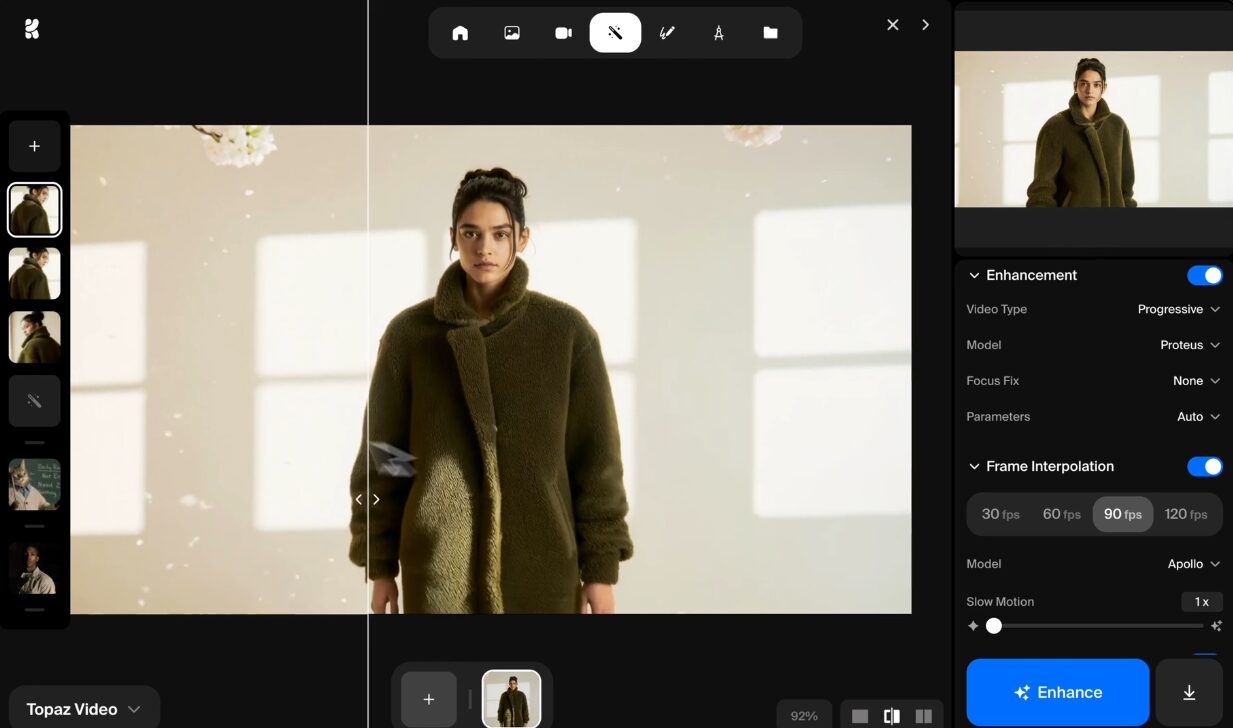
Weave treats video as just another element in a larger design composition. Its strength lies in its ability to integrate with the latest and greatest video models through APIs like fal.ai. This means you aren’t locked into a single proprietary model. You can set up your canvas to run the exact same prompt through OpenAI’s Sora, Google’s Veo, and Runway’s Gen-3 simultaneously. This allows you to A/B test the models to see which one handles physics, lighting, or character consistency better for your specific shot.
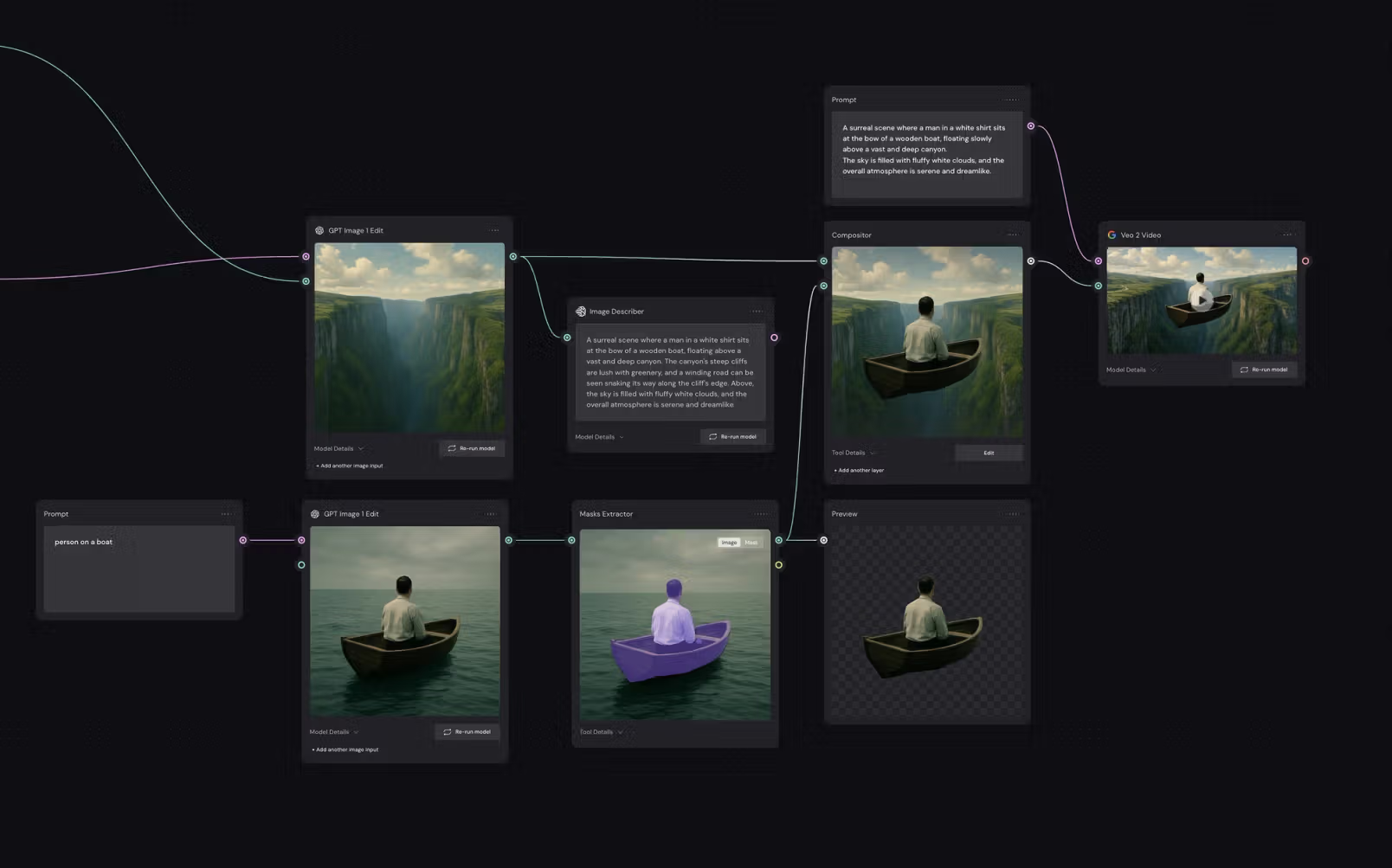
Once generated, the video clips exist as nodes in your graph. You can then pipe them into compositing nodes, layering them with other assets, adding graphical overlays from Figma, and color-grading them to match the overall design system. This is incredibly powerful for prototyping motion-rich UIs or creating complex animated marketing assets.
Krea: Keyframing and Narrative Control
Krea handles video with a focus on narrative control for short clips. It popularised a workflow based on keyframing. You generate a start frame and an end frame as two separate images, and then a video node interpolates the motion between them. This approach, borrowed from traditional animation, gives you explicit control over the beginning and end of your shot, preventing the AI from veering off in unexpected directions.
This is ideal for creating short, art-directed clips for social media or storyboarding. While the clips are often limited in duration (typically under 10 seconds), the level of control over the “acting” of the shot is much higher than what you get from a simple text-to-video prompt. Krea’s video tools are about giving the animator control over the story arc of a single shot.
Ecosystem and Integration
Where a tool lives is just as important as what it does. The context of the application determines its utility.
Figma Weave: Deeply Integrated
Weave’s greatest advantage is its home turf. For the millions of designers and entire organizations already operating within Figma, Weave isn’t another tool to learn—it’s a superpower added to the tool they already use all day. Generated assets don’t need to be exported, imported, resized, and repositioned. They are born directly on the design canvas, perfectly integrated into the UI mockups or brand presentations you’re building. This consolidation is a massive workflow accelerator and eliminates the “tab-switching tax” that drains creative energy. The long-term strategic commitment from Figma also makes it a safe bet for agencies looking to invest in a platform for the future.
Krea: A Standalone Creative Hub
Krea is a destination in itself. It’s not trying to fit inside another application; it aims to be the central hub for a new kind of mixed-media creation. Its ecosystem is defined by its multi-modal flexibility. A single Krea canvas can contain nodes generating 2D images, animating video clips, and even producing 3D objects. This makes it a powerful, self-contained environment for projects that don’t fit neatly into traditional categories. It’s for the artist who is building a complete audio-visual experience, not just a static asset for a website. Its integration is with the artist’s mind, not with another piece of software.
The Bottom Line: Is Figma Weave or Krea for You?
There’s no single right answer, only what’s right for your workflow. Don’t chase the hype. Be strategic and choose the tool that solves your specific problems.
Choose Figma Weave if…
- You are a UI/UX designer, product designer, or part of a branding agency where consistency and collaboration are non-negotiable.
- Your primary workspace is already Figma, and you want to bring powerful, controllable asset generation directly into your existing workflow.
- You think in systems and want to build scalable, reusable “design machines” that your entire team can use without needing to become AI experts themselves.
- Your final output requires a mix of AI generation and traditional design refinement (color grading, masking, layering) in a non-destructive pipeline.
Choose Krea if…
- You are a concept artist, illustrator, motion designer, or tech-artist whose process thrives on speed, improvisation, and immediate visual feedback.
- Your work involves live performance, interactive art, or rapid ideation where you need the AI to act as a real-time creative partner.
- You are focused on creating boundary-pushing, mixed-media content that blends 2D, video, and 3D elements in a single fluid canvas.
- You value direct, artistic control and want to “play” the AI like an instrument to discover unexpected creative directions.