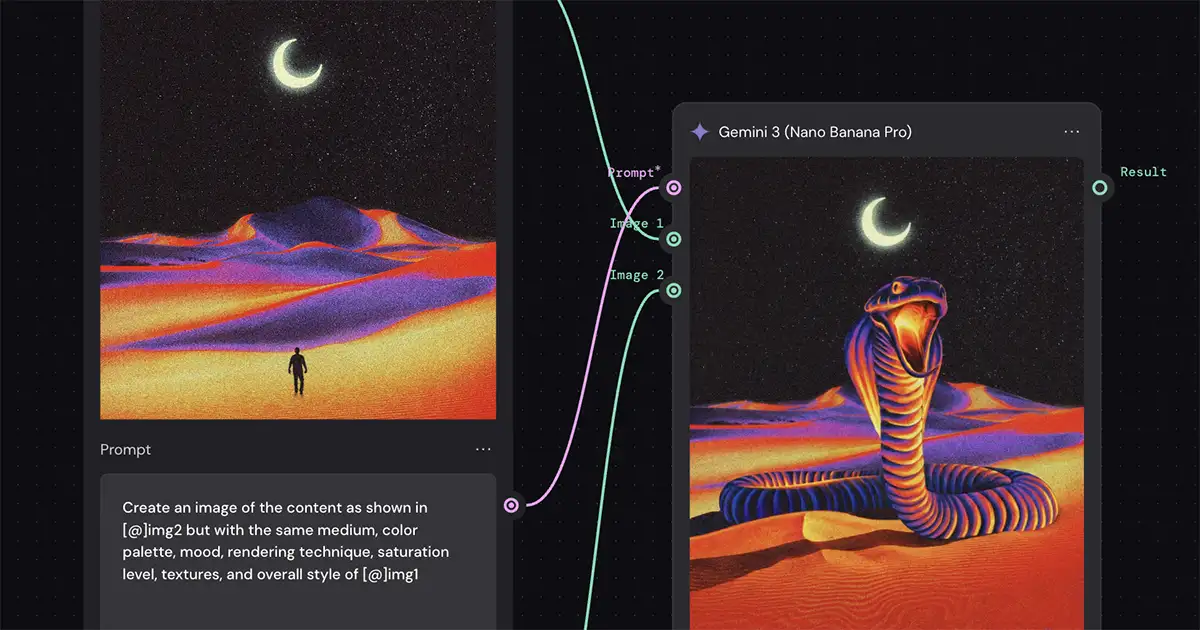
If you saw the recent news about Figma acquiring Weavy (renamed Figma Weave) and thought, “OK but WTF is Weavy?” you’re not alone! It’s a relatively new, but incredible app.
Weavy is a node-based platform for creating images and video. In a nutshell, each node does a specific thing (eg, create an image with Nano Banana or a video with Kling) and you chain them together to build the workflow you need. There are a few products in this category, and Weavy is the most pro-oriented, catering more towards power users than to beginners who want their hands held.
Once you make the mental shift of going from prompting a chatbot to stringing nodes together, I think you’ll have a hard time ever going back – and Weavy is my personal favorite product of its kind.
Here’s why:
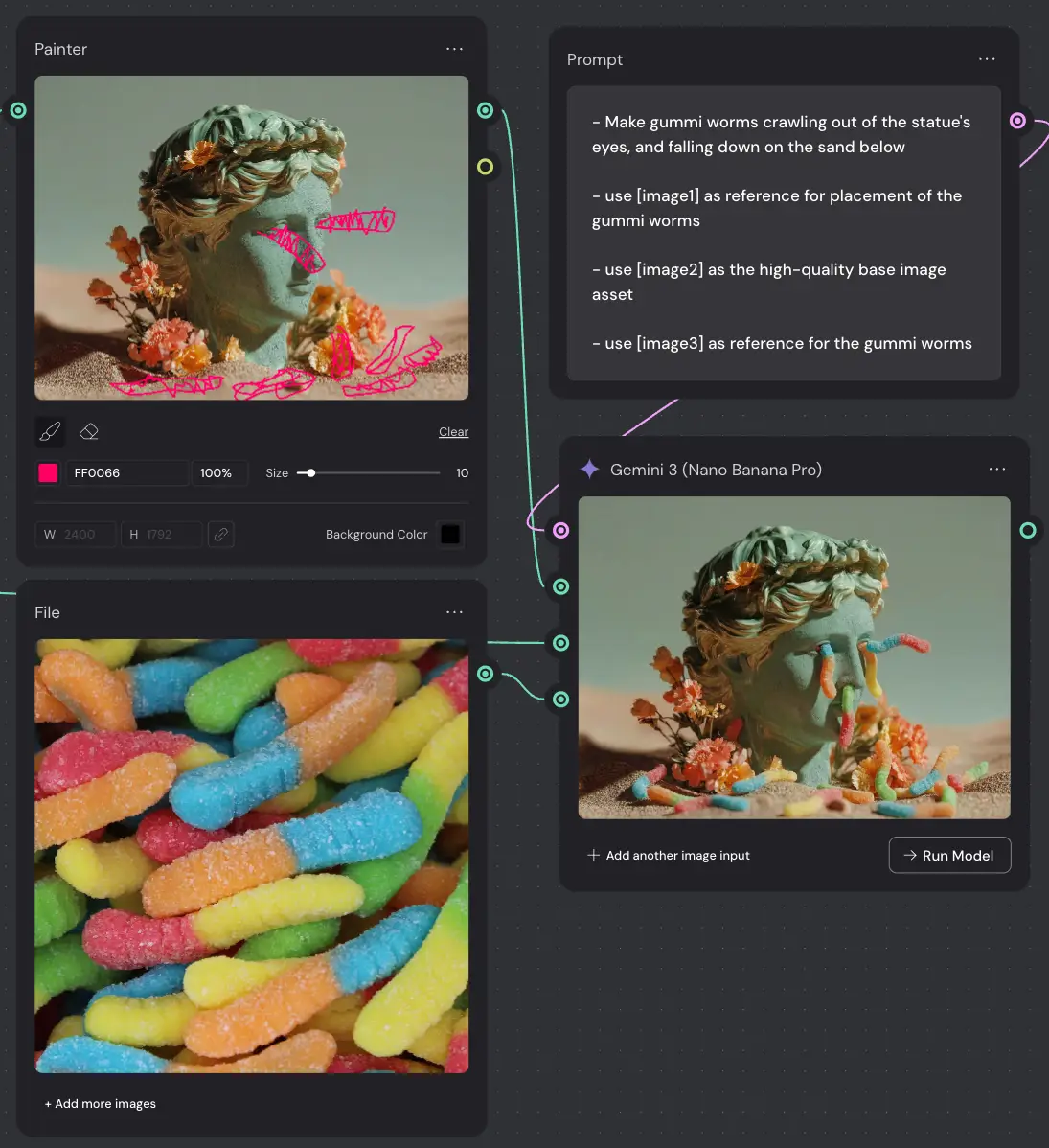
Add gummi worms coming out of a statues face? No problem with Weavy!
From Prompting to Programming with Nodes
The biggest difference between a basic AI tool and a platform like Weavy is the node-based interface. A standard AI generator is a black box: you put a text prompt in one end and get an image out the other. A node-based system, by contrast, visualizes the entire process as a flowchart.
Each step is a “node” that performs a specific task:
- Prompt: text box to enter a prompt
- Image generator: Nano Banana, Flux, Higgsfield, Stable Diffusion, etc
- Video generator: Veo, Kling, Runway, WAN, and more
- Image control: Levels, masking, crop, blur, etc
- Workflow: Routing, combine prompts, file import, etc
You connect these nodes to build a custom pipeline, which gives you granular control over every stage of the process. You can branch your workflow, test different models simultaneously, and adjust any part of the process at any time.
Connect them together and you can do amazing things like clone the style of one image and apply it to any number of other images.
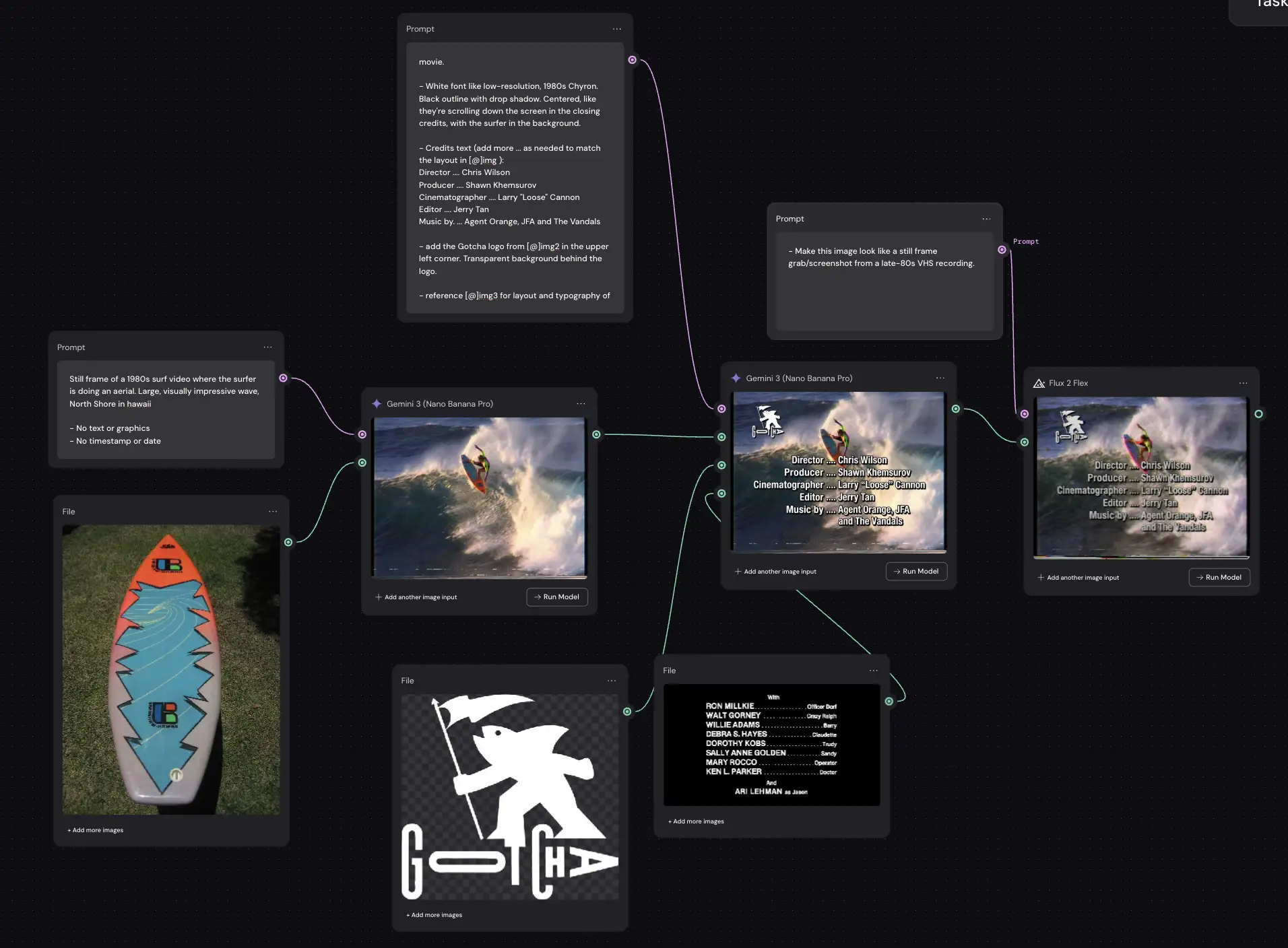
For example, this workflow creates an image of a surfer, then applies credits, and finally a VHS effect to simulate an 80s surf movie. The big difference here versus working with a chat bot or the AI features in Photoshop is that you have granular control over each piece, and it’s all laid out in a visual format that makes sense for creatives.
You don’t need to worry about one-shotting the whole image and re-rolling if one detail isn’t right. With nodes, you build it one step at a time, and if (for example) you don’t like the way the VHS effect is coming out you can just re-run that step while preserving the base image you already perfected.
Key Features For Creative Teams
For an agency or in-house brand team, Weavy’s features are designed to solve the biggest headaches of using AI in a commercial environment.
- Support for almost all image & video models: Weavy stays on top of everything, and integrates any new releases as quickly as possible. It also has several commercial models that aren’t available in ComfyUI like Higgsfield and Sora.
- It runs in the cloud. As compared to ComfyUI which runs locally, Weavy is a SaaS cloud product. You don’t need to think about upgrading hardware, optimizing the performance, driver updates, etc etc. And you can use it from anywhere that you can login to a browser.
- Collaboration is built-in. Everything you’d expect from an enterprise-ready app: create a team, add users, share assets and workflows, etc. This will probably get even more robust once it gets integrated with Figma.
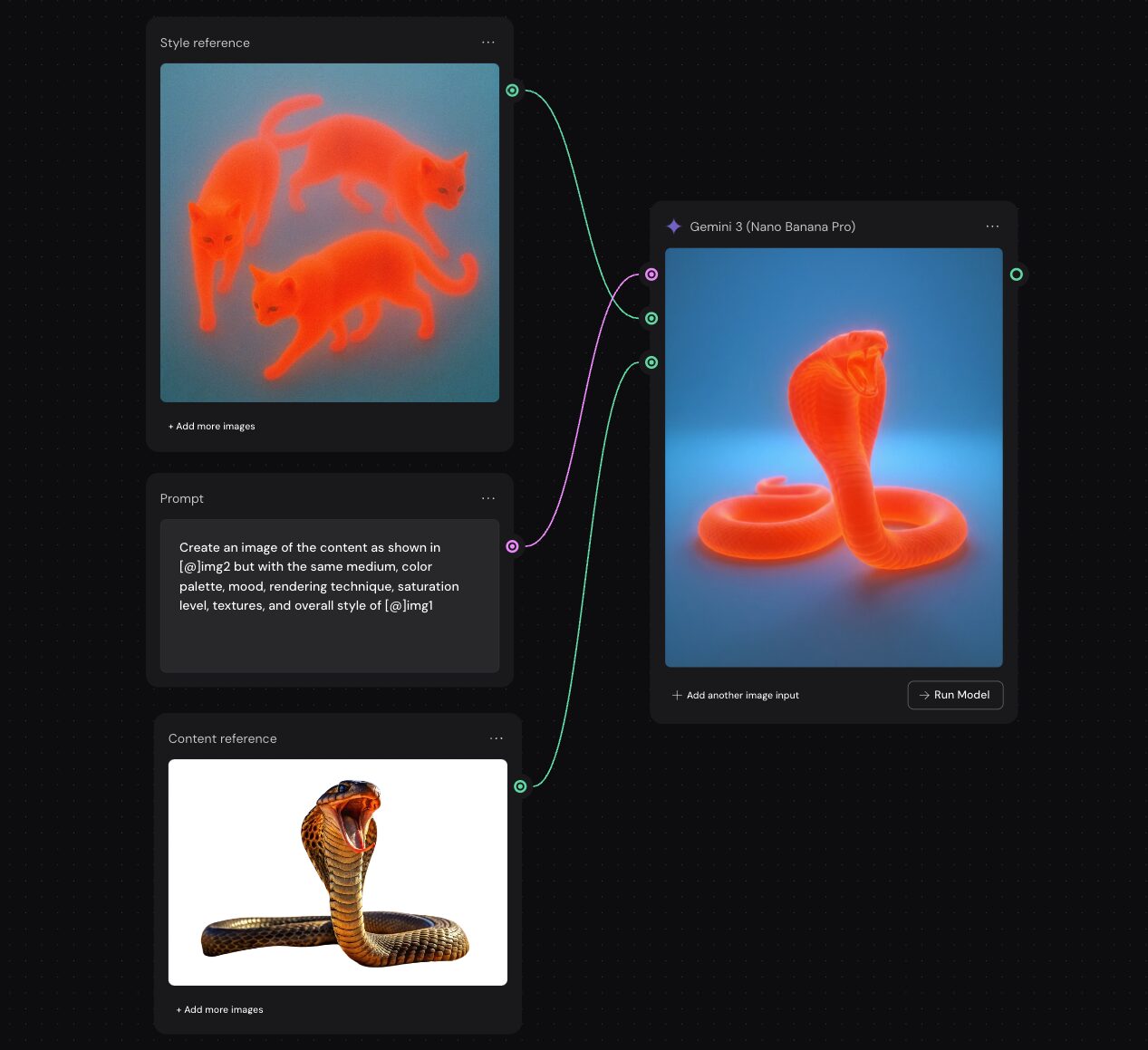
Simple style transfer workflow in Weavy
Weavy Pricing
Weavy has two costs: the monthly subscription plan, and the credits you spend on every image/video generation. They range from a free tier with 150 credits per month to team plans at $48 per user per month, with 4500 credits per user. If you run out of credits, those can be bought on an as-needed basis.
But the question is, what exactly do you get for those credits? Well, it depends.
For context, at the high end, Nano Banana Pro images and Veo videos are 15 credits and 120 credits respectively. At the lower end, Flux images and Wan videos are 5 credits and 24 credits respectively.
You could potentially stretch those credits by relying on lower-cost models where possible, but I suspect that anyone reading this will want to stick to the latest and greatest, so I’d plan your Weavy spending based on the higher end models.
Weavy vs. The Alternatives
Like I said before, Weavy is one of many node-based canvas apps. And in my opinion, it’s generally the best choice for most professionals; however, there are other options:
- Flora: This is another node-based, collaborative “infinite canvas” that unifies multiple AI models (like Flux Pro and Runway). Flora is heavily focused on real-time team collaboration and non-linear, experimental workflows. While powerful, some users find it leans more toward R&D and ideation rather than heavy production. It (much like Weavy) prioritizes an accessible, simplified interface, which may abstract or hide the granular, technical parameters that power users of tools like ComfyUI would expect. More on Flora vs Weavy here.
- ComfyUI: They’re more similar than it may seem. The main difference being that ComfyUI runs locally and Weavy is a SaaS product that runs in the cloud, but even then the differences are a bit blurry. Comfy Cloud is now available as a SaaS product, and Weavy can import LORAs. Check out more details here.
- Freepik Spaces: This is a direct competitor, but with a different angle. Freepik has evolved from a stock asset library into a full creative suite. Their “Spaces” feature is also a node-based, collaborative canvas for teams, The key difference is its deep integration with Freepik’s massive stock content library. The workflow is more simple, without the more complex nodes like arrays and iterators.
- Leonardo: Leonardo is essentially the “lite” version of Weavy. Pros can certainly get some good results from Leonardo, but it’s aimed at more of an amateur or hobbyist audience (as evidenced by Canva’s acquisition of Leonardo). More on Leonardo vs Weavy here.
Is Weavy right for you?
My honest opinion: Weavy is one of the most transformational tools I’ve used in years – arguably since Photoshop. It’s unlocked creative gears that I didn’t know existed, and helped me experiment at a pace I’ve never experienced before.
With that being said, Weavy is not a tool for casual hobbyists. It’s not as dense as ComfyUI, but it is a professional-grade orchestration hub designed for creative pros that are serious about integrating AI into their core production pipelines. Committing to a tool like this is a strategic career decision, much like choosing which professional projects to accept.
There’s a little bit of a learning curve and it’s best suited for people who are naturally systems thinkers. So the interface won’t be for everyone. But for those who want to jump in, it opens up a TON of possibilities for iteration and experimentation.
The bottom line is this: if you’re a solo artist who loves to tinker and wants maximum control at zero cost, ComfyUI may be your best bet. But if you work in an agency, a design studio, or an in-house brand team, and your primary challenges are brand consistency, team collaboration, and mitigating legal risk, Weavy is engineered to solve exactly those problems. It represents the next major step in creative AI- moving from simply making images to designing the machines that make the images.