You’ve probably seen a million headlines about “Meta AI.”
But what may have gotten lost in the shuffle is that there’s an actual app called Meta AI – and that it’s essentially a free version of Midjourney, the incredibly powerful image generation app.
And when I say that it’s a version of MidJourney, I don’t mean Meta knocked it off. I mean it’s literally built on MidJourney’s technology: they announced a formal partnership between the two companies, and if you’ve used Midjourney you’ll see the common foundation as soon as you look at the interface.
But the real question is: is it any good? Can it replace MidJourney in a professional workflow? Is it a free, fast, high-quality alternative to the undisputed (and paid) king of AI art?
I spent quite a bit of time putting this new tool through its paces, ran some tests, and I have a clear verdict- but you’ll need to keep reading to find that out…
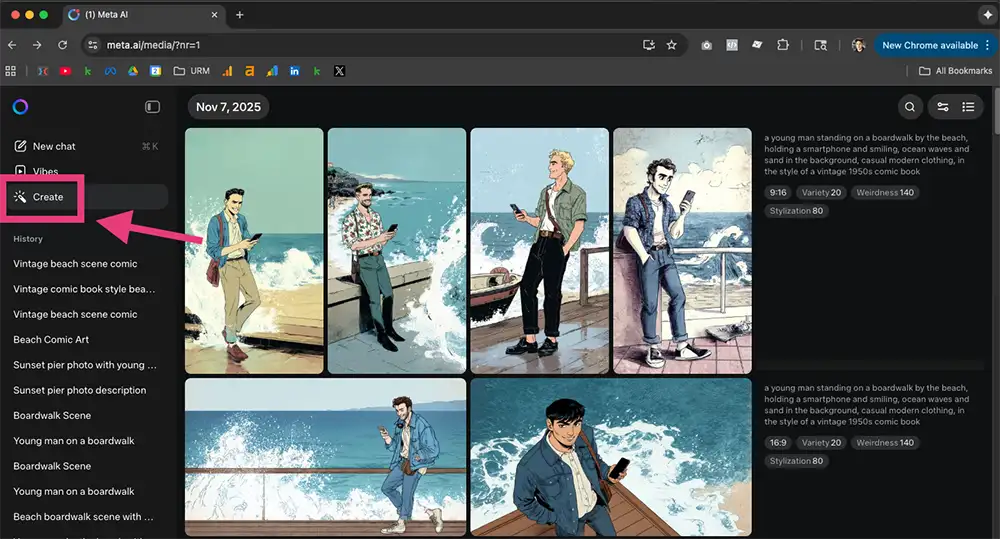
How to access Meta AI aka “free Midjourney”
It’s a bit confusing: You need to go to Meta.ai in your browser and navigate to the “create” tab on the left. Note that feature this is NOT available in the iOS/Android app called “Meta AI” or “Meta Vibes” – you can ONLY use it in the browser.
Once you’re in there, just describe the image you want to create in the prompt bar, submit, wait a few seconds and you’ll see 4 variations on the image.
There are more features I’ll get to in a minute, but that’s the basics. Easy!
The Good: It’s Fast, Free, and Good At Editing
Let’s start with the obvious: it’s free and it’s fast. There are no subscription tiers, no “fast hours,” no “relaxed mode”. For 99% of users, this is a massive win.
But its strengths go beyond just being free.
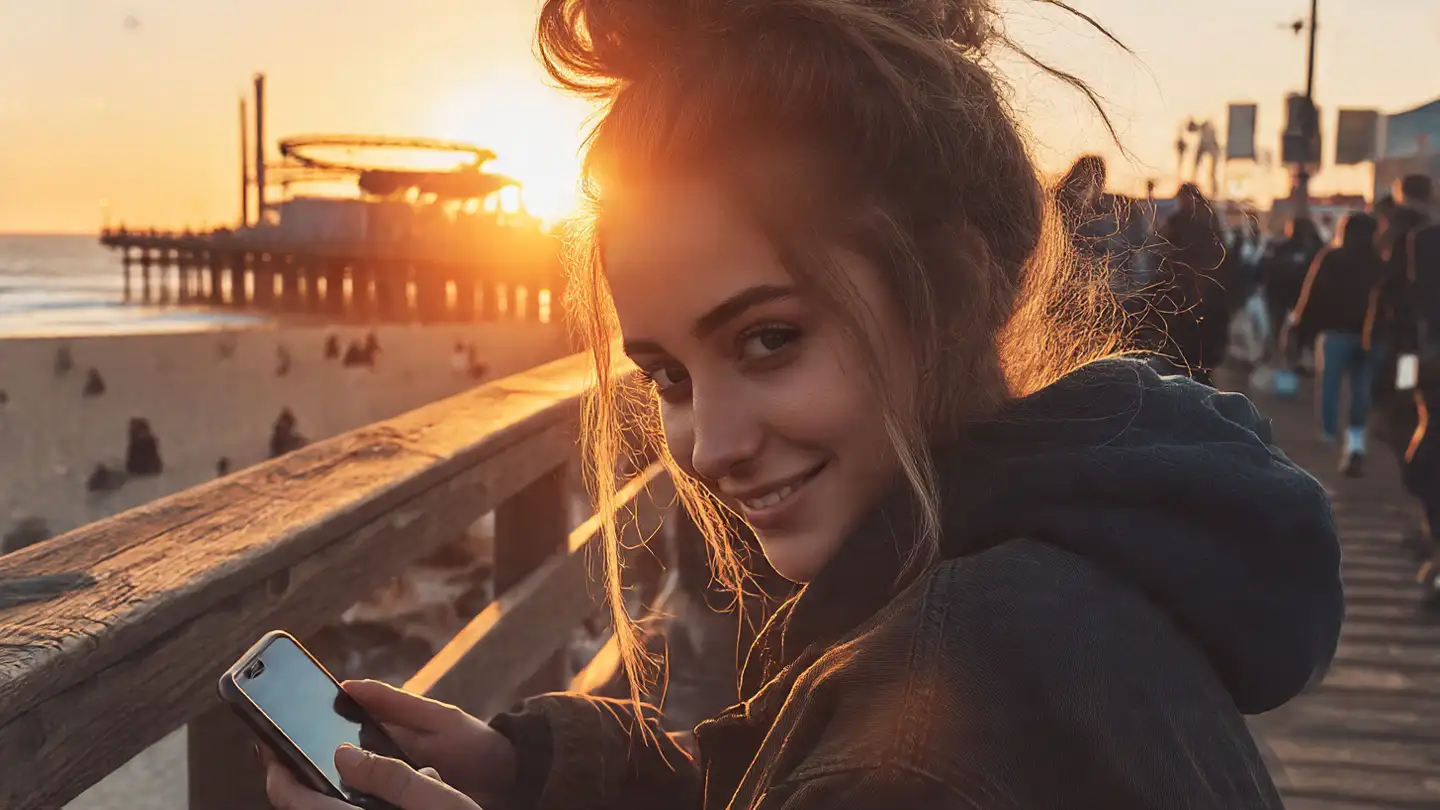
It’s very good at photorealism
My first tests were simple prompts like the “sunset pier” and “golden hour” shots we see all over Instagram- and I’d say the results are excellent. The model’s training on billions of real-world photos from Facebook and Instagram really shows. It nails natural light, skin tones, and textures etc effortlessly.
It can also do animation
This was a nice surprise. On any image you generate, there’s a little “Animate” button (you can see it in the images from our tests). You click it, and it adds a simple, clean motion effect- a subtle camera pan, a zoom, or a drift. It’s not a full-blown video generator like Sora or MidJourney’s own V1 model, but for creating a quick, engaging video for a social post, it could do the trick.
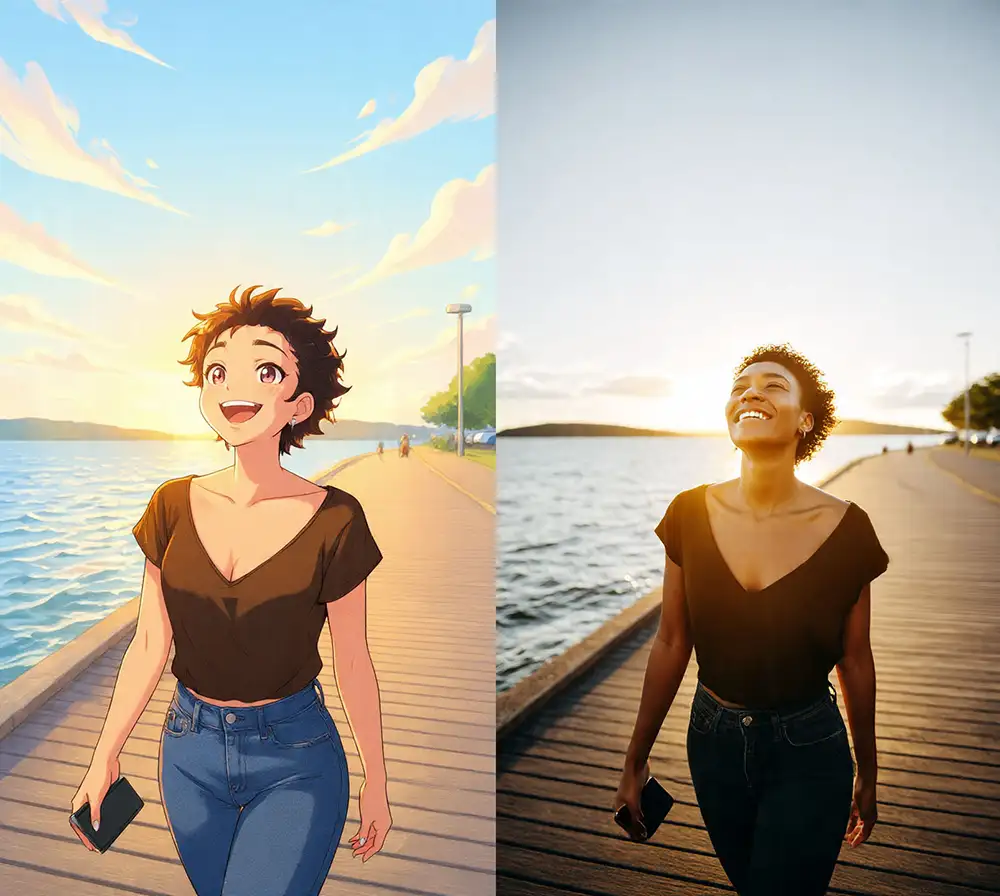
It has a “Simple Mode” for style transfer
MidJourney power-users know how to use images as style reference, and how powerful that is. Meta AI’s take on that is a simpler feature called “Restyle” where you can simply apply one of their presets like “anime” or “art deco” to an image – and it works well.
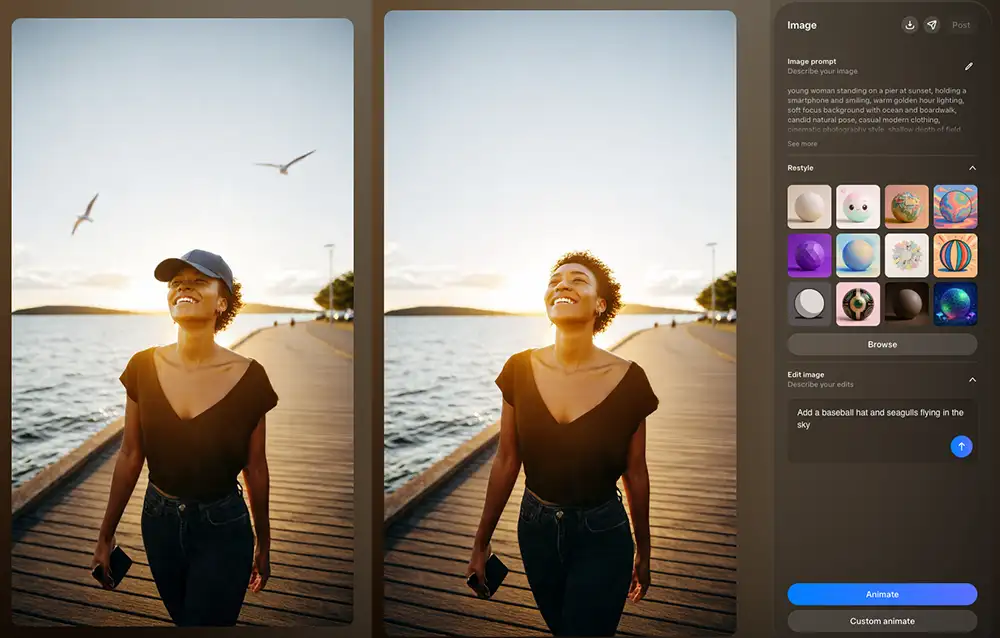
It handles editing well
Simple edits like adding a hat and some seagulls in the background are also well done. I suspect this is some combination of diffusion for the initial image generation and multi-modal LLM for the edits – either way, it’s good and easy. I’d have to do more testing to see how it compares to Nano Banana.
The Bad: A Bit Hard to Control and Aesthetically Limited
Prompts are fairly inconsistent
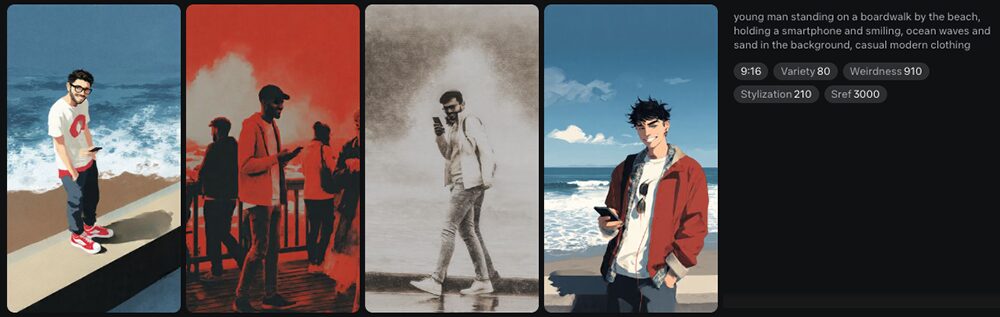
I ran a simple test: “young man on a boardwalk.” The model returned images in at four completely different styles. I got neon-pop art, gritty black-and-white photos, flat vector cartoons, and sketchy illustrations… all from the exact same prompt.
Turning down the variety and weirdness sliders will help, but compared to Midjourney there’s low prompt adherence.
That said, this may very well improve in the future, so stay tuned.
Meta AI is much better with photos than artwork/illustration
This is the most important difference between the two tools. MidJourney is an “art-first” model. Meta’s is a “realism-first” model.
It’s clear that Meta AI’s training data is heavily weighted toward photography. In one of my most revealing tests, I used a style code that should be for more of a “vector cartoon” style but put the word “sunset” in my prompt. The model got confused. It tried to obey both commands, resulting in a strange, photorealistic image that just felt like a cartoon. The model’s realism training “fought” the art style I demanded, and the text won.
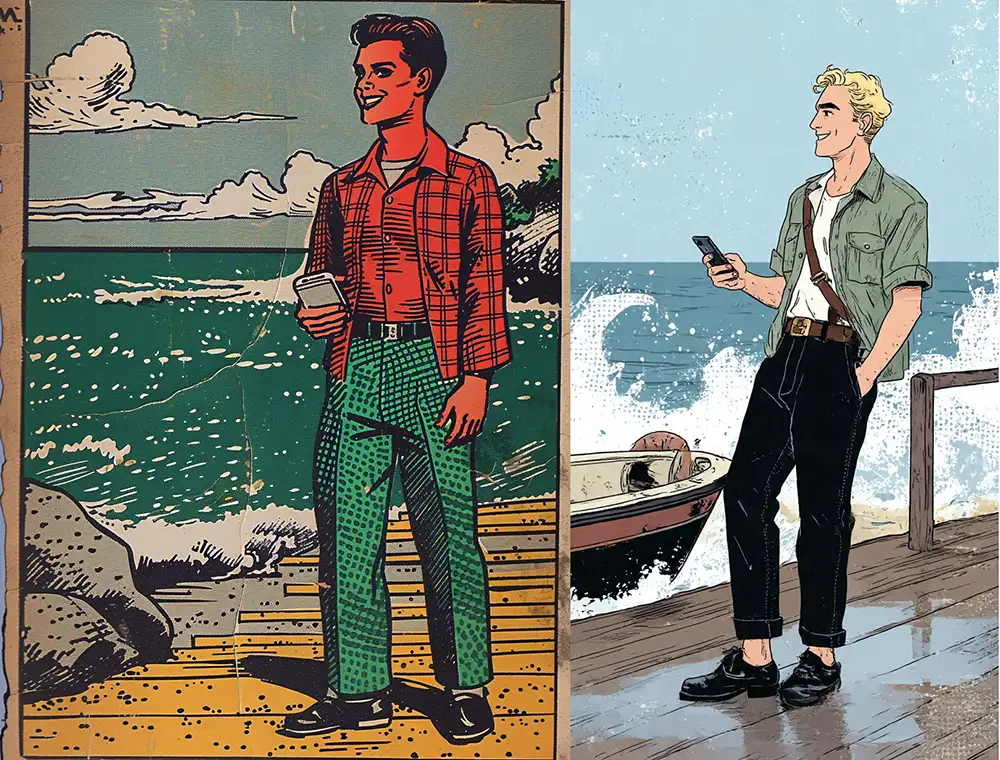
Same prompt in MidJourney and Meta AI:
“A young man standing on a boardwalk by the beach, holding a smartphone and smiling, ocean waves and sand in the background, casual modern clothing, in the style of a vintage 1950s comic book”
You can see the results – Midjourney is shockingly good at usual; Meta AI Is about halfway there. Looks a lot more like something from the 2010s than from the 1950s. I’m speculating but it seems likely to me that the art training data for MidJourney is simply better than what Meta AI has at the moment.
By contrast, MidJourney can nail just about any style of illustration (or photo) if you’re willing to put in the work with image and style references, moodboards, etc.
How to use the “Aesthetics” Panel in Meta AI
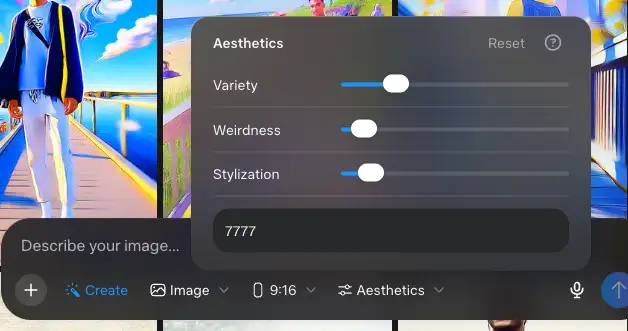
So, how do you fix the chaos? The solution is hidden in plain sight, in the “Aesthetics” panel. This is where you can see the MidJourney DNA shining through.
Here’s a breakdown of what each slider does and its direct MidJourney equivalent.
- Stylization: This is a direct parallel to MidJourney’s –stylize or –s parameter. This slider controls how “artistic” or “opinionated” the model is. A low stylize value sticks very closely to the prompt. A high stylize value lets the model “go crazy” with its own artistic flair- more dramatic lighting, textures, and colors.
- Weirdness: This is Meta’s version of MidJourney’s –weird or –w parameter. It does exactly what it says: it makes the images more surreal, abstract, and unexpected. Is that good or bad? That depends – experiment and see.
- Variety: This is Meta’s name for MidJourney’s –chaos or –c parameter. This slider controls the compositional variety of the 4 images in your grid. A low “Variety” forces the model to generate four images that are very similar in layout and composition. A high “Variety” would give you four completely different poses and angles. This is different from the stylistic chaos I mentioned earlier.
- Style Reference Seed: This is the text box at the bottom, and it’s the most powerful tool of all.
Mastering the “Style Reference Seed”
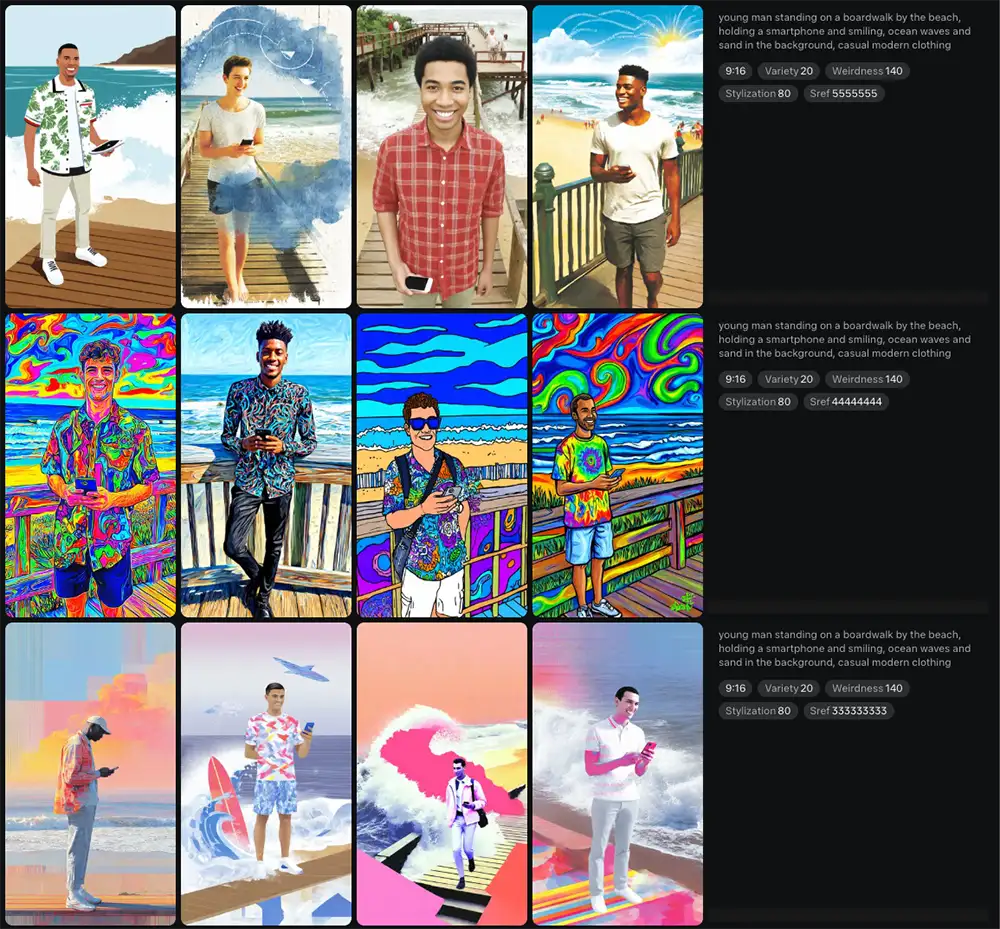
After all my testing, this little text box is the key to the entire platform. It’s Meta’s user-friendly name for MidJourney’s –sref parameter.
Essentially this code represents a specific visual style in the Meta rendering model: B&W journalistic photo, anime drawing, vintage snapshot, etc etc.
Each one is a 9 digit number, and they’ll radically change the visual style you get from the app. For example, above you’ll see the difference between Style Reference Seed 333333333, 444444444, and 555555555
However, as far as I’m aware there’s no library of these styles anywhere online- there are folks who maintain collections of srefs for Midjourney and they’ve added to a “styles” tab to the official app.
But for Meta AI? Literally nothing that I could find, so all you can do is type in random numbers and hope you get something you like- take a look at my deep dive on “style reference seed” here for more info.
No support for style blending
Because this tool shares DNA with MidJourney, I also wondered if any of the advanced features would be there.
This is a core part of my MidJourney workflow—blending two or more sref codes to create a new, hybrid aesthetic.
I tried it in Meta’s tool: –sref 7777 111111111
Nope. No dice.
The tool read the first valid code (7777) and completely ignored the second one. This was the final proof that it’s not the full MidJourney engine- at least, not at this point. It’s a “lite” version, with the advanced features stripped out.
Of course I understand why they made this choice (it’s a consumer app), but it’s not ideal for pros.
| Feature | Meta AI (The “Free” Tool) | MidJourney (The “Pro” Tool) |
| Cost | Free | Paid Subscription |
| Core Strength | Photorealism | Artistic Styles |
| Stylization | Yes (Slider) | Yes (–stylize or –s) |
| Weirdness | Yes (Slider) | Yes (–weird or –w) |
| Variety | Yes (Slider) | Yes (–chaos or –c) |
| Style Consistency | Yes (via single sref code) | Yes (via sref code) |
| Style Blending | No. (Ignores all but the first sref code) | Yes. (A core feature) |
| Image-to-Video | “Animate” (Simple motion) | V1 Model (Complex generation) |
The Verdict: Is Meta AI the “Free Midjourney” alternative?
After a round of pretty robust testing, here is my definitive answer.
For casual users & beginners? Yes.
It’s very fast, free and a lot of fun. The fact that it can produce high-end photorealistic images and animate them with one click makes it a clear winner for social media, brainstorming, or just having fun- especially for people just starting out, who may then graduate to Midjourney, ComfyUI, etc.
For creative pros? No.
Think of Meta AI as the “consumer” model and MidJourney as the “pro” model. If you’re a pro, there’s little reason to use Meta AI at this point.
That said it’s incredibly cool for what it is, and hats off to the team at Meta for shipping this. Hopefully it gets the attention it deserves and I look forward to seeing how they evolve the product.
PS – More on Midjourney:
- Niji v7 review
- How to use Midjourney with Nano Banana Pro
- Free Midjourney alternatives
- Midjourney vs ComfyUI